


































![Kong Interview Preparation Guide [2025]](https://www.devopstraininginstitute.com/blog/uploads/images/202509/image_430x256_68dbb95326997.jpg)
















DevOps Tools Setup Guide for Beginners (Bangalore Version)
Complete step-by-step DevOps tools setup guide for beginners in Bangalore. Install Git, Jenkins, Docker, Kubernetes, Terraform, Ansible, and AWS CLI on Ubuntu/Windows. 100% hands-on walkthrough with troubleshooting tips, Bangalore-specific recommendations, and free resources from DevOps Training Institute. Perfect for freshers targeting ₹8-15 LPA roles.
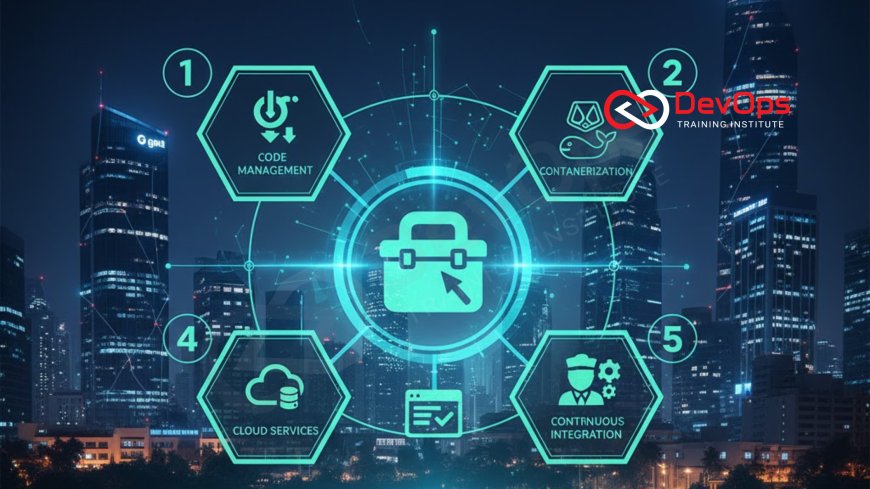
Introduction to DevOps Tools Setup in Bangalore's Fast-Paced Environment
Setting up your DevOps toolkit is the first and most critical step in launching a successful career in Bangalore's ultra-competitive IT landscape. With over 12,000 DevOps job openings annually and companies like Flipkart, Swiggy, Zerodha, and Amazon demanding production-ready engineers from day one, your local environment must be robust, secure, and optimized for real-world workflows. This guide is specifically crafted for beginners in Bangalore, covering installation on both Ubuntu (the DevOps standard) and Windows (for campus freshers), with troubleshooting tips tailored to local internet speeds, hardware constraints, and common pitfalls faced by learners at DevOps Training Institute near MG Road. Whether you're a BTech graduate preparing for campus placements or a career switcher targeting ₹8-15 LPA entry-level roles, mastering Git, Jenkins, Docker, Kubernetes, Terraform, Ansible, and AWS CLI will give you the edge. We'll walk you through each tool with exact commands, verification steps, and Bangalore-specific recommendations like using Jio Fiber for stable downloads and local mirrors for faster package installation. By the end, you'll have a fully functional DevOps lab ready for live projects and mock interviews.
System Requirements and Pre-Setup Checklist for Bangalore Learners
Before diving into individual tool installations, ensure your machine meets the minimum specs for smooth DevOps workflows. For Ubuntu, a 16GB RAM laptop with i5 processor and 512GB SSD is ideal, but even 8GB RAM works for beginners with proper resource management. Windows users should use WSL2 for Linux compatibility. In Bangalore's humid climate, invest in a good cooling pad to prevent thermal throttling during long Kubernetes lab sessions. Download all installers via Ethernet if possible, as Wi-Fi in PGs or shared apartments can drop during peak hours. DevOps Training Institute recommends starting with a fresh Ubuntu 22.04 LTS installation on VirtualBox for isolation, especially if you're on company hardware. Always backup your work to GitHub before experiments, as Bangalore's power cuts can be unpredictable. This checklist ensures your setup is resilient for the 10-week journey ahead, from basic Git commits to deploying microservices on EKS.
- Hardware: Minimum 8GB RAM, i5/Ryzen 5, 256GB SSD (512GB recommended)
- OS: Ubuntu 22.04 LTS or Windows 11 with WSL2
- Internet: 50Mbps+ (Jio Fiber or Airtel Xstream ideal for large downloads)
- Software: VirtualBox/VMware for VMs, VS Code as primary editor
- Accounts: GitHub free, AWS free tier, Docker Hub free
- Backup: External drive or Google Drive for VM snapshots
- Power: UPS for 30-min backup during Bangalore load shedding
Git Installation and Configuration – Version Control Foundation
Git is the cornerstone of every DevOps workflow, enabling collaboration, version history, and CI/CD integration. For Bangalore beginners, installing Git on Ubuntu is straightforward, but configuring it with SSH keys and local mirrors speeds up operations in shared networks. Start by updating your package list with sudo apt update, then sudo apt install git. Verify with git --version, which should show 2.34+ for modern features. On Windows, use Git Bash from the official installer, ensuring PATH is set for command line access. Configure your global settings with git config --global user.name "Your Name" and git config --global user.email "[email protected]". For SSH, generate keys with ssh-keygen -t ed25519 and add the public key to GitHub. Bangalore learners often face slow GitHub pushes due to ISP throttling; use git config --global http.postBuffer 524288000 to increase buffer size. DevOps Training Institute emphasizes early Git mastery, as 80% of interview questions involve branching strategies and merge conflicts. Practice with a sample repo: clone, branch, commit, and push your first change to build confidence.
Jenkins Setup – Your First CI/CD Pipeline Server
Jenkins, the de facto CI/CD tool, transforms code commits into deployable artifacts. In Bangalore's startup ecosystem, Jenkins runs 65% of pipelines, so setting it up correctly is crucial. On Ubuntu, add the repository with wget -q -O - https://pkg.jenkins.io/redhat-stable/jenkins.repo | sudo tee /etc/yum.repos.d/jenkins.repo, then sudo yum install jenkins. Start the service with sudo systemctl start jenkins and access via http://localhost:8080. Initial setup requires generating an admin password from sudo cat /var/lib/jenkins/secrets/initialAdminPassword. Install plugins like Pipeline, Docker Pipeline, and AWS Steps for comprehensive workflows. For Windows, download the .msi installer and run as a service. Configure security with role-based access and webhook integration from GitHub. Common Bangalore issue: port 8080 blocked by corporate firewalls; use sudo ufw allow 8080 or configure reverse proxy with Nginx. DevOps Training Institute starts every batch with building a simple "Hello World" pipeline, teaching you to troubleshoot agent disconnections and plugin conflicts early. This setup forms the backbone for deploying Docker images and Kubernetes manifests in later modules.
Docker Installation and Container Fundamentals
Docker revolutionizes application packaging, enabling consistent environments from dev to prod. In Bangalore's microservices-heavy landscape, 85% of DevOps roles require Docker proficiency. Install on Ubuntu with sudo apt update && sudo apt install docker.io, then add your user to the docker group: sudo usermod -aG docker $USER. Logout and login to apply. Verify with docker --version. For Windows, use Docker Desktop with WSL2 backend, ensuring Hyper-V is enabled. Pull your first image with docker pull nginx and run docker run -d -p 80:80 nginx. Explore volumes with docker run -v /host/path:/container/path nginx for data persistence. Bangalore learners face slow image pulls due to international bandwidth limits; configure domestic mirrors with daemon.json pointing to registry.aliyuncs.com. DevOps Training Institute dedicates Week 3 to Docker, where students build multi-stage images for Node.js apps, reducing size from 900MB to 120MB. This hands-on approach ensures you understand layering, caching, and security scanning with Trivy before moving to Kubernetes.
Kubernetes Installation – Local to Cloud Cluster Setup
Kubernetes, the container orchestrator, powers 59% of Bangalore's production workloads. Start locally with Minikube: curl -LO https://storage.googleapis.com/minikube/releases/latest/minikube-linux-amd64 && sudo install minikube-linux-amd64 /usr/local/bin/minikube. Launch with minikube start --driver=docker. For cloud, use AWS EKS: create cluster with eksctl create cluster --name my-cluster --region ap-south-1. Install kubectl with curl -LO "https://dl.k8s.io/release/$(curl -L -s https://dl.k8s.io/release/stable.txt)/bin/linux/amd64/kubectl". Verify connectivity with kubectl get nodes. Windows users use Chocolatey: choco install kubernetes-cli. Bangalore's variable internet makes local Minikube essential for offline practice; allocate 4GB RAM to avoid OOM kills. DevOps Training Institute teaches EKS setup in Week 5, where students deploy a 3-node cluster and scale it to handle 1,000 RPS. This project simulates Flipkart's Black Friday traffic, preparing you for high-load scenarios in interviews.
Terraform Setup – Infrastructure as Code Mastery
Terraform enables declarative infrastructure, reducing errors by 70%. Install with sudo apt-get install -y software-properties-common followed by wget -O- https://apt.releases.hashicorp.com/gpg | gpg --dearmor | sudo tee /usr/share/keyrings/hashicorp-archive-keyring.gpg and echo "deb [signed-by=/usr/share/keyrings/hashicorp-archive-keyring.gpg] https://apt.releases.hashicorp.com $(lsb_release -cs) main" | sudo tee /etc/apt/sources.list.d/hashicorp.list. Then sudo apt update && sudo apt install terraform. Verify with terraform version. For Windows, download the .exe from HashiCorp. Configure providers in terraform.tf with provider "aws" { region = "ap-south-1" }. Bangalore's multi-cloud trend requires AWS and Azure providers; set credentials via export AWS_ACCESS_KEY_ID=yourkey. DevOps Training Institute Week 6 focuses on Terraform, where students provision a VPC with EC2 instances and RDS, applying state locking with S3 backend. This module teaches remote state and workspaces, essential for team collaboration in Bangalore's startup scene.
Ansible Setup – Configuration Management Essentials
Ansible automates configuration without agents, ideal for Bangalore's heterogeneous environments. Install on Ubuntu with sudo apt update && sudo apt install ansible. Verify ansible --version. Create inventory in hosts.ini with [webservers] server1 ansible_host=192.168.1.10. Run playbook with ansible-playbook -i hosts.ini site.yml. For Windows, use Ansible via WSL. Set up Galaxy roles with ansible-galaxy install geerlingguy.nginx. Bangalore's firewall-heavy corporate networks require vault for secrets: ansible-vault encrypt_string 'password' --name 'db_pass'. DevOps Training Institute integrates Ansible in Week 7, teaching students to configure 10-node clusters with roles and facts. This hands-on session simulates Wipro's server provisioning, emphasizing idempotency and error handling for reliable automation.
AWS CLI and Cloud Integration – DevOps on the Cloud
AWS CLI is the command-line powerhouse for cloud operations. Install on Ubuntu with curl "https://awscli.amazonaws.com/awscli-exe-linux-x86_64.zip" -o "awscliv2.zip", unzip, and sudo ./aws/install. Configure with aws configure, entering access key, secret, region (ap-south-1 for Mumbai). Test with aws s3 ls. For Windows, download from AWS site. Bangalore's latency to us-east-1 makes ap-south-1 essential for fast S3 uploads. DevOps Training Institute Week 8 covers AWS CLI scripting, where students automate EC2 launches and EBS snapshots. This module includes IAM policy creation and MFA setup, preparing you for secure cloud interactions in production.
Integration and Testing – Bringing Tools Together
DevOps shines in integration. Combine Git with Jenkins: webhook setup via GitHub UI, triggering webhook: { url: 'http://jenkins:8080/github-webhook/' }. Docker in Jenkins with docker build -t myapp . inside pipeline stages. Kubernetes deployment via kubectl apply -f k8s/ post-build. Terraform plan/apply in CI with terraform init && terraform plan. Ansible for post-deploy config: ansible-playbook -i inventory deploy.yml. Test with pytest or newman for API. Bangalore's diverse stacks require multi-tool mastery; DevOps Training Institute culminates in Week 9 with a full pipeline project, integrating all tools to deploy a Node.js app from commit to K8s. This end-to-end exercise simulates PhonePe's payment gateway workflow, emphasizing error handling and rollback strategies.
Troubleshooting and Best Practices – Common Pitfalls and Solutions
Every beginner hits roadblocks. Git conflicts? git mergetool with vimdiff. Jenkins agent down? Check sudo journalctl -u jenkins. Docker layer caching fails? Use --no-cache. K8s pod pending? Verify node resources with kubectl describe node. Terraform state locked? terraform force-unlock. AWS CLI auth expired? aws sts get-caller-identity. Best practices: Use virtual environments for Python, .gitignore for secrets, and multi-stage Docker builds. In Bangalore's high-pressure environment, DevOps Training Institute dedicates Week 10 to troubleshooting workshops, simulating outages like EC2 terminations and K8s node drains. This prepares you for on-call duties, a staple in 80% of DevOps roles.
Next Steps: Building Your First Complete DevOps Pipeline
With tools ready, build a sample pipeline. Clone repo git clone https://github.com/devops-institute/sample-app, create Jenkins job with Git SCM, add build step docker build -t sample-app ., post-build docker push registry.example.com/sample-app, then K8s deployment kubectl apply -f deployment.yaml. Test with curl http://app.local. Scale with kubectl scale deployment sample --replicas=3. Monitor with kubectl logs. This pipeline, refined over iterations, mirrors Swiggy's order service deployment. DevOps Training Institute provides starter templates and mentorship to customize for your portfolio. As you advance, integrate monitoring and alerting for a full-stack DevOps setup, positioning you for Bangalore's high-paying roles.
Conclusion
Setting up DevOps tools is your gateway to Bangalore's thriving IT scene. From Git's version control to Kubernetes' orchestration, each installation builds the foundation for automation and collaboration. With troubleshooting tips and best practices, you're equipped to handle real-world challenges. DevOps Training Institute offers guided setups and projects to accelerate your learning. Start today, deploy tomorrow, and thrive in Bangalore's DevOps ecosystem.
Frequently Asked Questions
What is the best OS for DevOps tools in Bangalore?
Ubuntu 22.04 LTS for stability and community support.
How long does full setup take?
2-4 hours; follow this guide step-by-step.
Windows vs Ubuntu for beginners?
Ubuntu native; Windows with WSL2 as alternative.
Common Git installation error?
Missing dependencies; run sudo apt update first.
Jenkins port blocked in corporate network?
Use 8081 or configure reverse proxy with Nginx.
Docker permission denied?
Add user to docker group: sudo usermod -aG docker $USER.
Kubernetes Minikube not starting?
Check Docker daemon and allocate 4GB RAM.
Terraform provider not found?
Run terraform init; check .terraform directory.
AWS CLI configure stuck?
Use aws configure set for individual values.
Ansible inventory empty?
Verify hosts.ini format and ansible-playbook -i flag.
Integration testing fails?
Check environment variables and service dependencies.
Best practice for tool versions?
Use LTS releases for stability in production.
Troubleshooting AWS CLI errors?
Check IAM permissions and region settings.
Virtual environment for Python tools?
pip install virtualenv; source venv/bin/activate.
Final tip for setup?
Document everything in a personal wiki for quick reference.
What's Your Reaction?
 Like
0
Like
0
 Dislike
0
Dislike
0
 Love
0
Love
0
 Funny
0
Funny
0
 Angry
0
Angry
0
 Sad
0
Sad
0
 Wow
0
Wow
0


![100+ Azure DevOps Interview Questions and Answers [Updated 2025]](https://www.devopstraininginstitute.com/blog/uploads/images/202509/image_140x98_68c40aa9a3834.jpg)






![Future Scope of DevOps Careers in Pune [Updated 2025]](https://www.devopstraininginstitute.com/blog/uploads/images/202510/image_140x98_68e3a84652312.jpg)


