


































![Kong Interview Preparation Guide [2025]](https://www.devopstraininginstitute.com/blog/uploads/images/202509/image_430x256_68dbb95326997.jpg)
















15 DevOps Skills Freshers Can Learn in 30 Days
Embark on your engineering journey by mastering the fifteen most essential DevOps skills freshers can learn in just thirty days. This comprehensive guide provides a structured roadmap for beginners to understand Linux administration, version control with Git, containerization basics, and fundamental CI/CD concepts. Learn how to bridge the gap between development and operations by focusing on high-impact tools and collaborative mindsets that are in massive demand across the global tech industry in twenty twenty six. Whether you are a student or a career switcher, these actionable insights will help you build a strong technical foundation and prepare for a successful career in modern cloud-native software delivery today.
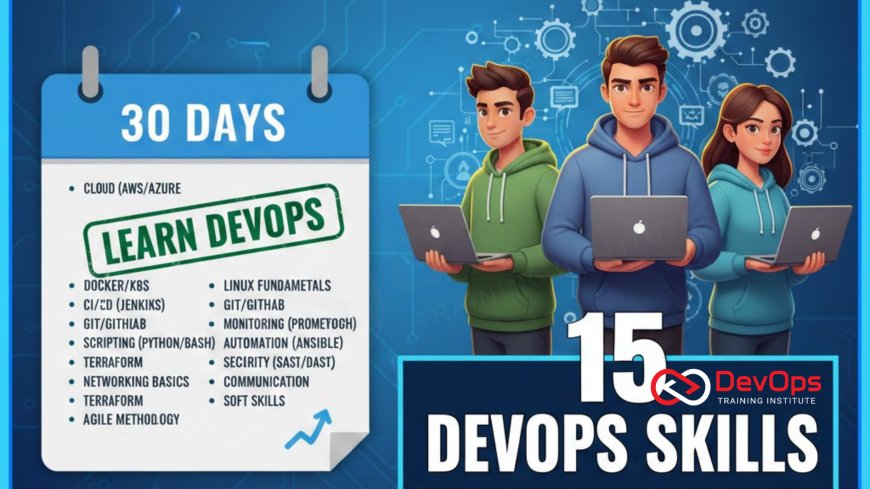
Introduction to the 30-Day DevOps Challenge
The field of DevOps is often perceived as a vast and intimidating domain reserved only for seasoned professionals, but the reality is quite different in twenty twenty six. For freshers and entry-level enthusiasts, the journey into DevOps is about building a versatile toolkit that combines technical proficiency with a collaborative mindset. While you cannot become an expert overnight, thirty days of focused, hands-on learning can provide you with the fundamental skills needed to contribute to a modern engineering team. This period is about understanding the "how" and "why" behind automated software delivery and the tools that make it possible.
During this 30-day challenge, the goal is to move beyond theory and engage with the actual tools used in production environments. You will start by mastering the command line and version control, which are the building blocks of all automation. As the days progress, you will explore containerization, basic cloud services, and the logic of continuous integration. This structured approach ensures that you are not just learning isolated tools but understanding how they fit into a cohesive software delivery lifecycle. By the end of the month, you will have a portfolio of mini-projects and a technical vocabulary that will set you apart in the competitive job market.
Mastering Linux Administration and the CLI
Linux is the operating system of the cloud, and for a DevOps professional, the command line interface (CLI) is the primary workspace. In the first week of your learning journey, you should focus on navigating the file system, managing permissions, and understanding process management. Mastering commands like grep, awk, and sed will allow you to manipulate data and logs with high efficiency. This foundational skill is essential because almost every DevOps tool, from Docker to Kubernetes, relies on a deep understanding of Linux principles and terminal-based interactions.
Beyond basic navigation, you should learn how to write simple shell scripts to automate repetitive tasks. Scripting is the first step toward the "automation first" mindset that defines the DevOps culture. Understanding how to manage packages, configure network settings, and monitor system resources (using tools like top or htop) provides you with the technical confidence needed to manage remote servers. As you grow, you will realize that a strong grasp of Linux is a system resilience booster, allowing you to troubleshoot issues at the most fundamental level before they escalate into major production outages.
Version Control with Git and Collaborative Workflows
Git is the heartbeat of modern software development, and mastering it is non-negotiable for anyone entering the DevOps space. You should start by learning the basic commands like clone, commit, push, and pull. However, the true skill lies in understanding branching strategies and how to resolve merge conflicts. These workflows are what enable hundreds of developers to work on a single codebase simultaneously without causing chaos. It is a vital component of continuous synchronization between the code written by developers and the live environment managed by operations.
During your 30-day plan, you should also explore platforms like GitHub or GitLab. Learn how to open pull requests, conduct code reviews, and use Git hooks to trigger automated actions. This exposure to collaborative development is a major cultural change for many freshers, shifting the focus from individual coding to team-based delivery. Understanding how to maintain a clean commit history and use tags for versioning ensures that your projects are professional and easy to audit. This skill is the foundation of GitOps, which is a leading trend in twenty twenty six for managing infrastructure through version control.
Introduction to Containerization with Docker
Docker has changed the way we build and run applications by allowing us to package everything into a single, portable unit called a container. For a fresher, learning how to write a Dockerfile and build your first image is a transformative experience. It eliminates the "it worked on my machine" problem by ensuring that the application runs identically in every environment. You should focus on understanding image layers, container networking, and how to use volumes for persistent data storage. This skill is a prerequisite for moving into the world of orchestration and microservices.
Once you understand individual containers, you should explore Docker Compose to manage multi-container applications. This allows you to define a whole stack—like a web server, a database, and a cache—in a single YAML file. Learning how to optimize your images for size and security is also a high-value skill. For example, using a lightweight runtime like containerd as your base can improve performance. By mastering container basics, you are preparing yourself to manage complex cluster states in a production environment where thousands of containers are running simultaneously across global cloud regions.
DevOps Skills Roadmap for Beginners
| Learning Phase | Core Skill | Key Tools | Learning Goal |
|---|---|---|---|
| Week 1 | System Foundation | Linux, Bash | CLI Proficiency |
| Week 2 | Version Control | Git, GitHub | Collaboration Skills |
| Week 3 | Containerization | Docker, YAML | App Portability |
| Week 4 | CI/CD & Cloud | GitHub Actions, AWS | Automation Flow |
Understanding the Basics of CI/CD Pipelines
Continuous Integration and Continuous Deployment (CI/CD) represent the core philosophy of DevOps automation. As a beginner, you don't need to build a complex enterprise pipeline, but you must understand the basic flow: code push, automated test, build artifact, and deploy. Tools like GitHub Actions or GitLab CI make it incredibly easy to start with simple YAML-based workflows. Learning how to automate a unit test or a security scan whenever you commit code is a high-impact skill that demonstrates your commitment to deployment quality and technical rigor.
In your final week of learning, try to connect your Git repository to a cloud provider or a hosting service. This hands-on project will teach you about environment variables, secrets management, and build logs. Understanding how to troubleshoot a failed pipeline is just as important as building a successful one. This experience with incident handling in a controlled environment is invaluable. By utilizing continuous verification strategies at a basic level, you ensure that your code is always in a healthy state, which is the ultimate goal of any professional DevOps engineer working in the cloud today.
Cloud Fundamentals and Infrastructure as Code
While you don't need to be a cloud architect, a fresher should understand the basic services provided by platforms like AWS, Azure, or Google Cloud. Focus on compute (EC2), storage (S3), and networking (VPC). Understanding how these services interact is critical for building any modern application. You can further enhance this skill by learning the basics of Infrastructure as Code (IaC) using a tool like Terraform. Instead of clicking buttons in a console, you write code to define your servers, ensuring that your architecture patterns are repeatable and version-controlled.
Learning IaC early on helps you understand the "immutable infrastructure" concept, where you never change a running server but rather replace it with a new, correctly configured one. This approach significantly reduces configuration drift and improves overall system reliability. By managing your cloud resources through code, you are adopting the same release strategies for your infrastructure as you do for your software. This alignment between dev and ops is the core of the DevOps revolution. It empowers you to manage complex environments with minimal manual effort, allowing you to scale your technical impact far beyond what traditional sysadmins could achieve.
15 DevOps Skills Checklist for Freshers
- Linux Navigation: Proficiency in moving through directories and managing files via the terminal.
- Shell Scripting: Ability to write basic Bash scripts to automate simple system tasks.
- Git Basics: Mastery of branching, merging, and committing code in a team environment.
- YAML Syntax: Understanding how to write and debug YAML files for configurations.
- Docker Foundations: Building, tagging, and running container images from scratch.
- Networking Basics: Knowledge of IP addresses, ports, DNS, and HTTP/S protocols.
- CI/CD Logic: Understanding the stages of an automated delivery pipeline.
- Cloud Storage: Learning how to manage and secure files in services like AWS S3.
- Infrastructure as Code: Writing simple Terraform scripts to provision a single server.
- Monitoring Basics: Learning how to read logs and basic metrics to check system health.
- Security Awareness: Using secret scanning tools to protect API keys and passwords.
- Kubernetes Concepts: Understanding what a pod and a service are in a cluster.
- Agile Methodology: Familiarity with Sprints, Backlogs, and Scrum meetings.
- Soft Skills: Developing the empathy and communication needed to bridge team silos.
- API Basics: Understanding how REST APIs work and how to test them with tools like curl.
Developing these fifteen skills requires a proactive and curious approach. You should spend at least two hours a day on hands-on practice, as theory alone is not enough in the DevOps world. Joining online communities and participating in open-source projects can also accelerate your learning. By utilizing ChatOps techniques even in your personal projects, you can stay informed and collaborate more effectively. Remember, the goal is not to master everything in 30 days but to build a solid foundation upon which you can grow throughout your career. Stay consistent, keep experimenting, and you will be amazed at how much you can achieve.
Conclusion: Your Journey Begins Today
In conclusion, learning fifteen DevOps skills in thirty days is an ambitious but highly rewarding goal for any fresher in twenty twenty six. By focusing on the core pillars of Linux, Git, Docker, and CI/CD, you are building a technical foundation that is in high demand globally. This journey is about more than just tools; it is about adopting a new way of thinking that prioritizes automation, security, and collaboration. As you move forward, remember that who drives cultural change in an organization is often the person who understands the entire lifecycle of a product, not just a single piece of code.
As you finish your 30-day challenge, don't stop learning. The DevOps landscape is constantly evolving with new trends like AI augmented devops and advanced observability. Staying informed and continuously practicing will help you stay ahead of the curve. Your ability to adapt and learn new release strategies will be your greatest asset. Whether you are managing a small project or a large-scale system, the principles of DevOps will guide you toward building more resilient and successful software. Start your first day today, and take the first step toward a bright and exciting career in the world of DevOps.
Frequently Asked Questions
Is 30 days enough to learn DevOps from scratch?
30 days is enough to learn the fundamental tools and concepts needed to start as a junior or intern in the DevOps field.
Do I need a strong programming background for DevOps?
While you don't need to be a lead developer, basic coding logic and scripting skills in Python or Bash are highly beneficial for automation.
What is the most important tool for a DevOps fresher?
Git is arguably the most important tool as it is the foundation for collaboration and all version-controlled automation in modern engineering teams.
Is Linux really mandatory for DevOps?
Yes, since the vast majority of cloud infrastructure and containers run on Linux, a deep understanding of the OS is absolutely essential.
What is the difference between CI and CD?
CI focuses on integrating and testing code changes, while CD focuses on automating the delivery of those changes to production environments.
Can I learn Kubernetes in my first 30 days?
You can learn the basic concepts of pods and services, but full Kubernetes mastery usually takes much longer than a single month.
How do I practice these skills without a job?
You can use free tiers of cloud providers like AWS or Azure and local tools like Docker Desktop to build and test projects.
What are "soft skills" in a DevOps context?
They include communication, empathy, and the ability to collaborate across different teams to break down technical and organizational silos and bottlenecks.
What is Infrastructure as Code (IaC)?
IaC is the process of managing and provisioning your cloud environment through machine-readable definition files rather than manual physical hardware configuration.
Why is YAML used so much in DevOps?
YAML is a human-readable data serialization language that is used for configuration files in almost all modern DevOps tools like Docker and K8s.
What role does security play in DevOps for beginners?
Security should be integrated from the start, a practice known as DevSecOps, focusing on protecting data and credentials throughout the delivery cycle.
How can I showcase my DevOps skills to employers?
The best way is to maintain a GitHub portfolio with projects showing automated pipelines, Dockerized apps, and basic infrastructure scripts and templates.
What is the "it worked on my machine" problem?
It refers to bugs that appear in one environment but not another, which containerization tools like Docker are designed to solve effectively.
Are there any good free resources for DevOps?
Yes, platforms like YouTube, official documentation of tools, and community blogs offer high-quality free tutorials for almost every DevOps skill mentioned.
What is the next step after the first 30 days?
The next step is to pick a specialization like Cloud Security or Platform Engineering and start working on more complex, real-world project scenarios.
What's Your Reaction?
 Like
0
Like
0
 Dislike
0
Dislike
0
 Love
0
Love
0
 Funny
0
Funny
0
 Angry
0
Angry
0
 Sad
0
Sad
0
 Wow
0
Wow
0

![100+ Azure DevOps Interview Questions and Answers [Updated 2025]](https://www.devopstraininginstitute.com/blog/uploads/images/202509/image_140x98_68c40aa9a3834.jpg)






![Future Scope of DevOps Careers in Pune [Updated 2025]](https://www.devopstraininginstitute.com/blog/uploads/images/202510/image_140x98_68e3a84652312.jpg)


