


































![Kong Interview Preparation Guide [2025]](https://www.devopstraininginstitute.com/blog/uploads/images/202509/image_430x256_68dbb95326997.jpg)
















10 Kubernetes Backup Strategies to Protect Data
Ensure your containerized applications remain resilient with our comprehensive guide on ten essential Kubernetes backup strategies designed to protect your critical data. This article explores diverse methods for safeguarding stateful workloads, including snapshotting, volume backups, and cluster state exports. Learn how to implement robust disaster recovery plans that mitigate the risks of data loss, human error, and system failures in complex cloud-native environments while maintaining high availability for your users.
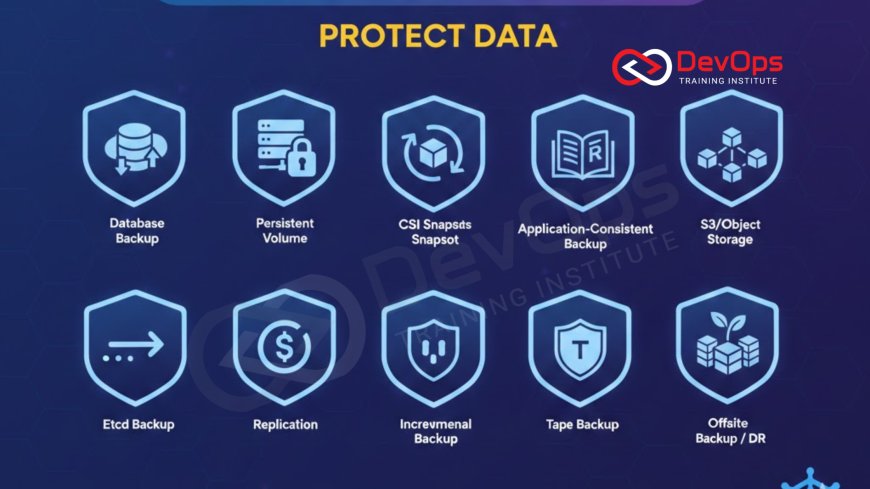
Introduction to Kubernetes Data Protection
As organizations transition their mission-critical applications to containerized environments, the complexity of data management increases significantly. Kubernetes was originally designed for stateless applications, but the modern reality involves complex databases and stateful services that require persistent storage. Protecting this information is no longer optional; it is a fundamental requirement for business continuity and risk management. Without a solid backup plan, a single misconfiguration or hardware failure could result in permanent loss of vital business assets.
This guide delves into the essential methods for safeguarding your cluster's state and application data. We will move beyond simple file copies to explore sophisticated techniques that capture the entire essence of a cluster, including its configuration, secrets, and persistent volumes. By understanding these strategies, teams can build a safety net that allows for rapid recovery in the face of disaster. Whether you are running on-premises or in the cloud, these principles will help you maintain a reliable and trustworthy platform for your end users.
Backing Up the Control Plane and Etcd
The control plane is the brain of your Kubernetes cluster, and etcd is its memory. Etcd stores every piece of information about your cluster, from the number of pods running to the complex networking rules and secrets. If etcd is lost or corrupted, your cluster essentially ceases to exist in its desired state. Therefore, the most critical step in any protection plan is ensuring that you have regular, consistent snapshots of the etcd database stored in a secure, external location.
Automating this process is vital to ensure consistency. Most managed cloud services handle this for you, but if you are running a self-managed cluster, you must set up scheduled cron jobs to trigger the etcdctl snapshot command. These snapshots should be encrypted and moved to an object storage bucket or a different physical location. This ensures that even if the entire data center experiences a catastrophic failure, you can rebuild your cluster from scratch using the stored state information, maintaining a high level of operational integrity.
Volume Snapshots and Persistent Data
While etcd contains the configuration, the actual business value often lives in Persistent Volumes. These volumes hold your databases, file uploads, and transaction logs. Modern storage interfaces in Kubernetes allow for volume snapshotting, which creates a point-in-time copy of the data without stopping the application. This is a highly efficient way to capture the state of your data at specific intervals, providing a quick way to roll back if a deployment goes wrong or data corruption occurs.
It is important to remember that a snapshot is often stored on the same storage system as the original data. To achieve true disaster recovery, these snapshots should be exported to a secondary storage platform. This multi-layered approach protects against both logical errors, such as a developer accidentally deleting a table, and physical failures where the storage array itself might fail. Integrating these steps into your standard workflows ensures that data protection is an inherent part of the application lifecycle rather than a manual afterthought.
Application-Aware Backup Techniques
Generic backups are useful, but application-aware backups are superior because they understand the internal state of the software. For example, a database might need to be put into a "quiesce" mode before a snapshot is taken to ensure all transactions are flushed to disk. Without this, you might end up with a "crash-consistent" backup that is difficult to recover. Application-aware tools use hooks to pause writes or trigger internal backup commands before capturing the storage layer.
By using specialized operators or backup tools that understand specific workloads, you can ensure that your restores are seamless and successful every time. This level of sophistication is a key part of platform engineering where the goal is to provide developers with a platform that handles complex operational tasks automatically. When the infrastructure understands the application, the risk of data inconsistency during a recovery event is minimized, allowing your team to focus on higher-value tasks instead of troubleshooting corrupted backups.
Table: Kubernetes Backup Strategy Comparison
| Strategy Name | Target Data | Recovery Speed | Main Advantage |
|---|---|---|---|
| Etcd Snapshots | Cluster Configuration | Fast | Complete cluster state recovery. |
| CSI Snapshots | Persistent Volumes | Very Fast | Near-instant recovery for data errors. |
| Object Storage Export | Volumes and Config | Moderate | Protects against data center failure. |
| GitOps Recovery | YAML Manifests | Moderate | Consistent, versioned environment state. |
| Database Dumps | Application Data | Slow | Granular data recovery at record level. |
GitOps as a Disaster Recovery Pillar
In a modern cloud-native environment, your configuration should never live only inside the cluster. By practicing gitops, you treat your cluster manifests as code stored in a version-controlled repository. This means that if the entire cluster is deleted, you can recreate all the namespaces, deployments, and services simply by pointing a new cluster at your Git repository. This provides a clean, documented, and reproducible path to recovery for the logical structure of your applications.
While GitOps handles the "what" of your infrastructure, it does not naturally handle the "data" within your volumes. Therefore, GitOps should be viewed as one half of a complete backup strategy. When combined with automated volume backups, it creates a powerful recovery mechanism. You can use your Git repository to define the infrastructure and your backup tool to reattach the data volumes. This separation of concerns makes your disaster recovery plan more modular, easier to test, and significantly more reliable during a real-world emergency.
Integrating Security and Resilience
Backup data is a high-value target for attackers. If a malicious actor gains access to your backups, they have access to your sensitive secrets and business data. Therefore, ensuring that devsecops principles are applied to your backup pipeline is essential. This includes encrypting data at rest and in transit, using the principle of least privilege for backup service accounts, and regularly auditing access logs to your storage buckets.
Beyond security, testing the actual resilience of your recovery plan is critical. You can use chaos engineering to simulate failures and see if your automated backup and restore processes trigger correctly. By intentionally breaking things in a controlled environment, you can gain confidence that your safety net actually works. This proactive approach ensures that when a real failure occurs, your team is prepared and the automated systems perform exactly as expected, reducing the stress and duration of an outage.
Monitoring Backup Health and Success
A backup is only useful if it actually works, and you don't want to find out it failed during a crisis. Implementing robust observability for your backup jobs is mandatory. You should have dashboards that show the success rate of scheduled tasks, the age of the latest backup, and the total storage consumed. Alerts should be configured to notify the team immediately if a backup fails or if the storage destination is running out of space.
Regularly performing "restore drills" is the only way to prove your backups are valid. These drills should involve taking a recent backup and attempting to restore it into a completely fresh namespace or a temporary cluster. This verifies not only the integrity of the data but also the accuracy of your documentation and the skills of your team. By treating backup health as a first-class citizen in your monitoring stack, you eliminate the guesswork and ensure that your data protection strategy remains effective as your cluster grows and evolves.
Advanced Deployment and Testing Safeguards
Preventing the need for a full restore is often better than performing one. Using sophisticated deployment techniques can significantly reduce the risk of data corruption during updates. For example, using canary releases allows you to test new versions on a small subset of traffic before rolling them out to everyone. If the new version starts corrupting data, you can stop the rollout immediately, limiting the damage and the scope of the required recovery.
- Implementing blue-green deployment strategies allows you to have a standby environment ready to take over if the active one fails.
- Using feature flags enables you to disable problematic code paths instantly without redeploying the entire application.
- Applying shift-left testing ensures that data migration scripts are tested thoroughly in staging before they ever touch production databases.
- Utilizing immutable backups prevents ransomware from deleting or encrypting your historical data copies.
By shifting your focus to include preventative measures, you create a more comprehensive safety profile. While backups are your last line of defense, these deployment strategies act as earlier filters to catch errors before they become catastrophes. Combining shift-left testing with strong backup policies ensures that your development velocity does not come at the expense of data safety. This holistic view of reliability is what separates mature engineering teams from those who are constantly in firefighting mode.
Optimizing Costs for Backup Storage
As your data grows, the cost of storing multiple copies can become significant. This is where finops becomes relevant to your data protection strategy. You need to balance the need for data safety with the reality of your cloud budget. Implementing lifecycle policies that move older backups to cheaper, "cold" storage tiers can save a significant amount of money without sacrificing the ability to recover from long-term data loss events.
De-duplication and compression are also vital technologies for reducing the footprint of your backups. Many modern Kubernetes backup tools include these features natively, allowing you to store weeks of history for only a fraction of the cost. By regularly reviewing your storage consumption and retention policies, you can ensure that you are getting the best value for your investment. This financial awareness ensures that your backup strategy remains sustainable and scalable as your organization continues to expand its footprint in the cloud.
Conclusion
Protecting data in a Kubernetes environment requires a multi-faceted approach that spans configuration, stateful volumes, and proactive testing. We have explored how etcd snapshots provide the foundation for cluster recovery, while volume snapshots and application-aware backups ensure that your business data remains intact. By incorporating modern practices like GitOps for manifest management and DevSecOps for backup security, you build a resilient ecosystem capable of withstanding both human error and infrastructure failure. Remember that the goal is not just to have a backup, but to have a verifiable and rapid recovery process. Regularly testing your restores and monitoring the health of your backup jobs will provide the confidence needed to innovate quickly while knowing your data is safe. As your cluster grows, continue to refine these strategies, using tools like feature flags and canary releases to minimize risk, and applying FinOps principles to keep your storage costs optimized and sustainable over the long term.
Frequently Asked Questions
What is the most important part of a Kubernetes backup?
The most critical part is the etcd database which stores the entire configuration and state of your cluster and its resources.
How often should I back up my cluster?
Backup frequency depends on your data change rate but typically you should run daily backups and more frequent snapshots for critical databases.
Can I use Git as a backup for my cluster?
Git is excellent for backing up your YAML configurations but it cannot store the actual data inside your persistent volumes or databases.
What is Velero in the context of Kubernetes?
Velero is a popular open source tool used for backing up and restoring Kubernetes cluster resources and persistent volumes to object storage.
Is a volume snapshot the same as a backup?
A snapshot is a point-in-time copy on the same system while a backup is usually stored externally to protect against system failure.
Do I need to backup my stateless applications?
While the apps themselves are stateless you should still backup their configurations and secrets to ensure you can redeploy them quickly if needed.
What is an application-aware backup?
It is a backup process that interacts with the application to ensure data is in a consistent state before the snapshot is taken.
How does GitOps help in disaster recovery?
GitOps allows you to recreate your entire cluster infrastructure and application structure from a Git repository in the event of a total loss.
Should backups be encrypted?
Yes you must always encrypt backups to protect sensitive information like secrets and customer data from unauthorized access or potential data breaches.
What is the difference between RTO and RPO?
RTO is the time it takes to recover while RPO is the maximum amount of data loss measured in time from the last backup.
How can I test my Kubernetes backups?
You should regularly perform restore drills by recovering data into a separate namespace or a temporary cluster to verify the backup integrity.
Can I backup Kubernetes clusters across different cloud providers?
Yes many backup tools support multi-cloud restores allowing you to migrate or recover your cluster from one cloud provider to another easily.
What are the costs associated with backups?
Costs include storage fees for the backup files and potential data egress charges if you are moving backups between different cloud regions or providers.
Does Kubernetes have a built-in backup tool?
Kubernetes provides primitives like volume snapshots but you typically need external tools or scripts to manage a full production grade backup strategy.
How do feature flags relate to data safety?
Using feature flags lets you disable broken features immediately which can prevent further data corruption before a full restore is even required.
What's Your Reaction?
 Like
0
Like
0
 Dislike
0
Dislike
0
 Love
0
Love
0
 Funny
0
Funny
0
 Angry
0
Angry
0
 Sad
0
Sad
0
 Wow
0
Wow
0






![100+ Azure DevOps Interview Questions and Answers [Updated 2025]](https://www.devopstraininginstitute.com/blog/uploads/images/202509/image_140x98_68c40aa9a3834.jpg)






![Future Scope of DevOps Careers in Pune [Updated 2025]](https://www.devopstraininginstitute.com/blog/uploads/images/202510/image_140x98_68e3a84652312.jpg)


