


































![Kong Interview Preparation Guide [2025]](https://www.devopstraininginstitute.com/blog/uploads/images/202509/image_430x256_68dbb95326997.jpg)
















10 Deployment Rollback Strategies Every DevOps Needs
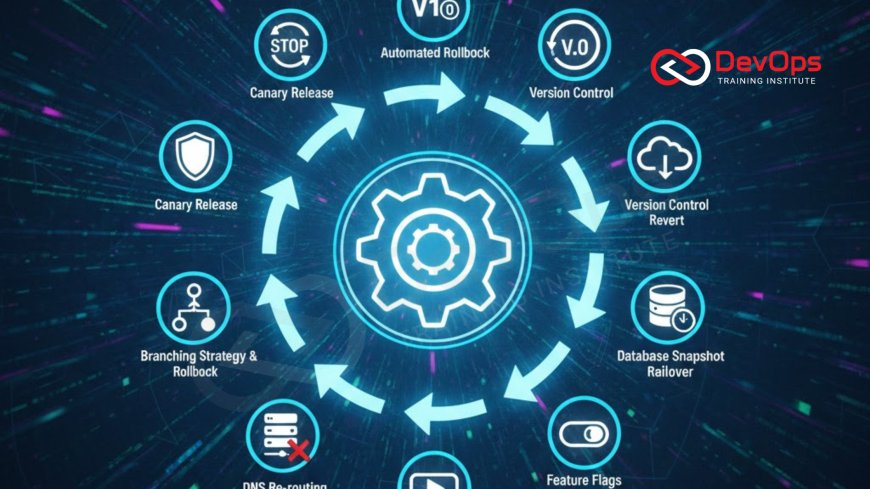
Discover the most effective ten deployment rollback strategies every DevOps professional needs to implement for maximum system uptime and reliability. This comprehensive guide explores technical methods such as blue-green deployments, canary releases, and automated health checks to ensure your software delivery process remains resilient. Learn how to handle production failures gracefully by reverting to stable states quickly, reducing the impact on end users while maintaining a high velocity in your continuous integration and delivery pipelines today.
Introduction to Deployment Resilience
In the world of modern software engineering, the speed of delivery is often a primary focus. However, fast deployments are only valuable if they are safe. No matter how much a team tests their code, the reality of production environments is that unforeseen issues will eventually occur. This makes the ability to revert to a previously stable state just as important as the ability to push new code forward. A well defined rollback strategy is a safety net that protects the user experience and the reputation of the business.
This guide will explore ten critical strategies that every professional should master to handle deployment failures with confidence. We will look at how automation, architectural choices, and cultural shifts contribute to a robust recovery process. By understanding these techniques, you can transform high stakes release days into routine, low stress events. The goal is to move away from reactive firefighting and toward a proactive state of operational excellence where rollbacks are handled seamlessly by the system itself without manual intervention or panic.
The Foundation of Version Control and Atomic Deploys
Before implementing complex strategies, a team must have a solid foundation in version control. Every deployment should be tied to a specific, immutable artifact or a unique commit hash. This ensures that the system knows exactly what the previous working version was and can point back to it instantly. Atomic deployments, where the transition between versions happens all at once or not at all, prevent the system from entering a half updated state that is difficult to debug or revert.
By treating your configuration and infrastructure with the same rigor as your application code, you create a predictable environment. This is often achieved through gitops where the desired state of the entire system is stored in a repository. When a deployment fails, the rollback is as simple as reverting a pull request or updating a pointer in your orchestrator. This level of automation reduces human error and ensures that the recovery process is consistent across different environments, from staging to production.
Implementing Blue Green Deployment Models
The blue green strategy is a classic approach to minimizing risk. In this model, you maintain two identical production environments. Only one environment, let's say blue, is live at any given time. When it is time to release new code, you deploy it to the green environment. Once the green environment is verified to be working correctly, you switch the traffic from blue to green at the load balancer level. This provides a nearly instantaneous transition for the end users.
If an issue is discovered in the new version after the switch, the rollback is just as fast. You simply switch the traffic back to the blue environment, which still contains the old, stable version of the code. This strategy is particularly effective when dealing with large updates that require significant infrastructure changes. For those working with modern container orchestrators, understanding the best practices for blue-green deployment in kubernetes is essential for managing resources efficiently while maintaining this high level of availability and safety.
Reducing Risk with Canary Releases
While blue green deployments switch all traffic at once, a canary release takes a more gradual approach. In this strategy, you deploy the new version of the software to a tiny fraction of your user base first. These users act as the "canaries" in the coal mine. You then monitor their experience closely for any signs of increased error rates or performance degradation. If the metrics stay within healthy limits, you slowly increase the percentage of traffic going to the new version until it reaches one hundred percent.
The primary advantage here is that if a bug exists, only a small number of people are affected. Rollbacks are performed by simply redirecting the canary traffic back to the stable pool. Professionals often integrate this with automated monitoring to ensure that the process can stop and revert without human eyes on the screen. Learning how do canary releases reduce risk in production deployments helps teams build confidence in their continuous delivery process, allowing them to release code more frequently with much less anxiety.
Table: Summary of Rollback Techniques
| Strategy Name | Primary Mechanism | Rollback Speed | Best Use Case |
|---|---|---|---|
| Blue-Green | Load balancer traffic switch | Near Instant | Major version updates and infrastructure changes. |
| Canary Release | Incremental traffic ramping | Fast | Risk-sensitive updates and testing in production. |
| Feature Flags | Software code toggles | Instant | Decoupling deployment from feature release. |
| Kubernetes Rollout | ReplicaSet version history | Moderate | Standard containerized application updates. |
| Database Migration | Reversible schema scripts | Slow | Handling changes to persistent data structures. |
Decoupling Releases with Feature Flags
One of the most modern and effective ways to manage rollbacks is to stop thinking of "deployment" and "release" as the same thing. Feature flags allow you to deploy code to production in a dormant state. The code is running on the servers, but it is hidden behind a conditional check in the software. You can then toggle the feature on for specific users or environments through a configuration dashboard without having to redeploy any code or restart any services.
If a new feature starts causing errors, you don't need to roll back the entire deployment. You simply flip the toggle back to "off" in the management tool. This is the fastest possible rollback because it happens at the application layer and takes effect immediately. Understanding how do feature flags enable safe continuous deployment is a game changer for teams. It allows for more experimental development and gives the business side of the organization more control over when features are actually seen by customers.
Automated Health Checks and Self Healing
A manual rollback is often too slow for modern systems that handle thousands of requests per second. Productive teams implement automated health checks that constantly monitor the status of new deployments. If the system detects that the new version is returning high error rates, crashing frequently, or consuming too many resources, it can automatically trigger a rollback. This reduces the "mean time to recovery" and ensures that the system is self healing in the face of bad code.
To make this effective, you must have a clear understanding of your system's baseline behavior. This is why the conversation around observability vs monitoring is so important. Monitoring tells you that something is wrong, but observability gives you the data needed for the system to make an intelligent decision about whether to roll back. By setting clear service level objectives, you can create automated triggers that protect your production environment around the clock, even when the engineering team is asleep.
Database Rollback Challenges and Best Practices
Rolling back application code is relatively simple compared to rolling back database changes. When a deployment involves a schema change, such as adding a new column or changing a data type, simply reverting the code can leave the application in a broken state if the code and database are out of sync. This is the most complex part of any rollback strategy and requires careful planning and the use of migration scripts that include an "undo" or "down" step.
The best practice for avoiding database rollback disasters is to ensure that all changes are backward compatible. This means that the current version of the code and the new version of the code should both be able to work with the database schema at the same time. This often involves a multi step process of adding a field, migrating data, and then eventually removing the old field in a later deployment. This disciplined approach minimizes the need for high risk database rollbacks and is a core part of building a resilient platform engineering environment that supports rapid, safe changes to persistent data.
- Always use version-controlled migration scripts for every database change.
- Ensure your "down" migrations are tested as thoroughly as your "up" migrations.
- Implement a "expand and contract" pattern for schema changes to maintain compatibility.
- Consider using database snapshots before major migrations for emergency recovery.
Continuous Testing and Resilience Engineering
The best rollback strategy is the one you never have to use, and that starts with finding bugs before they reach production. Implementing a shift left testing strategy means moving your quality checks earlier in the development lifecycle. By automating unit, integration, and performance tests in your pipeline, you catch the majority of issues long before the deployment phase. However, testing in isolation is not enough to guarantee success in the real world.
Resilience engineering goes a step further by proactively testing how your system handles failure. This is often done through chaos engineering, where you deliberately inject faults into your system to verify that your rollback triggers and self healing mechanisms work as expected. By "breaking" your system on purpose in a controlled environment, you gain the confidence that your recovery strategies will actually function when a real emergency occurs. This culture of continuous improvement and testing is what separates elite engineering teams from the rest.
Conclusion
Implementing a robust suite of deployment rollback strategies is not just a technical requirement; it is a fundamental part of providing a reliable service to your users. We have explored ten essential techniques, from the foundational simplicity of version control to the sophisticated automation of canary releases and feature flags. We have also highlighted the importance of backward compatible database changes and the proactive nature of resilience engineering. By combining these strategies, you can significantly reduce the risk associated with modern software delivery. Remember that a successful rollback is not a sign of failure, but a sign of a well engineered system that prioritizes stability and user trust above all else. As you continue to refine your CI and CD pipelines, focus on making your rollback processes as automated and invisible as possible. This investment in safety will allow your team to innovate faster and move with the confidence that you are always protected against the unpredictable challenges of the digital landscape.
Frequently Asked Questions
What is a deployment rollback?
A deployment rollback is the process of reverting a software application to its previously stable version after a new update fails.
Why are rollbacks important in DevOps?
Rollbacks are essential for maintaining high availability and minimizing the impact of bugs or performance issues on the end users.
How does blue-green deployment help with rollbacks?
It allows for an instant rollback by simply switching traffic back to the "blue" environment which still holds the previous stable code.
What is a canary release strategy?
A canary release involves rolling out new features to a small percentage of users first to test stability before a full release.
Can I roll back database changes automatically?
It is difficult and risky; the best approach is using backward-compatible schema changes and well-tested migration scripts for safer database management.
What role do feature flags play in rollbacks?
Feature flags allow you to instantly disable a broken feature without redeploying code, making it the fastest form of application rollback.
What is the "mean time to recovery" (MTTR)?
MTTR is a metric that measures the average time it takes to restore a service after a failure has been detected.
How do automated health checks work?
They monitor specific metrics like error rates and latency, automatically triggering a rollback if the new version exceeds predefined safety thresholds.
Is a rollback the same as a hotfix?
No; a rollback reverts to an old version, while a hotfix is a new code change pushed quickly to fix a bug.
What is GitOps in the context of rollbacks?
GitOps uses Git as the source of truth for infrastructure, making rollbacks as easy as reverting a commit in a repository.
How can I test my rollback strategy?
You can use chaos engineering to inject faults and verify that your automated rollback triggers and procedures function correctly under stress.
What is a "stop-the-world" rollback?
It is a manual process where all traffic is halted while the system is reverted, which is usually avoided by modern DevOps.
Why should I use atomic deployments?
Atomic deployments ensure that the update happens completely or not at all, preventing the system from entering an inconsistent, broken state.
Do rollbacks affect cloud costs?
Maintaining two environments for blue-green can increase costs, but finops practices help optimize this spend for better efficiency.
How often should I practice rollbacks?
You should perform dry runs or use staging environments frequently to ensure that your team and tools are ready for real production failures.
What's Your Reaction?
 Like
0
Like
0
 Dislike
0
Dislike
0
 Love
0
Love
0
 Funny
0
Funny
0
 Angry
0
Angry
0
 Sad
0
Sad
0
 Wow
0
Wow
0







![100+ Azure DevOps Interview Questions and Answers [Updated 2025]](https://www.devopstraininginstitute.com/blog/uploads/images/202509/image_140x98_68c40aa9a3834.jpg)






![Future Scope of DevOps Careers in Pune [Updated 2025]](https://www.devopstraininginstitute.com/blog/uploads/images/202510/image_140x98_68e3a84652312.jpg)


