


































![Kong Interview Preparation Guide [2025]](https://www.devopstraininginstitute.com/blog/uploads/images/202509/image_430x256_68dbb95326997.jpg)
















10 Jenkinsfile Examples for Faster Deployment
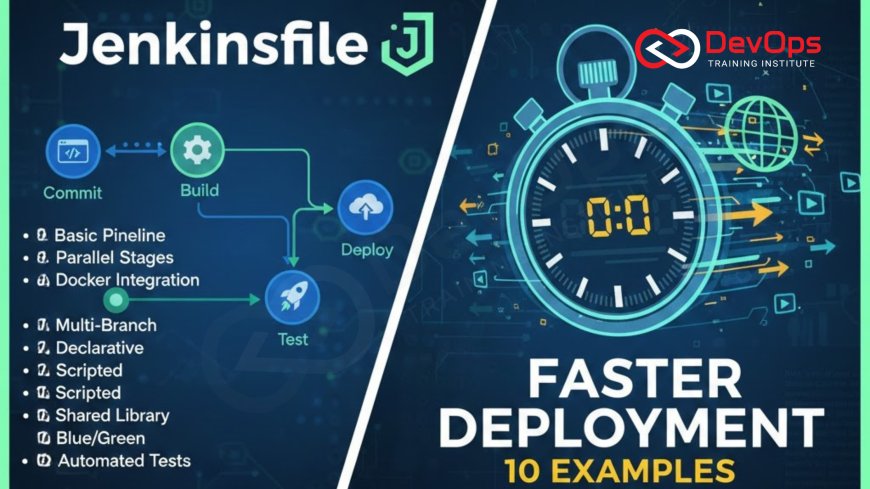
Accelerate your software delivery and master continuous deployment with 10 practical Jenkinsfile examples. This comprehensive guide provides ready-to-use Groovy scripts for declarative pipelines, covering essential DevOps tasks from multi-stage Docker builds and automated security testing to Infrastructure as Code (IaC) deployment with Terraform. We detail how to implement advanced techniques like parameterized builds, automated database migrations, and rolling updates to Kubernetes, all while integrating robust validation checks. These examples emphasize best practices for credential management, efficient environment switching, and streamlined reporting, helping you build faster, more reliable, and more secure pipelines. Learn how to transform slow, manual deployments into rapid, repeatable, and auditable processes, minimizing human error and significantly improving your team's lead time for changes. Focus on coding your entire delivery process, including the secure handling of SSH keys and the automation of critical server configurations.
Introduction
The Jenkinsfile is the cornerstone of modern software delivery using Jenkins, codifying your entire Continuous Integration and Continuous Delivery (CI/CD) pipeline into a single, version-controlled script. By defining the pipeline declaratively using Groovy syntax, teams ensure that the build, test, and deployment process is repeatable, transparent, and auditable. Moving from a manual, click-based process to a codified Jenkinsfile is the single biggest leap an organization can make toward achieving true DevOps maturity and significantly increasing deployment velocity. These examples focus on the declarative syntax, which is simpler to read and maintain than scripted pipelines, making them ideal for beginners and seasoned engineers alike. Each script provides a blueprint for common, high-value automation tasks designed specifically to eliminate human intervention and accelerate the path from commit to production. Understanding the structure—Stages, Steps, Agents, and Post actions—is critical for customizing these templates to your specific application needs. The goal is to make every release a non-event, fully automated, and executed consistently every time.
1. Simple Declarative Pipeline for Basic CI/CD
This foundational Jenkinsfile is the perfect starting point, demonstrating the basic structure necessary to execute a simple build and test sequence before deploying to a staging environment. The script utilizes the `agent any` directive for maximum flexibility, allowing the job to run on any available worker node. It clearly defines three sequential stages: Build, Test, and Deploy. In the Build stage, it typically executes the language-specific build command, such as `npm install` and `npm build` for a Node.js application, or `mvn clean package` for Java. This stage is responsible for compiling the source code and creating the necessary artifact. The Test stage focuses on quality, executing unit and integration tests; a critical step here is the inclusion of `junit` publishing steps to visualize test results within the Jenkins UI, turning raw execution results into actionable reports. The final Deploy stage simulates pushing the application artifact to a staging environment. The strength of this declarative approach lies in its readability; a new team member can quickly understand the flow of the application and the prerequisites for deployment. Ensuring that the build fails immediately upon any non-zero exit code during the testing phase is paramount, enforcing a high quality gate before proceeding to the deployment steps. This simple script replaces numerous manual steps, providing an instant increase in reliability for routine releases.
For the deployment step, even in a simple pipeline, it is best practice to include a validation step after the artifact transfer. Instead of just relying on the success of the transfer command, the pipeline should execute a health check against the newly deployed service, confirming that it has started correctly and is responding to external requests. This check prevents the pipeline from reporting success when the application has actually failed to initialize properly in the staging environment. The Jenkinsfile should also utilize the `post` section to handle cleanup and reporting, ensuring temporary files or containers are removed whether the pipeline succeeds or fails, maintaining a clean workspace. Furthermore, for foundational automation tasks, relying on simple shell executions is often the quickest path to success. These shell scripts can leverage basic commands for file transfer, service restarts, and configuration verification on the target hosts. This approach maintains simplicity while establishing a robust, end-to-end automation cycle. This first example provides the necessary scaffolding to which all subsequent complexity can be added safely and iteratively, making it the core template for all declarative pipelines within an organization.
The use of environment variables within this basic pipeline is crucial for decoupling the script from specific settings. Variables should define credentials (accessed via Jenkins' credentials binding), artifact paths, and target environment URLs. This portability allows the same script to be reused across multiple projects simply by modifying the configuration variables, upholding the principle of "Don't Repeat Yourself" (DRY). For example, the build command should reference the workspace directory using the built-in Jenkins variable `${WORKSPACE}` rather than hardcoding paths. The deployment target's security needs to be addressed early; even a simple deployment should use secure transport protocols, ensuring the artifact is moved via SSH or HTTPS, and never FTP, to protect intellectual property and maintain compliance. Finally, incorporating the `timestamps()` wrapper ensures that every output line in the console log is prefixed with the time it occurred, which is vital for diagnosing performance bottlenecks or identifying where the pipeline stalled, ensuring transparency in execution time. This initial script lays the indispensable groundwork for all future, more complex deployment scenarios and enforces the discipline required for successful continuous delivery.
2. Multi-Stage Docker Build and Push Pipeline
Containerization is essential for modern deployments, and this Jenkinsfile automates the entire Docker lifecycle: building an efficient image, testing it, and pushing it to a registry.
- Agent Configuration: The pipeline uses an `agent { dockerfile true }` directive to run the entire build process inside a container defined by the application's Dockerfile. This ensures the build environment is perfectly isolated and reproducible, eliminating dependency conflicts on the Jenkins worker itself.
- Multi-Stage Build Focus: The core logic executes a `docker build` command that leverages a multi-stage Dockerfile. The goal is to separate the heavy compilation environment (e.g., Node SDK, Java JDK) from the lightweight runtime image, drastically reducing the final container size and security attack surface.
- Registry Authentication: The pipeline includes a stage to securely authenticate to the private or public Docker registry (e.g., Docker Hub, AWS ECR). This must use the `withCredentials` step to bind Jenkins secrets (username/password) to environment variables, avoiding plain-text credentials in the script.
- Automated Tagging: The final `docker push` step automatically tags the image with immutable references, typically including the Git commit hash and the Jenkins Build Number. This provides necessary traceability, linking the deployed container image directly back to the exact code change and the pipeline run that created it.
- Security Scanning Integration: Before the final push, a step is included to run a lightweight container security scanner (e.g., Trivy or Clair) against the newly built image. The pipeline should be configured to fail if critical vulnerabilities are detected, acting as a crucial security gate for the container artifact.
- Image Cleanup: A `post` step is mandatory to clean up the local workspace and remove the locally built Docker image and dangling layers from the Jenkins agent cache, ensuring that disk space is consistently managed and not consumed by old artifacts.
- Verification and Reporting: The final stage confirms the image is accessible in the registry and publishes a link to the image manifest in the build summary, providing immediate visibility into the newly created, deployable container artifact.
3. Pipeline Implementing Git Branching Strategy (Feature/Master Gates)
Effective continuous delivery requires tying pipeline execution directly to the organizational Git branching model, and this Jenkinsfile achieves that using the `when` directive. The script dictates different stages and actions based on the branch that triggered the build (e.g., `master`/`main` for production, `develop` for staging, or feature branches for testing). For feature branches, the pipeline runs only the Build and Unit Test stages, providing immediate developer feedback without wasting time on deployments. For the develop branch, the pipeline extends to include Integration Tests and deployment to the shared Staging Environment. The most restrictive execution occurs on the master/main branch. This branch is reserved for production releases and requires passing all previous tests plus a new, rigorous stage like Load Testing or a manual Approval Gate before initiating the final production deployment. This conditional execution model prevents immature code from reaching production, enforces the "trunk-based development" or "GitFlow" model, and optimizes resource usage by skipping unnecessary deployment steps for branches that are not ready for production exposure.
The `when` condition is the heart of this pipeline's logic, using Groovy expressions to evaluate the environment. For instance, `when { branch 'master' }` ensures the sensitive production steps only execute when the source code is known to be the highly vetted main branch. Furthermore, the Approval Gate for production deployment is handled using the `input` step in the declarative pipeline, which pauses the execution flow and waits for manual confirmation from an authorized user (typically an SRE or senior developer). This pause introduces a crucial human safety check, mitigating the risk of accidental deployment while maintaining the automation's convenience. The pipeline can also utilize Groovy scripting within a stage to automatically apply specific configuration transformations based on the target branch, such as using different database credentials or environment variables for the staging environment versus the development environment. This keeps the application code itself clean of environment-specific configuration details, adhering to the principles of a 12-factor application. The entire setup elevates the pipeline from a mere sequence of steps to an intelligent workflow that actively manages risk based on the source of the code change.
A powerful addition to this strategy is using the `post` section within the stage definition to run cleanup specific to that environment. For example, the deployment stage for a feature branch might include a `post { always { sh 'cleanup_temporary_vm.sh' } }` step to destroy the ephemeral resources created for testing the feature, ensuring the infrastructure footprint is transient and costs are contained. The security layer is enforced by ensuring that only pipelines running from the master branch have access to production credentials, which is controlled via the `when` condition coupled with the Jenkins Credential Bindings scope. This strict credential separation prevents developers from accidentally or maliciously deploying feature branches to the live environment. This strategic use of branching logic and conditional execution ensures that the continuous delivery process is tightly governed by the organizational development policy, maximizing both speed for features and safety for production releases. This level of pipeline maturity is a hallmark of high-performing DevOps teams seeking both agility and enterprise-grade reliability in their deployment methodology.
4. Automated Security Scanning and Policy Enforcement Pipeline
This critical pipeline integrates security checks early in the development lifecycle, adhering to the DevSecOps principle of "shifting security left."
- Pre-Build SAST Gate: Includes a Static Application Security Testing (SAST) stage that runs tools like SonarQube or Checkmarx against the source code before compilation. The stage is configured to automatically fail the build if the number of critical or high-severity vulnerabilities exceeds a predefined threshold.
- Dependency Scanning: A dedicated step runs a Dependency Vulnerability Scanner (e.g., OWASP Dependency-Check) on the project libraries to identify known CVEs (Common Vulnerabilities and Exposures) in third-party components, preventing compromised libraries from being included in the artifact.
- Post-Deployment DAST Check: After deployment to a QA environment, a stage runs a Dynamic Application Security Testing (DAST) tool like OWASP ZAP against the live application endpoints. This finds runtime vulnerabilities that SAST tools miss, such as misconfigurations or injection flaws.
- Credentials and Secrets Audit: The pipeline uses Jenkins plugins to audit the source code and configuration files for accidental inclusion of hardcoded secrets, such as API keys or passwords, ensuring sensitive data is not exposed in the repository.
- Automated Certificate Check: A step is added to verify the expiration date and validity of SSL/TLS certificates used by the deployed application, automatically generating alerts if a certificate is nearing expiration, preventing unexpected service outages.
- Automated Compliance Validation: For environments requiring strict host hardening, a stage can execute a configuration management script that applies and verifies security settings. This script might involve ensuring that all required Firewalld commands and host-level security policies are active on the target deployment server.
- Centralized Reporting: The final post-action step aggregates reports from all security tools (SAST, DAST, dependency check) and publishes them to a centralized dashboard (like SonarQube or a custom security dashboard) for long-term tracking and compliance auditing.
5. IaC Pipeline: Terraform Provisioning with Approval Gate
This Jenkinsfile automates the deployment and management of infrastructure resources using Terraform, ensuring all cloud changes are codified and peer-reviewed before execution.
Terraform Plan Stage
The first stage executes `terraform init` and `terraform plan`, generating an execution plan of all infrastructure changes required. This plan is saved as an artifact, which provides a clear, auditable description of what will change.
The saved plan is crucial for audibility. It is immediately published as a summary in the build logs, allowing reviewers to assess the exact resource changes (creations, modifications, destructions) proposed by the code.
Manual Approval Gate
A mandatory `input` step is inserted after the plan stage, pausing the pipeline. This manual gate requires an authorized operations engineer to review the generated Terraform plan file and approve the infrastructure modifications.
This crucial step prevents unintended infrastructure changes, especially resource destruction, protecting production environments from accidental or erroneous Infrastructure as Code deployments before proceeding.
Terraform Apply Stage
Upon manual approval, the final stage executes `terraform apply` using the previously saved plan artifact. This ensures that the applied changes precisely match the reviewed plan, eliminating "drift" between review and execution.
The final step includes a validation task that runs immediately after the apply, checking that the provisioned resources, such as VMs, adhere to the strict organizational post-installation checklist standards before marking the infrastructure deployment as complete.
6. Automated Database Migration and Schema Update Pipeline
Database changes often represent the highest risk in a deployment, and this pipeline automates the schema migration process using tools like Flyway or Liquibase, ensuring changes are applied safely and rolled back if validation fails. The pipeline incorporates specific stages designed to minimize downtime and risk associated with schema updates. The first stage is a standard Pre-Migration Check, which verifies that the target database is healthy, its connection pool is available, and, crucially, that a recent backup exists. This check acts as a safeguard, ensuring the environment is stable enough to accept the change and providing a guaranteed recovery point should the migration fail catastrophically. The core Migration Stage executes the tool (e.g., `flyway migrate`), applying the necessary schema changes in a controlled, versioned manner. The success of this stage relies heavily on the migration tool's transactional support, which ensures that if any single script fails, the entire transaction is rolled back, leaving the database in a consistent state, which is vital for data integrity and application functionality. This automation removes the manual process of executing SQL scripts, which is highly prone to human error, especially in complex environments where database credentials must be managed carefully.
A critical step following the schema migration is the Post-Migration Validation. This stage is essential because a successful migration execution does not guarantee application functionality. The pipeline must run a suite of smoke tests or read/write integration tests against the database using the new schema structure. These tests confirm that the application can correctly read from and write to the modified tables. If these functional tests fail, the pipeline immediately triggers an Automated Rollback Stage. The rollback process, also codified and automated, typically involves restoring the database from the verified pre-migration snapshot or executing specific rollback scripts defined within the migration tool. This automated recovery mechanism drastically reduces the Mean Time to Recovery (MTTR) for database-related deployment failures, mitigating the single largest risk factor in continuous delivery. The database connection string must be handled with utmost security, using Jenkins' credentials binding to inject secrets into the migration utility, protecting highly sensitive database access credentials from exposure.
To manage potential performance degradation, this pipeline can include a stage that runs a Performance Baseline Test both before and after the migration. This test executes a standard set of high-volume, performance-sensitive queries against the database and compares the query latency results. If the latency after the migration significantly exceeds the established baseline (e.g., a 20% increase in p95 query latency), the pipeline can flag a warning or be configured to fail, signaling that the new schema, while functionally correct, has introduced an unacceptable performance regression. The entire workflow should ensure detailed auditing. Every migration script executed, the identity of the user who approved the build, and the exact timestamp of the schema change must be recorded and integrated into the log management system. This audit trail is critical for compliance, forensic analysis, and troubleshooting future application issues. By encompassing checks, migration, validation, and rollback, this Jenkinsfile transforms database deployment from a high-risk, multi-hour manual task into a low-risk, automated process that can run seamlessly within the overall application CI/CD pipeline, promoting true database agility.
7. Parameterized Pipeline for Environment Selection and Configuration
This pipeline allows users to select the target environment (Dev, QA, Staging, Production) and configure deployment options directly from the Jenkins UI, making the script highly flexible and reusable.
- Input Parameters: The pipeline utilizes the `parameters` block to define user-facing inputs, such as a drop-down list for `TARGET_ENVIRONMENT` (with options like "staging," "preprod," "production") and a boolean flag for `SKIP_INTEGRATION_TESTS`.
- Conditional Execution: The `when` directive is heavily used to ensure stages only run based on the selected parameter. For example, the `deploy_production` stage only executes `when { expression { params.TARGET_ENVIRONMENT == 'production' } }`.
- Dynamic Credential Binding: Credentials (e.g., cloud access keys, database passwords) are dynamically loaded based on the selected environment parameter. The `withCredentials` step uses the variable name derived from the `TARGET_ENVIRONMENT` to select the correct, securely stored secret.
- Environment Configuration Loading: A stage dynamically loads environment-specific configuration files (YAML or JSON) based on the selected parameter. This ensures the correct API endpoints, feature flags, and resource limits are used during deployment.
- Resource Tagging: For IaC provisioning, the selected environment parameter is automatically passed to the Terraform or Ansible script to tag cloud resources correctly (e.g., `environment: production`), which is vital for cost allocation and security policies.
- Role-Based Access Control (RBAC): Jenkins' built-in RBAC is configured to restrict which users can run the pipeline with the "production" parameter selected. This security measure is crucial, preventing unauthorized personnel from accessing sensitive deployment paths.
- Deployment Confirmation: If the "production" environment is selected, the pipeline displays an aggressive confirmation message in the UI using the `input` step, summarizing the impending risk and requiring explicit manual confirmation before execution.
8. Automated Notifications, Reporting, and Log Management Pipeline
This pipeline enhances communication and operational visibility by standardizing success/failure reporting and integrating centralized log management updates.
- Standardized Email Notifications: The `post { always { ... } }` section sends a detailed email notification upon pipeline completion (success or failure). The email includes the build duration, the responsible commit, and direct links to the job logs and artifact reports.
- Contextual Slack/Teams Messaging: Integrates with collaboration tools to send contextual alerts. Failure messages are sent to the development channel, while successful production deployments are sent to a dedicated release channel, ensuring real-time visibility for stakeholders.
- Artifact Report Publishing: Uses Jenkins' native functionality to publish JUnit test reports, code coverage reports (JaCoCo), and vulnerability scan reports, making all quality metrics easily accessible from the Jenkins UI without navigating external tools.
- Centralized Log Marker: Upon successful deployment, the pipeline executes a shell command that inserts a standardized marker into the centralized log management system (e.g., Elastic/Splunk). This marker identifies the deployment timestamp and version number, aiding future troubleshooting and log correlation.
- JIRA/GitHub Status Update: Integrates with project management tools to automatically update the status of the associated JIRA ticket or GitHub pull request (PR). For example, a successful staging deployment automatically changes the JIRA ticket status to "Ready for QA."
- Service Health Dashboard Update: Executes an API call to a centralized monitoring tool (e.g., Datadog, Grafana) to annotate the service health timeline with the new deployment event and version tag, linking code changes directly to system performance metrics.
- Performance Comparison: A post-deployment stage runs a brief smoke test and compares the key performance indicator (KPI) latency against the previous build's baseline, flagging immediate performance regressions before full traffic is allowed.
9. Secure Artifact Deployment using SSH and Credentials
This essential pipeline automates deployment to bare metal or remote VMs using SSH, securely handling credentials and ensuring host access is governed by strict policy.
Credential Binding and SSH Access
The pipeline uses the `sshagent` block coupled with the `withCredentials` step to securely bind the private deployment key. This prevents the sensitive SSH keys from being exposed in the pipeline script or the worker node's file system, enhancing security compliance significantly.
The `sshagent` block loads the specified private key into an SSH agent session, allowing subsequent shell steps to use standard `ssh` and `scp` commands without referencing the key file directly, simplifying secure remote execution and artifact transfer.
Artifact Transfer and Remote Execution
The pipeline uses `scp` or `rsync` over SSH to transfer the application artifact to a predetermined remote directory on the target VM. This is a common method when deploying to traditional infrastructure not running Kubernetes.
Immediately following the transfer, a remote `ssh` command executes a deployment script on the target host. This script handles unpacking the artifact, stopping the old service instance, updating configuration files, and starting the new application instance gracefully.
Validation and Post-Deployment Check
The remote script includes a final health check step. It waits for the application to report a healthy status on its port before the SSH session terminates and the pipeline marks the deployment stage as successful.
The `post` action ensures that the remote workspace on the target host is cleaned up, removing old deployment files to conserve disk space and ensure future deployments start with a clean environment.
10. Kubernetes Deployment with Rolling Update Strategy
This advanced Jenkinsfile manages application deployment directly on a Kubernetes cluster, utilizing the rolling update strategy for zero-downtime releases.
- Kubernetes Integration: The pipeline uses the `kubernetes` plugin steps (or `kubectl` shell commands) and authenticates to the cluster using securely bound credentials (e.g., Kubeconfig file or service account token) from the Jenkins secrets store.
- Manifest Templating: A stage dynamically substitutes variables (like the new Docker image tag and application version) into the Kubernetes YAML deployment manifest using Jinja2 templates or specialized tools like Helm or Kustomize.
- Rolling Update Strategy: The core deployment step applies the manifest (`kubectl apply -f deployment.yaml`). The deployment configuration ensures the `strategy` is set to `RollingUpdate`, which gracefully replaces old pods with new ones, guaranteeing zero downtime.
- Automated Health and Readiness Check: The pipeline pauses execution after the deployment is applied (`kubectl rollout status deployment/
`). This command blocks until all new pods are marked as `Ready` and `Available`, verifying the success of the update before proceeding. - Pre-Rollback Check: The deployment manifest ensures that the previous version's replica count is maintained until the new version is fully healthy. If the health check fails, the pipeline automatically triggers an instant rollback to the stable, working version (`kubectl rollout undo`).
- Configuration and Resource Management: The pipeline verifies that the deployment YAML specifies resource requests and limits. This ensures that the application respects cluster constraints and contributes to efficient resource allocation and predictable scaling across the file system management layer for persistent volumes.
- Service Exposure Verification: The final stage verifies that the Kubernetes Service and Ingress controllers correctly recognize the new Pods and are routing external traffic to them, confirming end-to-end connectivity.
Jenkinsfile Examples Summary Matrix
| # | Example Focus | Key Tool / Feature | Primary Benefit to Speed |
|---|---|---|---|
| 1 | Simple Declarative CI/CD | Basic Stages, Post Actions | Establishes Repeatable, Single-Click Flow |
| 2 | Multi-Stage Docker Build | Agent Dockerfile, Multi-Stage Tagging | Faster Image Pulls & Reduced Size |
| 3 | Git Branching Strategy | When Directive, Input Step | Optimized Resource Use (Skip Unneeded Stages) |
| 4 | Automated Security Scanning | SAST/DAST Integration, Build Gate | Prevents Slow, Costly Post-Production Fixes |
| 5 | Terraform Infrastructure Deployment | Terraform Plan/Apply, Input Step | Infra Provisioning Speed (Automated) |
| 6 | Automated Database Migration | Flyway/Liquibase Execution, Rollback Logic | Eliminates Manual, High-Risk DBA Steps |
| 7 | Parameterized Pipeline | Parameters Block, Dynamic Credentials | Reusability Across All Environments |
| 8 | Automated Notifications/Reporting | Slack/Email Steps, Log Markers | Faster Feedback Loop (MTTD Reduction) |
| 9 | Deployment using SSH and Credentials | SSH Agent, WithCredentials | Secure, Automated Deployment to VMs |
| 10 | Kubernetes Rolling Update | Kubectl Apply, Rollout Status | Zero-Downtime Deployment Guarantee |
Conclusion
The transition to codifying your entire deployment process via Jenkinsfiles is the defining factor in achieving modern continuous delivery. These 10 examples provide a comprehensive framework, demonstrating how to handle high-risk operations—from automated database schema migrations and zero-downtime Kubernetes rollouts to secure Infrastructure as Code provisioning—all through a repeatable script. By adopting these declarative patterns, your organization inherently reduces the two biggest enemies of deployment speed: manual intervention and human error. Every time a critical step is automated, the time saved in manual execution and subsequent rollback/debugging cycles contributes directly to faster deployments and a healthier MTTR. The ultimate success lies in the integration of these individual scripts; a mature CI/CD system utilizes a simple, clean master branch pipeline that calls upon these specialized, pre-tested scripts for tasks like security scanning, database migration, and infrastructure deployment. This modularity, coupled with rigorous credential management and automated quality gates, ensures your engineering teams can innovate rapidly while maintaining enterprise-grade reliability, moving deployment velocity from weeks to minutes, safely and consistently.
Frequently Asked Questions
What is the difference between a declarative and scripted Jenkinsfile?
Declarative Jenkinsfiles, which are used in these examples, enforce a rigid, structured syntax and are typically easier for beginners to read, write, and maintain, as they clearly define stages and steps using Groovy keywords. Scripted Jenkinsfiles are written in raw Groovy and offer greater flexibility and power, allowing for complex logic and loops, but they are generally harder to read, debug, and enforce consistency across large teams. Declarative is generally recommended for most application pipelines due to its simplicity.
How do I handle credentials securely in the Jenkinsfile?
You must never store sensitive data (API keys, passwords, database credentials) directly in the Jenkinsfile or Git repository. Instead, store them in the Jenkins Credentials Manager. The Jenkinsfile then uses the `withCredentials` step to securely inject the secret into the pipeline execution as a temporary environment variable or file, ensuring the secret is only exposed within that specific pipeline stage.
Can Jenkins automatically provision the infrastructure needed for deployment?
Yes, this is achieved by integrating IaC tools into the pipeline, as shown in Example 5. A pipeline stage executes Terraform or CloudFormation commands to provision VMs, networking, and load balancers before the application deployment step runs. This guarantees that the application always deploys to the correct, newly provisioned infrastructure.
What is the purpose of the when directive in the Jenkinsfile?
The `when` directive is used for conditional stage execution. It determines whether a stage should run based on criteria like the Git branch name, the value of a parameter, or whether a file has changed. This is essential for optimizing the pipeline, ensuring that heavyweight tasks like production deployment only run when explicitly required and meet all necessary preconditions.
How do I ensure proper file system management when deploying artifacts?
You ensure proper file system management by using robust remote execution methods (like SSH or Ansible) to precisely define where the artifact lands, how volumes are mounted, and how permissions are set. Furthermore, pipelines should include specific commands to clean up the deployment directory before placing the new artifact and ensure that container volumes are correctly configured, as described in detailed configuration guides for managing storage.
How can I use Jenkins for automated user management compliance checks?
While Jenkins is not an identity manager, you can use a pipeline to run auditing scripts against your infrastructure. The pipeline can execute Ansible scripts that check user accounts, group memberships, and privileged access configurations against a codified standard. The pipeline then publishes a report, effectively turning the pipeline into a continuous compliance tool for user management policies.
What are the benefits of using a multi-stage Docker build in the pipeline?
The primary benefit is security and size reduction. Multi-stage builds use a large base image with tools (compilers, test runners) for the build stage and then copy only the final, compiled application artifacts into a small, minimal runtime base image. This reduces the final container size (making pulls faster) and drastically limits the exposed security surface.
Why is the post-installation checklist relevant after deploying an application?
The post-installation checklist is relevant because deployment involves more than just copying files. The checklist ensures all non-functional requirements are met, such as verifying the application service started successfully, ensuring network ports are open, checking that log management agents are running, and confirming that the application is responding to a basic health check, providing a complete success audit.
Does a Jenkinsfile automatically handle zero-downtime deployment?
No, the Jenkinsfile orchestrates the steps, but zero-downtime deployment requires specific tooling and strategy. As shown in Example 10, the Jenkinsfile executes commands like `kubectl apply` with the `RollingUpdate` strategy defined in the Kubernetes manifest, which is the mechanism that ensures the update happens without interruption. The pipeline merely triggers this strategy.
Where should I use SSH keys in my deployment pipeline?
SSH keys are used when the Jenkins agent needs to securely access a remote Linux host (VM or bare metal) to execute commands or transfer files, as shown in Example 9. They are used for agentless deployment methods (like Ansible or simple SSH execution) and must always be handled using the `withCredentials` step to prevent exposure.
How do I prevent the pipeline from blocking when running a time-consuming stage?
If a stage takes a long time (e.g., performance testing), ensure it runs on a dedicated, beefy agent using the `agent { label 'performance-runner' }` directive. For optional human interventions, use the `input` step, which pauses the pipeline and frees up the agent while it waits for a user decision, rather than letting the agent remain idle.
How can I verify the success of a deployment to Kubernetes?
The simplest method is using the `kubectl rollout status deployment/
What are basic commands in the context of pipeline execution?
In the context of the Jenkinsfile, basic commands refer to essential shell commands executed within the `sh` step, such as `ls`, `cd`, `cp`, `mkdir`, `scp` (secure copy), and `grep`. These form the foundational layer for moving files, executing scripts on the agent, and performing fundamental housekeeping tasks required by the pipeline.
Should I put secrets directly into environment variables in the Jenkinsfile?
No. You should use the `withCredentials` step to bind the secret from the Jenkins Credential Manager to an environment variable only within the scope of that specific stage. Putting secrets directly into the `environment` block without `withCredentials` exposes the secret in the build logs, which is a major security vulnerability.
How do I ensure my deployment scripts are portable?
Ensure deployment scripts rely only on environment variables (injected via the Jenkinsfile parameters or credentials) rather than hardcoded paths or settings. Use relative paths within the Jenkins workspace, and ensure all dependency installations (like Docker, Python) are handled consistently either by the agent configuration or within a container environment (Example 2).
What's Your Reaction?
 Like
0
Like
0
 Dislike
0
Dislike
0
 Love
0
Love
0
 Funny
0
Funny
0
 Angry
0
Angry
0
 Sad
0
Sad
0
 Wow
0
Wow
0

![100+ Azure DevOps Interview Questions and Answers [Updated 2025]](https://www.devopstraininginstitute.com/blog/uploads/images/202509/image_140x98_68c40aa9a3834.jpg)






![Future Scope of DevOps Careers in Pune [Updated 2025]](https://www.devopstraininginstitute.com/blog/uploads/images/202510/image_140x98_68e3a84652312.jpg)


