DevOps Training for Non-IT Learners in Pune: How to Choose
How non-IT learners in Pune can choose DevOps training: readiness checks, learning order, beginner-friendly course signs and red flags.
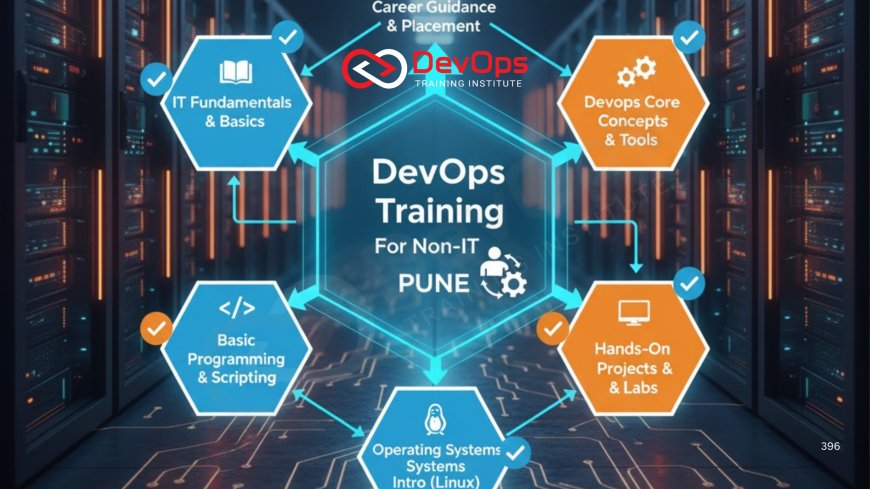
Non-IT graduates can learn DevOps, but they need a course that starts with computer basics, Linux, networking and Git before CI/CD, containers and cloud. When choosing training in Pune, look for that foundation, a slow-ramping syllabus, plenty of supervised practice and honest career guidance, and test your own readiness first with a few free exercises.
This guide explains what a non-IT learner should look for in DevOps training, how to check whether you are ready, a realistic learning order, and the questions that separate a beginner-friendly course from one that only says so. It does not rank institutes. For the related question of where to study near the eastern IT parks, see our page on DevOps training near Magarpatta and our Kharadi classroom.
Key takeaways
- A non-IT background is a starting point, not a barrier, but the first stretch of learning is fundamentals, not DevOps tools.
- Choose a course that teaches Linux, networking and Git explicitly rather than assuming them.
- Test yourself with free material before paying: if you enjoy fixing small technical problems, DevOps will likely suit you.
- Judge courses by practice volume, trainer patience with beginners and written terms, not by "best" labels or salary promises.
- No course can guarantee a job. Career support should be described honestly and in writing.
What "non-IT background" usually means
Learners who call themselves non-IT come from very different places: commerce, arts, mechanical or civil engineering, science, BPO and customer support, sales, or teaching. Some have used computers heavily at work; others mainly use a phone. The gap that matters is not your degree. It is how comfortable you are with three things:
- Typing commands and reading error messages without panic.
- Thinking in steps: if this fails, check that, then try the next thing.
- Reading technical documentation in English.
Engineers from non-computer branches often have the problem-solving habit already. Support and BPO staff often understand incidents, tickets and customer impact well. Those strengths transfer. What has to be built from scratch is the technical vocabulary and hands-on comfort.
Check your readiness before you pay
Spend a week or two on free material before choosing any course. It tells you whether the work suits you and makes the paid course far easier.
- Install a Linux environment. On Windows, WSL or a virtual machine both work.
- Practise basic commands: moving around directories, creating and editing files, viewing processes, checking disk space.
- Read the first chapters of the free Pro Git book and make a few commits in a practice repository.
- Try a beginner networking exercise: find your IP address, ping a host, look up a domain name.
pwd
ls -la
mkdir practice && cd practice
echo "hello" > notes.txt
cat notes.txt
ps aux | head
df -h
ping -c 3 example.com
git init
git add notes.txt
git commit -m "first commit"
If you finished those steps and enjoyed figuring out what went wrong when something failed, you are a good candidate for DevOps training. If you found it frustrating, that is useful to know before spending money; it may mean you need a slower, longer path, or a different role.
A realistic learning order
The order matters more for non-IT learners than for anyone else. Skipping steps is the most common reason beginners give up.
| Stage | Topics | Why it comes here |
|---|---|---|
| 1. Computer basics | Files, processes, memory, how programs run | Everything else builds on these ideas |
| 2. Linux | Shell, permissions, users, packages, services, logs | Most servers and containers run Linux |
| 3. Networking | IP, DNS, ports, HTTP, firewalls | Deployments fail on networking more than anything else |
| 4. Git | Commits, branches, merges, pull requests | All DevOps work starts from version control |
| 5. Scripting | Bash, then basic Python | Automation is the core of the job |
| 6. CI/CD | Pipelines in one tool | Turns code changes into tested builds |
| 7. Containers | Docker images, containers, registries | Standard way to package applications |
| 8. Cloud and IaC | One cloud provider, Terraform or similar | Where most applications run today |
| 9. Kubernetes and monitoring | Deployments, services, metrics, logs | Running and observing applications at scale |
Our Linux administration course covers stages 1 and 2 if you want to build that base first. Expect the early stages to take longer than the later ones; once Linux and networking click, tools come faster.
What a beginner-friendly course looks like
Many courses say they welcome non-IT learners. Here is how to check.
The syllabus starts at the beginning
Look for explicit modules on Linux, networking and Git at the start. If the first session is "Introduction to DevOps and Jenkins", the course assumes knowledge you may not have. Ask whether there is a separate foundation track or bridge module.
Practice is supervised
Beginners get stuck on small things: a typo in a path, a missing permission, a wrong port. A course that only shows demos leaves you stuck alone. Ask how much class time is hands-on, whether the trainer looks at your screen or terminal when you are stuck, and how doubts are handled between sessions.
The pace is explained
Ask how many hours a week you should practise outside class. A good answer is specific and honest. "Do not worry, it is easy" is not.
The trainer is patient with basics
Sit in on a class or watch a normal recorded session if the institute allows it. Notice whether the trainer explains terms or assumes them, and how they respond to basic questions.
Projects are scaled for beginners
A beginner project might be: write a small script, put it in Git, build a pipeline that tests it, package it in a container and deploy it to a cloud virtual machine. That is better than copying a large microservices project you do not understand.
Questions to ask before enrolling
- How many learners in recent batches came from non-IT backgrounds, and how did you support them?
- Is there a foundation module for Linux and networking, and is it included in the fee?
- How much of each session is hands-on?
- Can I repeat sessions or move to a later batch if I fall behind?
- What will I have built by the end, and will it be in my own repository?
- What does career support include, in writing?
Red flags for non-IT learners
- Promises that anyone can become a DevOps engineer in a few weeks regardless of background.
- Job guarantees or "100% placement" claims.
- Salary figures used to sell the course.
- A syllabus that starts with advanced tools and has no fundamentals.
- Pressure to decide on the spot.
Roles that suit career changers
Many non-IT learners enter through adjacent roles before a DevOps engineer title: technical support, Linux or cloud support, build and release support, or junior operations work. These roles build the troubleshooting experience employers look for. Our explainer on DevOps roles for freshers describes them, and DevOps skills freshers can learn in 30 days gives a starting list of skills.
Keeping cost under control
Fees vary widely in Pune, and a higher fee does not guarantee a better course. Use free material for the readiness stage, compare written fee breakdowns, and remember practice costs such as cloud usage. Our guide to low-cost DevOps courses in Pune for beginners covers budget options. If you are in Bangalore rather than Pune, see DevOps certification for non-IT professionals in Bangalore.
Study habits that work for career changers
- Practise every day, even for 30 minutes. Command-line comfort comes from repetition.
- Keep a notes file of every error you hit and how you fixed it. It becomes your personal troubleshooting guide and good interview material.
- Push all practice work to a public Git repository with clear README files.
- Explain what you learned each week to someone else, out loud or in writing.
- Learn to read official documentation early instead of relying only on videos.
A sample first month of self-study
If you want structure for the readiness stage, this four-week outline uses only free material and a laptop.
Week 1: get comfortable in a terminal
Install Linux in WSL or a virtual machine. Practise moving around the filesystem, creating and editing files with a terminal editor, and reading the manual pages for commands you use. By the end of the week you should be able to create a folder structure, write a few files and find text inside them without looking anything up.
Week 2: users, permissions and processes
Create users and groups, change file ownership and permissions, start and stop services, and read system logs. Break something on purpose, such as removing read permission from a file, and fix it. Learning to read the error message is the real lesson.
Week 3: networking basics
Learn what IP addresses, ports and DNS are. Use commands to see your network settings, test connectivity and look up names. Run a simple web server on your machine and reach it from a browser. Then stop it and see what error the browser shows.
Week 4: Git and a first script
Work through the early Pro Git chapters, create a repository, make commits on a branch and merge them. Write a short Bash script that backs up a folder with a date in the file name, and commit it. Push the repository to a free hosting service.
If you complete this month and want more, you are ready for a structured course. If you stalled, look at where, and choose a course that is strong exactly there.
Common worries, answered honestly
"I am not good at maths."
Day-to-day DevOps work uses very little maths beyond basic arithmetic and some understanding of percentages and units, such as memory sizes and network addresses. Subnetting needs a little binary, which is learnable in an afternoon. Logical thinking matters far more.
"My English is not strong."
Documentation, error messages and most online help are in English. You do not need perfect English, but you will need to read technical text steadily. Reading a page of official documentation every day improves this faster than you might expect.
"I am too old to switch."
People move into technical roles at many ages. What matters to employers is what you can do and show. Age can bring advantages, such as experience handling customers, deadlines and pressure, which are useful during incidents.
"I tried to learn before and gave up."
Ask why. Often the cause was starting with advanced tools, learning from videos without practising, or studying alone with no one to ask. A structured course that fixes those specific problems may work where self-study did not. If the cause was lack of time, solve that first.
Classroom or online for beginners?
For many non-IT learners, being in a room with a trainer helps in the early weeks, because someone can look at your screen and spot a typo you have stared at for ten minutes. Others manage well online, provided sessions are live and the trainer can see shared screens. Think about how you learned best at college or work. If you tend to drift during video calls, a classroom may suit you better. If commuting would eat the time you need for practice, live online is the practical choice. Whichever you pick, the deciding factor is whether you get help quickly when you are stuck, so ask each institute exactly how that works in its format.
What to expect after the course
Finishing a course is a starting point. Most career changers need time after training to build projects, apply widely, prepare for interviews and sometimes take an adjacent role first. Plan for that period financially and mentally. A good institute will be honest about it rather than suggesting an offer will arrive straight away.
During this stage, keep practising. Extend your course projects, read job descriptions and fill the gaps they reveal, and join local or online communities where engineers discuss real problems. Being able to talk about something you built, broke and fixed is more convincing in an interview than a list of tools.
About us
We teach DevOps from a classroom in Kharadi, Pune, and live online. We do not claim to be the best option for every non-IT learner; use the questions above on us as on anyone. Our DevOps training in Pune page has the syllabus.
Frequently asked questions
Can a non-IT graduate learn DevOps?
Yes, but expect to spend the first part of your learning on computer basics, Linux, networking and Git before DevOps tools.
Do I need to know coding before DevOps training?
Not before starting, but you will need basic Bash and Python scripting during the course. A good beginner course teaches them.
How do I know if DevOps suits me?
Try free Linux and Git exercises for a week or two. If you enjoy working out why something failed, it is a good sign.
What should a beginner-friendly DevOps course include?
Explicit foundation modules, mostly hands-on sessions, help when you are stuck, beginner-sized projects and a clear weekly practice expectation.
Is there a guaranteed job after DevOps training for non-IT students?
No. No institute can guarantee a job. Ask for a written description of what career support includes.
Which roles can non-IT learners start in?
Technical or cloud support, Linux support, build and release support and junior operations roles are common entry points.
Where is your classroom?
Our classroom is in Kharadi, Pune. We also teach live online.
References
What's Your Reaction?
 Like
0
 Dislike
0
 Love
0
 Funny
0
 Angry
0
 Sad
0
 Wow
0