


































![Kong Interview Preparation Guide [2025]](https://www.devopstraininginstitute.com/blog/uploads/images/202509/image_430x256_68dbb95326997.jpg)
















12 Essential SSH Security Practices for DevOps
Enhance your infrastructure security with our comprehensive guide on 12 essential SSH security practices for DevOps professionals. This detailed article covers critical steps such as disabling root login, implementing public key authentication, and using bastion hosts to protect your servers from unauthorized access. Learn how to secure remote connections, manage user permissions, and automate security audits to ensure your development and production environments remain robust and resilient against modern cyber threats in today's digital landscape.
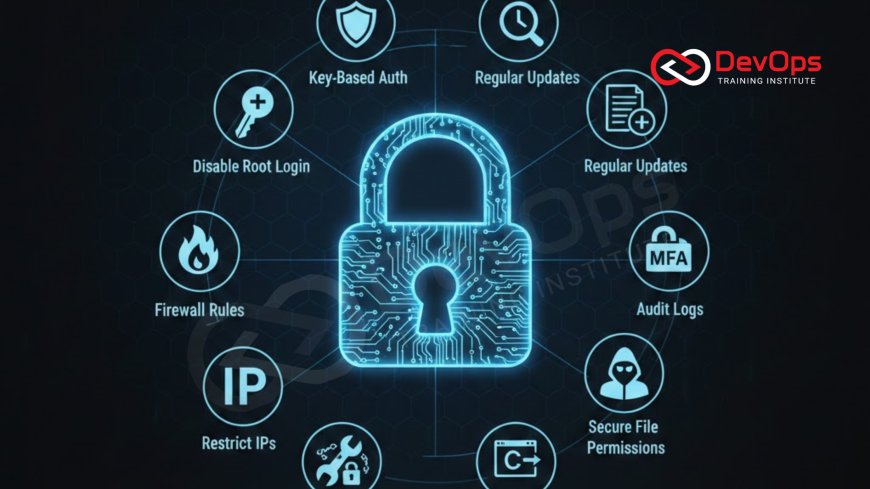
Introduction to Secure Remote Access
Secure Shell or SSH is the primary tool used by engineers to manage servers and infrastructure across the globe. It provides an encrypted channel for communication over an unsecure network, ensuring that data and commands remain private. For teams working in modern environments, the security of these connections is not just a technical preference but a foundational requirement. If an attacker gains access to your server via SSH, they potentially gain control over your entire application and sensitive data.
As we move toward more automated and complex systems, the way we handle remote access must evolve. It is no longer enough to rely on basic passwords or default configurations. Professional teams must implement a series of layered security measures to protect their assets. This blog post explores twelve essential practices that every engineer should follow to harden their SSH environment. By adopting these methods, you can significantly reduce the risk of unauthorized access and maintain a higher standard of operational excellence across all your cloud and on-premise deployments.
Transitioning from Passwords to SSH Keys
One of the first and most impactful changes you can make is to stop using passwords for server authentication. Passwords are inherently vulnerable to brute force attacks where a computer tries thousands of combinations every second to guess your login details. Instead, you should use SSH keys which consist of a public key stored on the server and a private key kept securely on your local machine. This cryptographic pair is much harder to crack and provides a more seamless experience for the user.
When you implement key based authentication, you should also take the step of disabling password logins entirely in the configuration file. This ensures that even if an attacker manages to steal a username, they cannot gain entry without the specific private key. This shift is part of a larger movement toward secure cloud architecture where identity is verified through cryptographic means rather than easily guessable strings. Managing these keys correctly is vital for maintaining a clean and secure access policy across a growing fleet of servers.
Hardening the SSH Daemon Configuration
The SSH daemon is the background process on the server that listens for incoming connections. By default, it is often configured for compatibility rather than maximum security. Hardening this configuration involves making several specific changes, such as disabling root login and limiting the number of authentication attempts. Allowing direct root access is a major risk because it gives an attacker total control over the system if they manage to break in. Instead, users should log in with a limited account and use specific commands to elevate their privileges when necessary.
Other hardening steps include setting an idle timeout interval which automatically disconnects sessions that have been inactive for a certain period. This prevents abandoned terminals from being used by unauthorized persons. You should also restrict SSH access to specific users or groups to ensure only authorized personnel can even attempt to connect. These configuration changes are essential for creating a "defense in depth" strategy where multiple layers of security work together to protect the core system. It is also important to ensure that secret scanning is performed regularly to prevent private keys from being accidentally committed to public code repositories.
Implementing Bastion Hosts and Jump Servers
In a professional network setup, you should never expose all your servers directly to the public internet. Instead, you should use a bastion host or a jump server as the single point of entry. This is a highly secured, hardened server that acts as a gateway. Users first connect to the bastion host and from there, they can access other servers within the internal network. This setup allows you to focus your security efforts and monitoring on a single point, making it much easier to track who is accessing your environment.
Using a bastion host also allows you to implement strict firewall rules that only permit SSH traffic from the bastion to the internal servers. This architecture significantly reduces the attack surface of your entire infrastructure. It is a common practice when managing complex clusters where gitops is used to maintain the desired state of the system. By funneling all access through a controlled point, you can implement more robust logging and auditing, ensuring that every command executed on your production systems is recorded and traceable back to a specific individual.
Table: SSH Security Configuration Summary
| Configuration Setting | Recommended Value | Security Benefit | Default Status |
|---|---|---|---|
| PermitRootLogin | no | Prevents direct access to the administrative account. | Often 'yes' or 'prohibit-password' |
| PasswordAuthentication | no | Eliminates the risk of brute force password attacks. | Usually 'yes' |
| MaxAuthTries | 3 | Limits the number of failed attempts per connection. | Usually 6 |
| Port | Custom (e.g., 2222) | Reduces noise from automated script scans. | 22 |
| AllowUsers | Specific List | Ensures only whitelisted accounts can connect. | Not defined |
Two-Factor Authentication for SSH
Even with strong SSH keys, there is a risk that a private key could be stolen from an engineer's laptop. To add an extra layer of defense, you should implement Two-Factor Authentication or 2FA. This requires the user to provide two different types of evidence to prove their identity: something they have (their SSH key) and something they know or possess at that moment (a one-time code from an app like Google Authenticator or a physical hardware token). This makes it significantly harder for an attacker to gain access even if they have the private key.
Integrating 2FA into your SSH workflow is a powerful way to enhance your security posture. Most modern Linux distributions support the use of PAM modules to enable this functionality easily. While it adds a small step to the login process, the security benefits far outweigh the minor inconvenience. This practice is increasingly common among those who drive cultural change toward a more security-conscious mindset. By making 2FA a requirement for all administrative access, you ensure that your most critical systems are protected by the latest industry standards.
Monitoring and Auditing SSH Activity
Visibility is a key component of security. You must know who is accessing your servers and what they are doing while connected. This involves setting up comprehensive logging for all SSH events, including successful logins, failed attempts, and the specific commands executed during a session. Most Linux systems record this information in the authentication logs, but for a professional environment, you should ship these logs to a centralized server for analysis and long-term storage.
Automated tools can scan these logs in real-time to detect suspicious patterns, such as multiple failed logins from an unknown IP address. This proactive monitoring allows you to respond to threats quickly before they can cause damage. It also provides a vital audit trail for compliance purposes. In the context of continuous verification, regular audits of your SSH logs help ensure that your access policies are being followed and that no unauthorized accounts have been created. This constant oversight is essential for maintaining the integrity of your production environment.
Advanced Techniques for SSH Security
Beyond the basic configuration changes, there are several advanced techniques that can further enhance your SSH security. One such method is the use of SSH Certificates instead of traditional keys. Certificates allow you to set expiration dates on access and provide more granular control over what a user can do. This reduces the burden of managing and revoking individual keys as the team grows. Another technique is Port Knocking, which keeps the SSH port closed until a specific sequence of "knocks" is received on other ports, effectively hiding the service from automated scanners.
- Disable Forwarding: Unless specifically needed, disable features like X11 forwarding and agent forwarding to prevent potential credential theft.
- Use Strong Ciphers: Configure your server to only allow modern, strong encryption algorithms and disable older, vulnerable ones.
- Change the Default Port: Moving SSH from port 22 to a non-standard port can stop the vast majority of automated bot attacks from filling up your logs.
- Implement IP Whitelisting: Use firewall rules to only allow SSH connections from known, trusted IP addresses such as your office or VPN.
These techniques help in creating a highly resilient environment where the risk of human error or automated attack is minimized. For teams using containerized workloads, knowing when to use containerd can also impact how you manage host-level access. Furthermore, applying security at the entrance of your cluster, much like how admission controllers work in Kubernetes, ensures that every connection is scrutinized before it is allowed to interact with your critical resources. These advanced steps demonstrate a commitment to deep security that goes beyond the surface level.
The Role of Automation in SSH Hardening
Manually configuring SSH on every server is not only slow but also prone to inconsistencies. Professional teams use automation tools like Ansible, Chef, or Puppet to apply security configurations across their entire fleet. This ensures that every server follows the exact same set of rules and that no security setting is accidentally missed. Automation also makes it much easier to update your policies; for example, if you decide to change the allowed ciphers, you can roll that change out to hundreds of servers with a single command.
Integrating security checks into your deployment pipelines is another vital step. You can use scripts to verify that a server meets all SSH hardening requirements before it is allowed to join a production cluster. This proactive approach prevents insecure configurations from ever reaching a live environment. It also facilitates faster time to market because the security auditing is handled automatically as part of the release process. By automating the "boring" parts of security, you free up your engineers to focus on building new features while maintaining a robust and dependable infrastructure foundation.
Conclusion
Securing remote access is a continuous journey that requires diligence, the right tools, and a proactive mindset. The twelve practices we have discussed provide a comprehensive roadmap for hardening your SSH environment. From the fundamental move to key-based authentication and disabling root login to the advanced use of bastion hosts and two-factor authentication, each step adds a critical layer of defense. We have also explored the importance of monitoring, auditing, and leveraging automation to ensure consistency and speed. By treating SSH security as a first-class citizen in your DevOps workflow, you protect not only your data but also the trust of your users. Furthermore, adopting chatops can help your team manage and respond to security incidents more efficiently. As the threat landscape continues to evolve, staying informed and applying these essential practices will ensure that your infrastructure remains a safe and reliable platform for innovation. Remember that security is not a one-time project but a core part of operational excellence that must be maintained every day to be truly effective.
Frequently Asked Questions
What is an SSH key?
An SSH key is a pair of cryptographic files used for authentication that is much more secure than a traditional password.
Why should I disable root login over SSH?
Disabling root login prevents attackers from targeting the most powerful account directly, requiring them to first break into a limited account.
What is a Bastion Host?
A Bastion Host is a specialized, highly secured server that acts as a single point of entry to a private network.
How does 2FA work with SSH?
It adds a second verification step, such as a code from a mobile app, making it harder for unauthorized persons to log in.
Is changing the SSH port really worth it?
Yes, while it's not total security, it stops thousands of automated bots from constantly trying to guess your credentials on port 22.
What is an SSH agent?
An SSH agent is a program that holds your private keys in memory so you don't have to re-enter your passphrase constantly.
Should I use a passphrase on my SSH key?
Absolutely, a passphrase adds an extra layer of protection if your private key file is ever stolen from your computer.
How do I audit SSH logins?
You can check the system authentication logs, usually found in /var/log/auth.log or /var/log/secure, for a history of login events.
What are SSH certificates?
SSH certificates are a more advanced way of managing keys that include metadata like expiration dates and user identities for better control.
What is port forwarding in SSH?
Port forwarding allows you to securely tunnel network traffic from one machine to another through an encrypted SSH connection.
Can I limit SSH access by IP address?
Yes, you can use firewall rules or the 'AllowUsers' directive with specific host patterns to restrict access to trusted IPs.
What is the SSH config file?
It is a local file (~/.ssh/config) that allows you to save connection settings like hostnames and usernames for easier remote access.
Does SSH use symmetric or asymmetric encryption?
SSH uses asymmetric encryption for the initial handshake and symmetric encryption for the actual data transfer to ensure speed and security.
What is a jump server?
A jump server is similar to a bastion host; it is an intermediary server used to connect to other servers in different network zones.
Why is automation important for SSH security?
Automation ensures that hardening steps are applied consistently across all servers, reducing the risk of human error and security gaps.
What's Your Reaction?
 Like
0
Like
0
 Dislike
0
Dislike
0
 Love
0
Love
0
 Funny
0
Funny
0
 Angry
0
Angry
0
 Sad
0
Sad
0
 Wow
0
Wow
0





![100+ Azure DevOps Interview Questions and Answers [Updated 2025]](https://www.devopstraininginstitute.com/blog/uploads/images/202509/image_140x98_68c40aa9a3834.jpg)






![Future Scope of DevOps Careers in Pune [Updated 2025]](https://www.devopstraininginstitute.com/blog/uploads/images/202510/image_140x98_68e3a84652312.jpg)


