


































![Kong Interview Preparation Guide [2025]](https://www.devopstraininginstitute.com/blog/uploads/images/202509/image_430x256_68dbb95326997.jpg)
















12 Kubernetes Storage Classes Explained for Beginners
Demystify the complex world of Kubernetes storage by exploring twelve essential storage classes designed for beginners and modern DevOps professionals. This extensive guide explains how to manage persistent data, choose the right disk types for your applications, and automate volume provisioning in the cloud. Learn about the critical roles of provisioners, reclaim policies, and binding modes in ensuring your data remains safe and accessible. Whether you are running databases on high performance SSDs or managing backups on cost effective object storage, these insights will help you build a resilient and scalable technical foundation for your containerized workloads in twenty twenty six today.
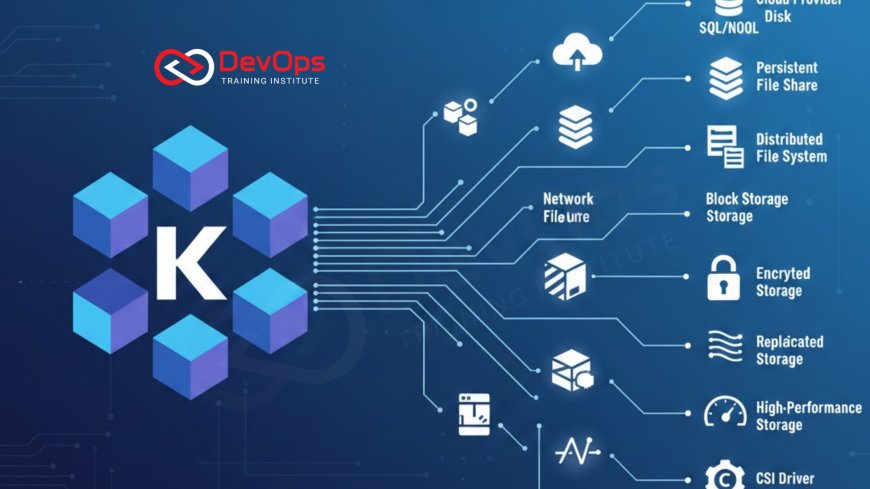
Introduction to Kubernetes Storage Management
In the world of container orchestration, managing where and how data is stored is one of the most critical challenges for any engineering team. While containers are naturally ephemeral, meaning they can be destroyed and recreated at any time, many applications like databases and file systems require data to persist. Kubernetes storage classes provide the necessary abstraction to handle this requirement by allowing administrators to define different "tiers" or "types" of storage available in their cluster. This allows developers to request the storage they need without having to understand the underlying hardware or cloud specific implementation details.
A storage class acts as a blueprint for creating persistent volumes on demand. Instead of a human administrator manually creating a virtual disk every time a new application is deployed, the storage class automates this process through dynamic provisioning. This transition from manual work to automated continuous synchronization is a core component of modern DevOps. As we explore the twelve different types of storage classes in this guide, you will see how they enable teams to balance performance, cost, and reliability across various cloud and on premises environments effectively in twenty twenty six.
Understanding Dynamic Volume Provisioning
Dynamic provisioning is the "magic" behind storage classes that allows Kubernetes to talk to cloud providers and request disk space automatically. When a developer creates a Persistent Volume Claim (PVC), they specify the name of a storage class. The Kubernetes control plane then uses the information in that storage class to create a new physical disk and a corresponding Persistent Volume (PV) object. This seamless workflow eliminates the need for manual intervention and allows applications to scale horizontally with ease. It is a fundamental part of building a responsive and agile technical infrastructure.
Without storage classes, teams would be forced to use static provisioning, where disks must be created beforehand and manually mapped to the cluster. This approach is slow, error prone, and does not scale well as the number of applications grows. By utilizing architecture patterns that prioritize dynamic provisioning, you ensure that your storage lifecycle is just as automated as your application deployments. This level of automation is essential for maintaining cluster states and ensuring that your data is always exactly where it needs to be when a pod starts up or moves to a new node.
The Role of Provisioners and CSI Drivers
Every storage class must define a "provisioner," which is the piece of software responsible for actually creating the storage. In the early days of Kubernetes, these provisioners were built directly into the core code, but modern clusters now use the Container Storage Interface (CSI). CSI drivers allow storage vendors to write plugins that work with any Kubernetes distribution, providing a more flexible and modular approach to data management. Whether you are using Amazon EBS, Azure Disk, or a specialized solution like containerd compatible local storage, the CSI driver handles the heavy lifting.
Choosing the right provisioner depends heavily on your cloud environment and your application's specific performance needs. Some provisioners are optimized for high throughput and low latency, while others are designed for sharing files across multiple pods at once. Understanding how these drivers interact with your release strategies is key to ensuring that your deployments are both fast and reliable. By standardizing on CSI drivers, your organization remains portable and can move between different cloud providers or hybrid environments without having to rewrite your entire storage configuration from scratch.
Reclaim Policies and Binding Modes
Two essential parameters within a storage class are the "reclaim policy" and the "volume binding mode." The reclaim policy tells Kubernetes what to do with the physical disk once the claim is deleted. The "Delete" policy automatically removes the disk to save money, while the "Retain" policy keeps the disk intact so that an administrator can recover the data manually. This choice is vital for incident handling and data protection; for production databases, you might prefer the safety of the Retain policy to prevent accidental data loss during a cleanup operation.
The volume binding mode determines when the storage should be created and attached to a pod. The "Immediate" mode creates the volume as soon as the claim is made, while the "WaitForFirstConsumer" mode waits until a pod is actually scheduled to a node. This second option is often better for multi zone clusters, as it ensures the disk is created in the same physical data center where the pod is running. Integrating ChatOps techniques can help you monitor these binding events in real time, providing your team with visibility into the health and status of your automated storage workflows.
Comparison of Common Kubernetes Storage Types
| Storage Tier | Typical Provisioner | Best Use Case | Performance Level |
|---|---|---|---|
| Standard HDD | kubernetes.io/gce-pd | Backups, logs | Low |
| Premium SSD | disk.csi.azure.com | Production DBs | High |
| Shared File | https://www.google.com/search?q=efs.csi.aws.com | Content Mgmt Systems | Medium |
| Local NVMe | kubernetes.io/no-provisioner | Cache, Scratch space | Extreme |
| Encrypted Block | https://www.google.com/search?q=ebs.csi.aws.com | Sensitive Data | High |
Storage Classes for High Availability
For applications that require extreme uptime, regional or multi zone storage classes are essential. These classes use replication to ensure that your data is available even if an entire data center zone goes offline. In a cloud environment like AWS or Azure, this involves creating disks that are automatically mirrored across different availability zones. While this adds some cost and slight latency, it is a non negotiable requirement for mission critical services that cannot afford any downtime during a regional failure. It is a cornerstone of robust cultural change toward data resilience.
When using these high availability classes, it is important to configure your pods with anti affinity rules. This ensures that the various replicas of your application are spread across different nodes and zones, taking full advantage of the underlying storage replication. By combining these storage settings with admission controllers, you can enforce a policy where every production database must use a regional storage class. This proactive approach to infrastructure design prevents human error and ensures that your system remains resilient by default, regardless of which developer is performing the deployment.
Balancing Cost and Performance
Not every application needs the most expensive SSD storage available. A well designed Kubernetes cluster will offer multiple storage classes to help teams optimize their cloud spending. For example, you might provide a "Silver" class for development environments using standard HDDs and a "Gold" class for production using high speed SSDs. This allows the organization to save money on non critical workloads while ensuring that customer facing services always have the performance they need. This financial awareness is a key part of FinOps and modern technical leadership in the cloud era.
Regularly auditing your storage usage is necessary to identify underutilized volumes that can be downsized or moved to a cheaper class. Some modern AI augmented devops tools can even suggest these optimizations automatically based on historical performance data. By utilizing secret scanning tools during these audits, you can also ensure that no sensitive data has been accidentally stored in an unencrypted or public tier. A thoughtful approach to storage classification results in a technical foundation that is both high performing and fiscally responsible, allowing your business to scale without runaway costs.
Best Practices for Kubernetes Storage Classes
- Set a Default Class: Always mark one storage class as the default for the cluster to simplify deployments for developers who don't have specific requirements.
- Use Descriptive Names: Name your classes based on their function, such as "ssd-fast" or "hdd-cheap," rather than obscure cloud provider names.
- Implement Quotas: Use resource quotas to limit the total amount of storage each namespace can consume, preventing one project from using the entire budget.
- Enable Encryption: Ensure that encryption at rest is enabled for all production storage classes to meet modern security and compliance standards.
- Version Your Manifests: Use GitOps to version your storage class definitions, providing a clear audit trail of all infrastructure changes.
- Monitor Latency: Use observability tools to track disk I/O and latency, allowing you to identify when an application is outgrowing its current storage tier.
- Verify Periodically: Utilize continuous verification to ensure that the storage classes are behaving as expected during and after major cluster upgrades.
Maintaining a clean and efficient storage environment requires a commitment to these best practices and a willingness to evolve as new technologies emerge. As we move into twenty twenty six, the rise of software defined storage and NVMe over TCP will provide even more options for high performance data management. Staying informed about release strategies for your infrastructure will help you adopt these innovations safely. The ultimate goal is to provide a storage platform that is so reliable and easy to use that your developers never have to think about it, allowing them to focus entirely on building great products for your users.
Conclusion on Kubernetes Storage Classes
In conclusion, understanding and implementing the right Kubernetes storage classes is a fundamental skill for any professional working with containerized applications. By abstracting the complexities of physical hardware and providing an automated way to manage persistent data, storage classes enable organizations to build more resilient and scalable systems. From the cost savings of tiered storage to the reliability of regional replication, these tools provide a wide range of benefits for teams of all sizes. As the cloud native ecosystem continues to mature, the role of intelligent storage management will only become more central to our technical success.
As you build your own storage strategy, remember to prioritize automation and security at every step. Integrating AI augmented devops into your storage lifecycle will help you stay ahead of performance issues and cost spikes before they impact your business. By mastering these twelve storage class concepts today, you are preparing your team for the challenges and opportunities of a data driven future. Start by auditing your current setup, defining clear tiers, and empowering your developers with the storage they need to succeed in the modern digital landscape. The path to a stable and scalable cluster begins with a solid foundation in persistent data management.
Frequently Asked Questions
What is a StorageClass in Kubernetes?
A StorageClass is a Kubernetes object that allows administrators to describe and define different tiers of storage available for dynamic provisioning.
What is the difference between a PV and a PVC?
A Persistent Volume is the actual storage resource, while a Persistent Volume Claim is a request for that storage by a user.
Why should I use dynamic provisioning instead of static?
Dynamic provisioning automates the creation of disks, saving time and reducing errors compared to manually creating and mapping volumes in the cluster.
What does the Delete reclaim policy do?
The Delete reclaim policy automatically removes the underlying physical disk from the cloud provider when the Persistent Volume Claim is deleted.
What is the benefit of the WaitForFirstConsumer binding mode?
It delays volume creation until a pod is scheduled, ensuring the disk is created in the same availability zone as the pod.
Can I change the parameters of a StorageClass after it is created?
No, StorageClass objects are immutable once created; you must delete and recreate them if you need to change their configuration parameters.
How do I set a default StorageClass in my cluster?
You add a specific annotation to the metadata of the StorageClass object to mark it as the default for all new claims.
What is a CSI driver in Kubernetes?
A CSI driver is a standardized plugin that allows Kubernetes to communicate with various storage systems and cloud providers for volume management.
Does every pod need its own storage class?
No, many pods can share the same storage class, but each claim usually results in a dedicated persistent volume for that specific workload.
Can I share a single Persistent Volume across multiple pods?
Yes, but only if the underlying storage and the access mode support ReadWriteMany, allowing multiple nodes to attach to the same disk.
How do storage classes impact cloud infrastructure costs?
By offering different tiers like HDD and SSD, storage classes allow you to use cheaper storage for non-critical tasks to save money.
Is encryption at rest handled by the storage class?
Yes, many provisioners allow you to enable encryption through parameters in the StorageClass definition, ensuring that your data is stored securely.
What is a regional persistent disk?
A regional disk is one that is automatically replicated across multiple availability zones within a single cloud region for higher data availability.
What happens if my pod is moved to a different node?
If the storage is network-attached, Kubernetes will automatically detach it from the old node and reattach it to the new node for you.
How can I see a list of storage classes in my cluster?
You can use the command kubectl get sc to see all the defined storage classes along with their provisioners and reclaim policies.
What's Your Reaction?
 Like
0
Like
0
 Dislike
0
Dislike
0
 Love
0
Love
0
 Funny
0
Funny
0
 Angry
0
Angry
0
 Sad
0
Sad
0
 Wow
0
Wow
0



![100+ Azure DevOps Interview Questions and Answers [Updated 2025]](https://www.devopstraininginstitute.com/blog/uploads/images/202509/image_140x98_68c40aa9a3834.jpg)






![Future Scope of DevOps Careers in Pune [Updated 2025]](https://www.devopstraininginstitute.com/blog/uploads/images/202510/image_140x98_68e3a84652312.jpg)


