


































![Kong Interview Preparation Guide [2025]](https://www.devopstraininginstitute.com/blog/uploads/images/202509/image_430x256_68dbb95326997.jpg)
















12 Kubernetes Upgrades Without Downtime
Discover twelve expert strategies for performing Kubernetes upgrades without downtime to ensure your production environment remains stable and accessible during critical maintenance. This detailed guide covers advanced techniques like rolling node pool migrations, pod disruption budgets, and automated canary analysis to protect your workloads from interruption. Learn how to coordinate control plane updates with worker node lifecycle management and how to leverage blue green deployment patterns for infrastructure level transitions. Stay ahead of the technical curve by mastering the essential tools and workflows that top tier DevOps teams use to achieve zero-downtime cluster lifecycle management in twenty twenty six and beyond.
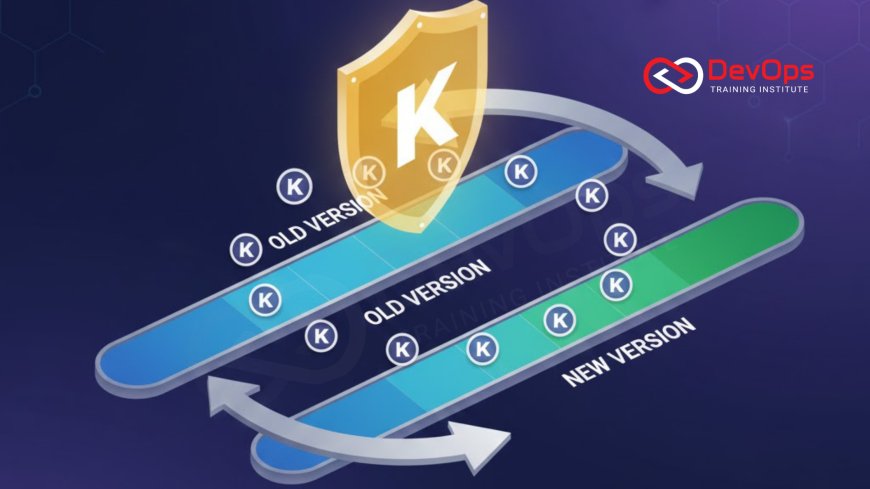
Introduction to Zero-Downtime Cluster Upgrades
Upgrading a Kubernetes cluster is often viewed with a mixture of necessity and anxiety by DevOps professionals. As the backbone of modern containerized applications, the cluster must be kept up to date to ensure security, performance, and access to the latest orchestration features. However, the complexity of a distributed system means that a standard upgrade can easily lead to service interruptions if not managed with extreme care. Achieving a zero downtime upgrade is the gold standard of cluster management, requiring a deep understanding of how the various components of the system interact during a transition.
A successful upgrade strategy focuses on maintaining application availability even as the underlying infrastructure is being replaced or reconfigured. This involves a coordinated dance between the control plane components and the worker nodes that host your actual workloads. By leveraging the built in features of Kubernetes and adopting advanced release strategies, teams can ensure that users never even notice that a major version change is taking place. This guide will walk you through twelve essential steps and patterns to master this process, turning a potentially risky operation into a routine and predictable part of your operational cycle in twenty twenty six.
Preparing Your Cluster with Conformance Checks
Before you begin the upgrade process, it is vital to verify that your current environment is healthy and follows industry standards. Conformance checks involve running a suite of tests to ensure that all Kubernetes APIs are functioning as expected and that there are no underlying configuration errors. Using tools like Sonobuoy can help you validate that your cluster meets the official requirements before you introduce the variables of a new version. This baseline provides the confidence needed to proceed, knowing that any issues discovered during the upgrade are likely caused by the update itself rather than pre existing technical debt.
In addition to conformance testing, you must review the release notes for the target version to identify any deprecated APIs or breaking changes that might affect your workloads. Many teams use automated scanners to look for resources that use old API versions, allowing them to update their manifests before the upgrade begins. This proactive approach to continuous verification ensures that your applications remain compatible with the newer Kubernetes environment. By resolving these conflicts early, you eliminate the risk of pods failing to start once the control plane is updated, which is one of the most common causes of post upgrade downtime in complex enterprise clusters.
The Role of Pod Disruption Budgets (PDBs)
Pod Disruption Budgets are a critical mechanism for maintaining high availability during voluntary disruptions like node upgrades. A PDB allows you to define the minimum number of replicas that must remain operational at all times for a specific application. When the cluster attempts to drain a node for an upgrade, the eviction process will respect these budgets, ensuring that your services are never underpowered. This is particularly important for stateful applications or microservices with limited redundancy where losing even a single pod could lead to a localized service failure for your end users.
Implementing PDBs requires a careful balance between safety and speed. If your budgets are too restrictive, the upgrade process may stall because the cluster cannot find a safe way to move workloads. Conversely, if they are too lax, you risk a situation where an application becomes unresponsive due to insufficient capacity. DevOps engineers often pair PDBs with horizontal pod autoscaling to ensure that new replicas are created on healthy nodes before the old ones are terminated. This synergy is a key part of modern architecture patterns designed for maximum resilience during infrastructure maintenance windows.
Mastering the Control Plane Upgrade Sequence
The control plane is the brain of your Kubernetes cluster, and its upgrade is always the first major step in the lifecycle process. In a high availability setup, the control plane consists of multiple master nodes that run the API server, scheduler, and controller manager. The upgrade should be performed sequentially, updating one master node at a time to ensure that the API remains accessible to the rest of the cluster throughout the process. This sequential approach prevents a total loss of cluster management capabilities and allows the cluster states to remain synchronized as each component is brought up to the new version.
While the control plane is being updated, the worker nodes and their running pods continue to function normally. However, you will be unable to make changes to the cluster or deploy new applications during the brief moments when a master node is restarting. Advanced teams use AI augmented devops tools to monitor the health of the control plane in real time, automatically pausing the upgrade if any anomalies are detected in the API response times. Once all master nodes are successfully updated and the API is stable, you can safely proceed to the next phase of the upgrade, which involves the worker nodes where your actual production workloads reside.
Comparison of Kubernetes Upgrade Strategies
| Upgrade Strategy | Primary Tactic | Downtime Risk | Cost Impact |
|---|---|---|---|
| In-Place Rolling | Drain and update existing nodes | Low | Low |
| Node Pool Migration | Create new pool and migrate pods | Minimal | Medium |
| Blue-Green Cluster | Full parallel cluster swap | Zero | High |
| Canary Node Upgrade | Upgrade one node as a test | Low | Low |
| Managed Service Auto | Cloud provider automation | Varies | Managed |
Implementing the Drain and Cordon Pattern
The core of a zero downtime node upgrade is the "drain and cordon" process. When a node is ready for an upgrade, it is first cordoned to prevent the Kubernetes scheduler from placing any new pods on it. Following this, the node is drained, which gracefully evicts all existing pods and reschedules them onto other healthy nodes in the cluster. This process respects the termination grace periods defined in your pod specifications, allowing your applications to finish processing current requests before they are shut down. This level of control is essential for maintaining continuous synchronization between your application state and the infrastructure.
Using the kubectl drain command with the --ignore-daemonsets flag ensures that critical system pods continue to run while your application pods are safely moved. Once the node is empty, it can be updated or replaced with a new instance running the latest Kubernetes version. After the upgrade is complete, the node is uncordoned, making it available for scheduling once again. By repeating this process across the entire cluster one node at a time, you can achieve a full upgrade without ever losing the capacity to serve user traffic. It is a fundamental skill for any engineer managing cultural change toward automated operations.
Leveraging Node Pool Migrations for Safety
For teams using managed Kubernetes services like GKE, EKS, or AKS, node pool migrations offer a safer alternative to in place upgrades. Instead of modifying existing nodes, you create a completely new node pool with the desired Kubernetes version. You then gradually migrate your workloads from the old pool to the new one using the same drain and cordon techniques. This approach provides a clear rollback path; if you encounter issues during the migration, you can simply stop and move the pods back to the original, stable node pool that is still running the previous version.
Node pool migrations also allow you to test the new version with a small subset of your workloads before committing the entire cluster to the change. This "canary" approach to infrastructure upgrades reduces the blast radius of any potential bugs or configuration errors. Once the new node pool is fully operational and has successfully hosted your applications for a period of time, you can decommission the old pool to save costs. This strategy is a key component of modern incident handling, as it prioritizes safety and predictability over the speed of a single destructive operation. It ensures that your underlying containerd runtime and kernel settings are perfectly aligned with the new version requirements.
Best Practices for Zero-Downtime Success
- Enable Liveness Probes: Ensure every pod has a liveness probe so the cluster can automatically restart instances that fail during the transition.
- Use Readiness Probes: This ensures traffic is only routed to pods that are fully initialized and ready to handle requests on the new nodes.
- Configure Graceful Termination: Set a reasonable terminationGracePeriodSeconds to give your application enough time to finish in flight work.
- Monitor Network Latency: Use a service mesh to track any changes in communication performance as pods move between nodes during the upgrade.
- Implement Security Policies: Use admission controllers to prevent outdated or insecure images from being rescheduled during the update process.
- Scan for Secrets: Utilize secret scanning tools to ensure no credentials are exposed in the logs or configurations during the migration.
- Verify with GitOps: Use GitOps to manage your cluster configuration, providing a clear audit trail of all changes made during the upgrade.
Maintaining a disciplined approach to these best practices will transform your upgrade windows from stressful events into routine maintenance. It is also important to communicate the upgrade schedule to all stakeholders, even if you expect zero downtime, to ensure that the support team is ready in case of unforeseen issues. By integrating ChatOps techniques, you can provide real time updates on the progress of the upgrade directly in your team's communication channels. This transparency builds trust and ensures that everyone is aligned on the status of the cluster as it evolves through different versions.
Conclusion on Seamless Kubernetes Lifecycles
In conclusion, achieving twelve Kubernetes upgrades without downtime is a testament to the power of automated orchestration and careful planning. By mastering techniques like pod disruption budgets, sequential control plane updates, and node pool migrations, you can keep your infrastructure modern and secure without sacrificing availability. The key is to treat your cluster as a dynamic entity that can be evolved in place, rather than a static piece of hardware that requires a total restart. As you build these capabilities, you will find that your organization becomes more agile and better equipped to handle the rapid pace of change in the cloud native ecosystem.
Looking toward the future, the rise of AI augmented devops will further simplify the upgrade process by predicting potential conflicts before they occur. Integrating continuous verification into your lifecycle management ensures that your cluster always meets the highest standards of performance and reliability. By prioritizing zero downtime strategies today, you are positioning your team for success in an era where infrastructure is truly invisible. Embrace these twelve strategies to build a resilient, future proof Kubernetes environment that empowers your developers to ship software faster and more safely than ever before.
Frequently Asked Questions
What is the first step in a zero-downtime Kubernetes upgrade?
The first step is always to upgrade the control plane components before moving on to any of the worker nodes in the cluster.
How do Pod Disruption Budgets help during an upgrade?
They ensure a minimum number of replicas remain running, preventing the cluster from evicting too many pods at once during node maintenance.
Can I upgrade my nodes while the control plane is updating?
No, you should wait for the control plane to be fully stable and updated before you begin the process of upgrading worker nodes.
What happens to my pods when a node is drained?
The pods are gracefully terminated on the current node and the scheduler automatically starts new replicas on other available healthy nodes.
Why should I use readiness probes for zero-downtime upgrades?
Readiness probes ensure that traffic is not sent to a newly created pod until the application is fully ready to handle requests.
Is a blue-green cluster upgrade better than a rolling update?
Blue-green is safer as it provides a full parallel environment but is significantly more expensive and complex to set up and manage.
What is the purpose of cordoning a node?
Cordoning marks a node as unschedulable, ensuring no new pods are placed on it while you prepare to drain and upgrade it.
How does GitOps improve the upgrade process?
GitOps provides a versioned, declarative source of truth for your cluster configuration, making it easy to track changes and perform rollbacks.
What are breaking changes in a Kubernetes upgrade?
These are removals or modifications of APIs that can cause existing application manifests to fail if they are not updated beforehand.
Can managed services like EKS handle upgrades automatically?
Yes, managed services offer automated control plane updates and node group management to simplify the entire lifecycle and reduce manual errors.
Should I back up my data before starting an upgrade?
Absolutely, you should always back up etcd and any persistent volume data to ensure you can recover from a catastrophic upgrade failure.
How long does a typical cluster upgrade take?
The duration depends on the number of nodes, but a rolling upgrade can take anywhere from thirty minutes to several hours.
What is the blast radius in a Kubernetes upgrade?
The blast radius refers to the potential scope of impact if an upgrade fails; sequential upgrades help keep this radius very small.
Can I skip multiple minor versions during an upgrade?
No, Kubernetes generally requires you to upgrade one minor version at a time to ensure compatibility and prevent significant system instability.
How does ChatOps assist in cluster maintenance?
ChatOps provides real time visibility and collaboration tools, allowing the team to monitor and manage the upgrade process through conversational interfaces.
What's Your Reaction?
 Like
0
Like
0
 Dislike
0
Dislike
0
 Love
0
Love
0
 Funny
0
Funny
0
 Angry
0
Angry
0
 Sad
0
Sad
0
 Wow
0
Wow
0




![100+ Azure DevOps Interview Questions and Answers [Updated 2025]](https://www.devopstraininginstitute.com/blog/uploads/images/202509/image_140x98_68c40aa9a3834.jpg)






![Future Scope of DevOps Careers in Pune [Updated 2025]](https://www.devopstraininginstitute.com/blog/uploads/images/202510/image_140x98_68e3a84652312.jpg)


