


































![Kong Interview Preparation Guide [2025]](https://www.devopstraininginstitute.com/blog/uploads/images/202509/image_430x256_68dbb95326997.jpg)
















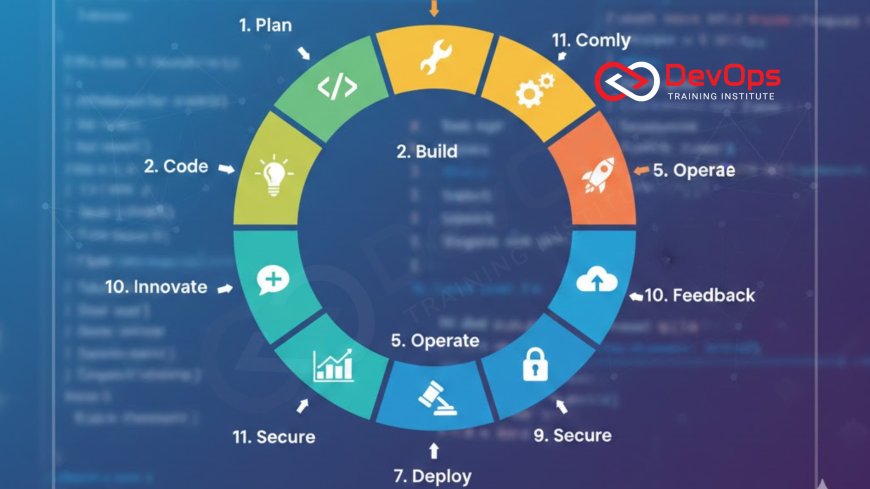
12 Stages of DevOps Lifecycle Explained Clearly
Understand the complete DevOps lifecycle with this beginner-friendly guide. We break down all 12 stages—from planning and coding to monitoring and feedback—in simple language with real-world examples, tools, and best practices to help you implement DevOps successfully in 2025.
Introduction
The DevOps lifecycle is a continuous loop of practices that helps teams deliver high-quality software faster and more reliably. Unlike traditional waterfall methods, DevOps treats development and operations as one seamless process. In 2025, almost every successful engineering team follows some version of this lifecycle, even if they don’t call it “DevOps.” Understanding the 12 stages will give you a clear mental model of how modern software is built, tested, shipped, and improved.
This guide explains each stage in plain English with practical examples, popular tools, and tips even beginners can follow. Whether you’re a developer, tester, manager, or just curious about DevOps, you’ll finish this article knowing exactly how the entire process works from idea to production and back again.
Stage 1: Plan – Turning Ideas into Actionable Work
Everything starts with planning. Teams gather requirements, define features, estimate effort, and prioritize work using tools like Jira, Azure Boards, ClickUp, or Linear. Good planning includes creating user stories, acceptance criteria, and success metrics. In mature DevOps teams, planning is collaborative—developers, testers, security, and operations all give input early.
Best practice: Keep backlog items small and testable. Use definition of ready (DoR) before work starts. Many teams now use OKRs (Objectives and Key Results) tied directly to epics and stories so everyone knows the business impact.
Stage 2: Code – Writing Clean, Maintainable Code
Developers write code in their preferred IDE (VS Code, IntelliJ, etc.) and store it in a version control system—almost always Git. Modern teams use feature branches, pull requests, and code reviews to maintain quality. Style guides and linters run automatically to catch issues early.
Trunk-based development or short-lived branches (less than 24 hours) are now standard in high-performing teams. Tools like GitHub, GitLab, or Bitbucket make collaboration smooth. Code is the foundation—everything that follows depends on it being clean and well-documented.
Stage 3: Build – Compiling and Packaging
Once code is merged, the build stage compiles source code into executables or packages (Docker images, JARs, etc.). Build tools like Maven, Gradle, npm, or Go compile the code. In containerized environments, this stage produces immutable Docker images.
Successful builds are versioned and stored in artifact repositories (JFrog Artifactory, Nexus, GitHub Packages). Failed builds stop the pipeline immediately, giving fast feedback. Modern DevOps tools make this stage completely automated and repeatable.
Stage 4: Test – Automated Quality Gates
Automated testing is the heart of DevOps. Unit tests, integration tests, API tests, UI tests, performance, and security scans run automatically on every commit. Tools include JUnit, pytest, Postman, Selenium, JMeter, and Snyk.
Shift-left testing means catching bugs as early as possible. High-performing teams aim for 80%+ test coverage and run tests in parallel to keep feedback fast. If any test fails, the pipeline stops—no bad code reaches production.
Stage 5: Release – Preparing for Deployment
The release stage packages approved builds into release candidates. Feature flags, canary releases, and versioning happen here. Tools like Git tags, GitHub Releases, or ArgoCD prepare the artifact for different environments (staging, production).
Release notes are often auto-generated from commit messages and pull requests. Compliance checks, license scanning, and final sign-offs occur before anything goes live.
Stage 6: Deploy – Getting Code to Production
Deployment automates pushing releases to servers, Kubernetes clusters, or serverless platforms. Tools include Kubernetes, Helm, Terraform, AWS CodeDeploy, ArgoCD, and Spinnaker. Blue-green or canary strategies ensure zero-downtime deployments.
Deployment pipelines are fully automated in mature teams. Rollbacks are instant if something goes wrong. Infrastructure as code ensures environments are identical every time.
Stage 7: Operate – Keeping Systems Running
Once deployed, operations teams (or platform teams) keep services healthy. This includes managing servers, networks, scaling, certificates, backups, and disaster recovery. Most of this is now automated with cloud infrastructure and infrastructure as code.
Self-healing systems using Kubernetes operators or serverless platforms reduce manual work dramatically.
Stage 8: Monitor – Watching Everything in Real Time
Monitoring collects metrics, logs, traces, and events from production. Tools: Prometheus, Grafana, ELK/EFK stack, Datadog, New Relic, OpenTelemetry. Alerts notify teams instantly when something is wrong.
Observability goes beyond basic monitoring—distributed tracing helps debug microservices quickly. SLOs (Service Level Objectives) define acceptable performance and error budgets.
Stage 9: Log – Centralizing and Analyzing Logs
Logs from all services are collected centrally (Loki, Elastic, Splunk, CloudWatch). Structured logging (JSON) makes searching and alerting easier. Teams set retention policies and use log-based metrics for alerting.
Logs combined with traces give the full picture during incidents.
Stage 10: Secure – DevSecOps Integration
Security is no longer a separate phase—it runs through every stage. SAST/DAST scans in test, secret detection in code, IAM policies in deploy, runtime security in operate. Tools: Snyk, Trivy, Falco, Aqua Security.
Many teams now follow full DevSecOps practices with automated compliance as code.
Stage 11: Feedback – Learning from Production
Real user data, error reports, performance metrics, and customer feedback flow back to the team. A/B testing, feature flags, and analytics (Mixpanel, Amplitude) help decide what to improve next.
This closes the loop—production data directly influences planning for the next cycle.
Stage 12: Improve – Continuous Optimization
The final stage focuses on getting better every sprint after sprint. Teams measure DORA metrics (deployment frequency, lead time, change failure rate, MTTR), run blameless post-mortems, and automate more toil.
Key DevOps metrics guide decisions on tooling, process, and culture improvements.
| Stage | Goal | Popular Tools |
|---|---|---|
| 1. Plan | Define & prioritize work | Jira, Linear, ClickUp |
| 2. Code | Write & review code | GitHub, GitLab |
| 3–6. Build → Deploy | Automated delivery pipeline | Jenkins, GitHub Actions, ArgoCD |
| 7–9. Operate & Monitor | Keep systems healthy | Prometheus, Grafana, Datadog |
| 10–12. Secure → Improve | Continuous security & learning | Snyk, Falco, DORA metrics |
Conclusion
The DevOps lifecycle is not a straight line—it’s an infinite loop of planning, building, testing, releasing, operating, monitoring, and improving. When all 12 stages are connected and mostly automated, teams ship better software dozens or hundreds of times faster than traditional methods. Start small: automate one stage at a time, measure your metrics, and keep improving. The real power of DevOps comes from this continuous cycle of learning and delivery.
Frequently Asked Questions
What are the 12 stages of DevOps?
Plan, Code, Build, Test, Release, Deploy, Operate, Monitor, Log, Secure, Feedback, Improve.
Is the DevOps lifecycle the same as CI/CD?
No. CI/CD covers only build-test-deploy. The full DevOps lifecycle includes planning, operations, monitoring, security, and feedback.
How long does one DevOps cycle take?
Elite teams complete multiple cycles per day. Most organizations aim for weekly or daily deployments.
Do I need all 12 stages?
Yes for maturity, but start with the ones that give fastest wins—usually code → build → test → deploy.
Can small teams follow the DevOps lifecycle?
Absolutely. The lifecycle scales down beautifully and often gives small teams huge advantages.
What is the most important stage?
There isn’t one—each stage feeds the next. Breaking any link slows everything down.
Is DevOps just automation?
No. Automation is critical, but culture, feedback, and collaboration are equally important.
How do I measure DevOps success?
Use the four DORA metrics: deployment frequency, lead time, change fail rate, and time to restore.
Where does security fit?
Security runs through every stage—this is called DevSecOps.
Can I skip the planning stage?
Never. Poor planning leads to chaos later, no matter how fast you deploy.
What tools do I need for the full lifecycle?
Git, CI/CD platform, container registry, Kubernetes/serverless, monitoring stack, and ticketing system.
Is DevOps different from Agile?
Agile is about iterative development; DevOps extends it to operations and delivery.
How often should we deploy?
Elite teams deploy multiple times per day; start with once per week and improve.
Who owns the DevOps lifecycle?
Everyone—developers, ops, security, product—all share responsibility.
Where do I start implementing DevOps?
Start with version control + automated testing, then add CI/CD, then monitoring.
What's Your Reaction?
 Like
0
Like
0
 Dislike
0
Dislike
0
 Love
0
Love
0
 Funny
0
Funny
0
 Angry
0
Angry
0
 Sad
0
Sad
0
 Wow
0
Wow
0






![100+ Azure DevOps Interview Questions and Answers [Updated 2025]](https://www.devopstraininginstitute.com/blog/uploads/images/202509/image_140x98_68c40aa9a3834.jpg)






![Future Scope of DevOps Careers in Pune [Updated 2025]](https://www.devopstraininginstitute.com/blog/uploads/images/202510/image_140x98_68e3a84652312.jpg)


