


































![Kong Interview Preparation Guide [2025]](https://www.devopstraininginstitute.com/blog/uploads/images/202509/image_430x256_68dbb95326997.jpg)
















12 Steps to Implement CI/CD in Your Project
Follow this complete 12-step guide to successfully implement CI/CD in any project in 2025. From choosing tools to achieving continuous deployment and monitoring — includes practical examples for GitHub Actions, GitLab CI, Jenkins, and AWS.
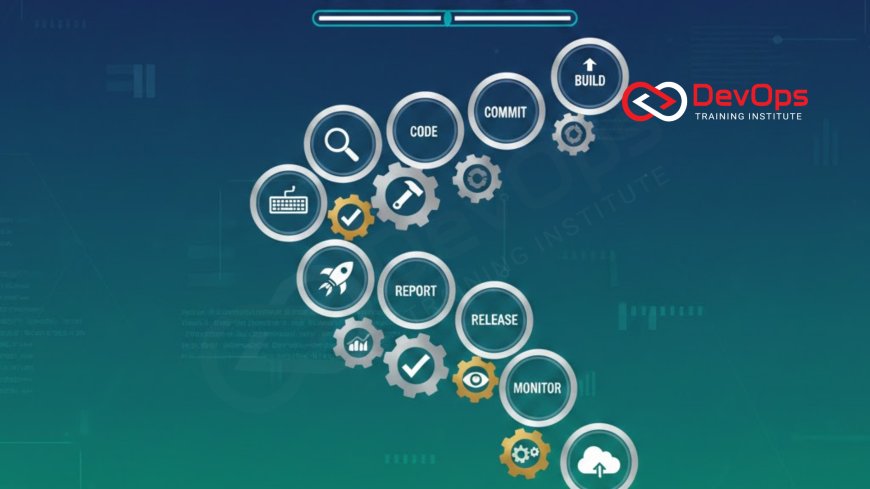
Introduction
Implementing CI/CD is the fastest way to move from slow, risky manual releases to fast, reliable automated deployments. Teams that adopt proper CI/CD deploy 200 times more frequently with 2,500 times faster lead times (State of DevOps Report). This step-by-step guide walks you through everything you need — even when your stack includes serverless components like AWS Lambda. Let’s go from zero to fully automated in 12 proven steps.
Step 1: Choose Your Version Control Strategy
- Use Git (GitHub, GitLab, Bitbucket, Azure Repos)
- Adopt GitFlow or Trunk-Based Development
- Protect main branch with required reviews and status checks
- Enforce conventional commits or semantic versioning
Step 2: Pick a CI/CD Tool
Popular options in 2025:
- GitHub Actions – best for GitHub users
- GitLab CI/CD – all-in-one platform
- Jenkins – maximum flexibility
- AWS CodePipeline + CodeBuild
- CircleCI, Azure Pipelines, Harness
Step 3: Write Your First Pipeline (Hello World)
Start simple — a pipeline that runs on every push:
name: CI
on: [push, pull_request]
jobs:
  test:
    runs-on: ubuntu-latest
    steps:
      - uses: actions/checkout@v4
      - name: Hello
        run: echo "Pipeline is working!"
Step 4: Add Automated Testing
- Unit tests → Integration tests → E2E tests
- Fail the build on test failure
- Cache dependencies to speed up runs
- Generate coverage reports
Step 5: Implement Code Quality & Security Scans
Add these jobs:
- Static analysis (SonarQube, CodeQL)
- Dependency scanning (Dependabot, Snyk)
- Secret detection (git-secrets, TruffleHog)
- Container scanning (Trivy, Grype)
Step 6: Build and Package Artifacts
Generate consistent artifacts:
- Docker images
- JAR/WAR files
- Serverless packages (SAM, Serverless Framework)
- Upload to registry (Docker Hub, ECR, Nexus)
Step 7: Set Up Multiple Environments
- dev → staging → production
- Use environment variables and secrets
- Separate approval gates for production
Step 8: Add Manual Approval for Production
jobs:
  deploy-prod:
    needs: deploy-staging
    environment: production
    runs-on: ubuntu-latest
    steps:
      - run: echo "Deploying..."
    # GitHub automatically pauses for manual approval
Step 9: Implement Infrastructure as Code
Manage infrastructure in the same pipeline:
- Terraform, Pulumi, AWS CDK, CloudFormation
- terraform plan on PR, apply on merge
- Store state securely (S3 + DynamoDB, remote backends)
Step 10: Enable Progressive or Zero-Downtime Deployment
Choose one:
- Blue-Green (AWS Elastic Beanstalk, Kubernetes)
- Canary (Argo Rollouts, AWS CodeDeploy)
- Feature flags (LaunchDarkly, Unleash)
Step 11: Add Monitoring & Feedback Loops
- Send notifications (Slack, Teams, email)
- Integrate with Datadog, New Relic, Prometheus
- Auto-rollback on failure (optional)
- Track DORA metrics
Step 12: Achieve Continuous Deployment (CD)
Final stage — every merge to main automatically deploys to production after passing all gates. Example for AWS Lambda:
stage('Deploy Lambda') {
    when { branch 'main' }
    steps {
        sh 'aws lambda update-function-code --function-name myfunc --zip-file fileb://app.zip'
    }
}
Now you have true Continuous Deployment!
Conclusion
Implementing CI/CD is a journey, not a one-time task. Start with steps 1–4 to get immediate value, then progressively add security, IaC, and safe deployment strategies. Within weeks you’ll go from manual releases to multiple deployments per day with higher quality and less stress. Bonus: when using serverless, follow best practices to optimize Lambda cold start times inside your pipeline for lightning-fast function deployments.
Frequently Asked Questions
How long does it take to implement CI/CD?
Basic pipeline: 1–2 days. Full enterprise-grade with IaC and approvals: 2–6 weeks.
Can I implement CI/CD without Docker/Kubernetes?
Yes — start with simple scripts or serverless deployments; containers come later.
Is GitHub Actions enough for CI/CD?
No — GitHub Actions turns GitHub into a complete CI/CD platform.
What if my team is small?
GitHub Actions or GitLab CI are perfect — zero infrastructure to manage.
How do I handle database changes safely?
Use migrations in code + tools like Flyway/Liquibase + blue-green or canary database deployments.
Should tests be in the same pipeline as deploy?
Yes — single source of truth. Separate only if you need ultra-fast feedback loops.
How do I debug failing Lambda deployments in CI/CD?
Integrate CloudWatch Logs and use CloudWatch monitoring steps directly in your pipeline.
Can I have different pipelines for different branches?
Yes — run full tests on main, lighter checks on feature branches.
What’s the biggest mistake when starting CI/CD?
Not failing the build on test/security issues — “fast but broken” is worse than slow.
Is continuous deployment safe?
Yes, when combined with feature flags, canary releases, and observability.
What's Your Reaction?
 Like
0
Like
0
 Dislike
0
Dislike
0
 Love
0
Love
0
 Funny
0
Funny
0
 Angry
0
Angry
0
 Sad
0
Sad
0
 Wow
0
Wow
0


![100+ Azure DevOps Interview Questions and Answers [Updated 2025]](https://www.devopstraininginstitute.com/blog/uploads/images/202509/image_140x98_68c40aa9a3834.jpg)






![Future Scope of DevOps Careers in Pune [Updated 2025]](https://www.devopstraininginstitute.com/blog/uploads/images/202510/image_140x98_68e3a84652312.jpg)


