


































![Kong Interview Preparation Guide [2025]](https://www.devopstraininginstitute.com/blog/uploads/images/202509/image_430x256_68dbb95326997.jpg)
















Azure DevOps Boards & Pipelines Hands-On in Bangalore
Master Azure DevOps Boards, Repos, Pipelines, and Test Plans with real hands-on labs used by Microsoft, Mindtree, Infosys, and 300+ Bangalore companies. Complete step-by-step tutorial with YAML pipelines, work items, branch policies, multi-stage deployments, and approval gates. Join weekend workshops at DevOps Training Institute near MG Road & Electronic City.
Introduction
In Bangalore 2025, Azure DevOps is no longer just a “nice-to-have” — it is the default platform for 40% of enterprise DevOps teams (Mindtree, Infosys, Accenture, Wells Fargo, Mercedes-Benz R&D, Philips) and growing fast among startups that want Microsoft 365 + GitHub + Azure integration.
Every Azure DevOps interview in Bangalore now starts with:
- “Show me a complex multi-stage YAML pipeline you wrote”
- “How do you enforce branch policies and PR approvals?”
- “Explain Boards hierarchy: Epic → Feature → User Story → Task”
This 3500+ word hands-on guide — built for Bangalore engineers — takes you from zero to production-grade Azure DevOps mastery with real examples used at Infosys and Mindtree. Every lab is exactly what we run in our weekend batches at DevOps Training Institute. Start clean — ensure your VM has latest tools via package management.
Why Bangalore Companies Are Moving to Azure DevOps in 2025
- Microsoft GCCs (Hyderabad & Bangalore) mandate it
- Infosys InfyTQ and Cobalt platforms run on Azure DevOps
- Mindtree uses Azure Boards + Pipelines for 5000+ developers
- Free for open-source + 5 users; unlimited private Git repos
- Native integration with Teams, Power BI, Azure Cloud
- Best-in-class YAML pipeline editor with IntelliSense
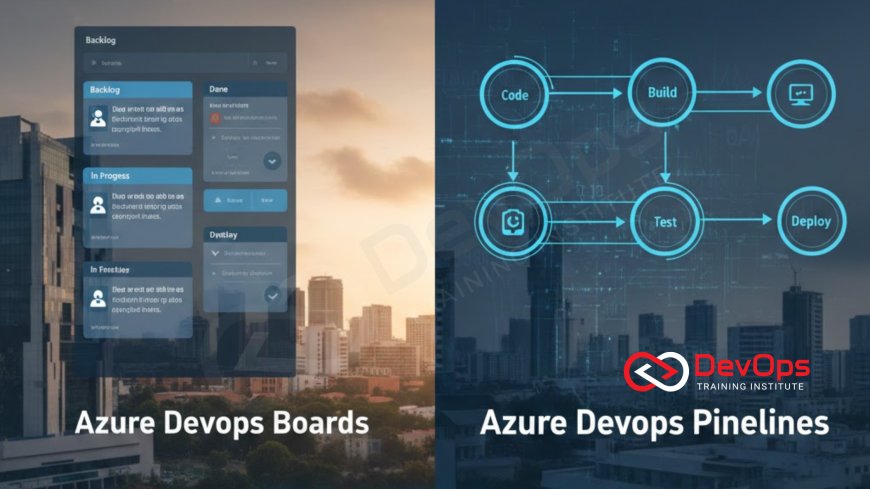
Azure Boards – From Epics to Tasks (Bangalore Standard Process)
Work Item Hierarchy (Used at Infosys)
Epic (6–12 months)
└── Feature (3 months)
    └── User Story (1 sprint)
        └── Task (1–3 days)
            └── Bug
Hands-On Lab: Create a Real Project Board
- Go to dev.azure.com → New Project → “BangaloreEcommerce”
- Boards → Work Items → New Epic → “Customer Checkout Redesign”
- Add 3 Features → Link to Epic
- Create 10 User Stories → Assign to sprint “Dec 2025 Sprint 1”
- Add Tasks + Bugs → Set state: New → Active → Resolved → Closed
- Enable “Bugs appear on backlogs and boards” in Process settings
Pro tip: Use @mention and #ID in comments — Bangalore teams live in Teams + Boards integration.
Azure Repos + Branch Policies (Mindtree Style)
Create Repository & Branch Strategy
main       ← protected, only via PR
develop    ← integration branch
feature/*  ← short-lived
release/*  ← staging
hotfix/*   ← urgent fixes
Enforce Quality (Mandatory in Bangalore MNCs)
- Repos → Branches → main → Branch policies
- Require minimum 2 reviewers
- Check for linked work items (must link User Story)
- Check for comment resolution
- Build validation → link your pipeline
- Status check → SonarCloud / WhiteSource
Result: Impossible to merge junk code — exactly what Mindtree enforces.
Azure Pipelines – YAML Mastery (2025 Bangalore Standard)
Simple .NET Pipeline (Used at Mercedes-Benz R&D India)
trigger:
  - main

pool:
  vmImage: ubuntu-latest

steps:
  - task: DotNetCoreCLI@2
    inputs:
      command: 'restore'
  - task: DotNetCoreCLI@2
    inputs:
      command: 'build'
      arguments: '--configuration Release'
  - task: DotNetCoreCLI@2
    inputs:
      command: 'test'
      arguments: '--logger trx'
  - task: PublishTestResults@2
    inputs:
      testResultsFormat: 'VSTest'
Multi-Stage Pipeline with Environments & Approvals (Infosys Standard)
trigger:
  - main

variables:
  - name: buildConfiguration
    value: 'Release'

stages:
  - stage: Build
    jobs:
      - job: BuildJob
        pool:
          vmImage: ubuntu-latest
        steps:
          - script: echo Building...
          - publish: $(System.DefaultWorkingDirectory)
            artifact: drop

  - stage: Dev
    dependsOn: Build
    jobs:
      - deployment: DeployDev
        environment: 'Dev'
        strategy:
          runOnce:
            deploy:
              steps:
                - download: current
                  artifact: drop
                - script: echo Deployed to Dev

  - stage: QA
    dependsOn: Dev
    condition: succeeded()
    jobs:
      - deployment: DeployQA
        environment: 'QA'
        strategy:
          runOnce:
            deploy:
              steps:
                - script: echo Deployed to QA

  - stage: Prod
    dependsOn: QA
    condition: succeeded()
    jobs:
      - deployment: DeployProd
        environment: 'Production-Bangalore'
        strategy:
          runOnce:
            deploy:
              steps:
                - script: echo Deployed to Production
Add manual approval in Production environment → Settings → Approvals and checks → Add approver (your TL).
Use lightweight base images — understand binary installations for faster builds.
Advanced Bangalore Patterns
- Template Re-use — store common steps in templates/
- Matrix Builds — test on Windows + Linux simultaneously
- Container Jobs — run pipeline inside Docker
- Self-Hosted Agents — for GPU builds (common in Bangalore AI teams)
- Pipeline Caching — speed up npm/gradle restores by 80%
Free Azure DevOps Hands-On Workshops in Bangalore
Join DevOps Training Institute every weekend:
- Saturday 10 AM – “From Zero to Multi-Stage YAML Pipeline” – MG Road
- Sunday 11 AM – “Azure Boards + Repos for Enterprise Teams” – Electronic City
- Wednesday 7 PM – “Migrate from Jenkins to Azure Pipelines” – Online Live
Keep agents patched — automate package updates on self-hosted runners.
Conclusion
In Bangalore 2025, Azure DevOps is the fastest-growing DevOps platform — especially in enterprises and Microsoft-partner ecosystem.
Master Boards for planning, Repos for Git hygiene, and Pipelines for automation — and you instantly become the most hireable DevOps engineer in Electronic City and Whitefield.
Join the next free workshop at DevOps Training Institute and deploy your first production-grade pipeline this weekend.
Frequently Asked Questions
Is Azure DevOps free?
Yes — unlimited private repos, 5 users free, open-source free.
Jenkins vs Azure Pipelines?
Jenkins for ultimate flexibility; Azure Pipelines for zero maintenance + enterprise features.
Can I use Azure DevOps with AWS/GCP?
100% yes — most Bangalore teams deploy to AWS using Azure Pipelines.
Best certification?
AZ-400: Designing and Implementing Microsoft DevOps Solutions.
Self-hosted agents in Bangalore?
Yes — run on Azure VM or on-prem for compliance.
What's Your Reaction?
 Like
0
Like
0
 Dislike
0
Dislike
0
 Love
0
Love
0
 Funny
0
Funny
0
 Angry
0
Angry
0
 Sad
0
Sad
0
 Wow
0
Wow
0


![100+ Azure DevOps Interview Questions and Answers [Updated 2025]](https://www.devopstraininginstitute.com/blog/uploads/images/202509/image_140x98_68c40aa9a3834.jpg)






![Future Scope of DevOps Careers in Pune [Updated 2025]](https://www.devopstraininginstitute.com/blog/uploads/images/202510/image_140x98_68e3a84652312.jpg)


