


































![Kong Interview Preparation Guide [2025]](https://www.devopstraininginstitute.com/blog/uploads/images/202509/image_430x256_68dbb95326997.jpg)
















10 Cloud Storage Solutions for Kubernetes Applications
Discover the top ten cloud storage solutions tailored specifically for Kubernetes applications to ensure data persistence and high availability. This detailed guide explores essential storage options ranging from cloud-native managed services to software-defined storage systems. Learn how to choose the right storage class for your stateful sets, manage persistent volumes effectively, and optimize your containerized workloads for performance and scalability in modern cloud environments today.
Introduction to Persistent Storage in Kubernetes
Kubernetes was originally designed for stateless applications that do not need to save data between restarts. However, as the ecosystem matured, the need to run stateful applications like databases, message queues, and content management systems became apparent. Managing storage in a containerized environment is unique because containers are ephemeral. When a container stops, any data stored inside its local file system is lost forever. To solve this, Kubernetes introduced the concept of persistent volumes, which allow data to live independently of the container life cycle.
In this comprehensive guide, we will explore ten of the most effective cloud storage solutions that help bridge the gap between volatile containers and permanent data. These solutions range from managed services provided by major cloud platforms to open source software defined storage that you can run within your own cluster. Understanding these options is vital for any team looking to build reliable and scalable applications. We will break down the technical concepts into beginner friendly language, ensuring you can make informed decisions for your infrastructure and provide a stable foundation for your growing digital services.
Understanding the Container Storage Interface
The Container Storage Interface, often abbreviated as CSI, is a standard that allows Kubernetes to communicate with various storage backends seamlessly. Before this standard existed, storage drivers had to be built directly into the Kubernetes source code, which made updates difficult. Now, storage providers can develop their own drivers independently. This innovation has led to a massive increase in the number of storage solutions available to users, making it easier than ever to attach high performance disks or shared file systems to your running pods.
When you use a CSI driver, you interact with your storage using Kubernetes objects like StorageClasses and PersistentVolumeClaims. This abstraction means that developers do not need to know the specific details of the underlying cloud hardware. They simply request a certain amount of space with specific performance characteristics, and the system handles the rest. This level of automation is a key part of platform engineering as it provides a self service model for data management that scales alongside the application's needs in complex environments.
Managed Cloud Block Storage Options
Major cloud providers offer managed block storage that is highly integrated with their Kubernetes services. Amazon Elastic Block Store, Google Persistent Disk, and Azure Disk Storage are the primary examples. These services provide high performance disks that can be attached to a single node at a time. They are ideal for database workloads that require low latency and high throughput. Because these are managed services, the cloud provider handles the underlying hardware maintenance, backups, and replication, reducing the operational burden on your team.
Choosing a managed block storage solution is often the easiest path for teams starting their journey. These disks are easy to provision and offer deep integration with identity management and encryption services. However, it is important to monitor your usage closely to avoid unexpected costs. Implementing finops practices helps teams analyze their storage spending and choose the right disk types for different environments. This ensures that you are not paying for premium performance on development databases that do not require it, keeping your budget optimized while maintaining high standards for production.
Software Defined Storage for Cluster Flexibility
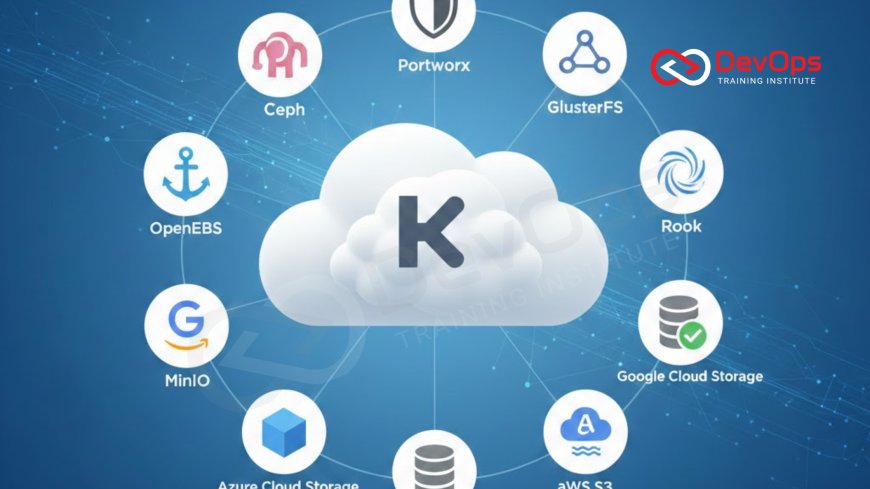
For teams that require more control or are running in hybrid environments, software defined storage is an excellent choice. Solutions like Ceph, Rook, and OpenEBS allow you to turn the local disks of your worker nodes into a distributed storage pool. This creates a highly resilient system where data is replicated across multiple nodes, ensuring that even if a server fails, your application can still access its data. These tools are often managed using Kubernetes operators, which automate the deployment and maintenance of the storage cluster itself.
One of the main advantages of this approach is that it avoids cloud provider lock in. You can run the same storage configuration on your local hardware as you do in the public cloud. This consistency is highly valued by teams using gitops to manage their entire stack. By defining your storage infrastructure as code, you can ensure that your data layer is just as portable and version controlled as your application logic. While these systems require more expertise to manage, they offer unparalleled flexibility and can often be more cost effective at very large scales.
Table: Top Kubernetes Storage Solutions Comparison
| Storage Solution | Type | Primary Advantage | Best Use Case |
|---|---|---|---|
| Amazon EBS | Managed Block | Seamless AWS integration | Production databases on EKS |
| Google Persistent Disk | Managed Block | High reliability on GCP | Standard stateful apps on GKE |
| Rook / Ceph | Software Defined | Unified block, file, and object | Complex, multi-purpose clusters |
| Portworx | Enterprise SDS | Advanced data management | Mission-critical enterprise apps |
| Longhorn | Open Source SDS | Lightweight and easy to use | Small to medium sized clusters |
Enterprise Features with Portworx and Kasten
As Kubernetes moves deeper into the enterprise, the need for advanced data management features has grown. Portworx is a leading solution that provides more than just raw storage. It offers built in encryption, snapshot management, and disaster recovery capabilities that are specifically designed for containers. It allows you to move stateful applications between different cloud regions or even different cloud providers with ease. This capability is essential for businesses that require high availability and compliance across a global footprint.
Similarly, tools like Kasten focus on the backup and recovery aspect of storage. They allow you to create application consistent backups, meaning that the backup captures the state of the database and the application together. This ensures that when you restore, the system is in a healthy state. Integrating these enterprise tools into your devsecops workflow ensures that security and data protection are handled automatically. By automating the backup process, you reduce the risk of data loss due to human error or malicious attacks, providing peace of mind for your stakeholders.
Lightweight Options for Edge and Small Clusters
Not every application requires a massive, multi petabyte storage cluster. For small projects, edge computing, or development environments, lightweight solutions like Longhorn are ideal. Developed by Rancher, Longhorn provides highly available block storage that is easy to install and manage through a simple web interface. It allows you to create snapshots and backups to external object storage like Amazon S3, providing a solid safety net without the complexity of more enterprise focused systems.
Using lightweight storage helps keep your cluster's resource overhead low. This is particularly important for smaller nodes where CPU and memory are limited. Even in these smaller setups, you should still practice chaos engineering to test how your application handles storage failures. By simulating a disk disconnect or a node crash, you can verify that your storage solution correctly replicates data and that your application can recover gracefully. This proactive testing builds confidence in your system's reliability, regardless of its size or complexity.
The Importance of Shared File Systems
While block storage is great for databases, many applications need to share files between multiple pods simultaneously. This is where shared file systems like Amazon EFS, Google Cloud Filestore, or Azure Files come in. These solutions support the ReadWriteMany access mode in Kubernetes, allowing dozens of containers to read and write to the same set of files at the same time. This is essential for content management systems, web servers, or data processing pipelines where multiple instances need access to a shared library of assets.
Shared storage requires careful management of permissions and locking to prevent data corruption. Most cloud providers offer managed versions of these systems that handle the scaling and availability for you. When deploying these systems, you can use canary releases to test how a new version of your app interacts with the shared data before rolling it out to everyone. This minimizes the risk of a bug accidentally deleting or corrupting shared files, ensuring that your collaborative workloads remain stable and performant as you update your software.
- Access Modes: Understand the difference between ReadWriteOnce and ReadWriteMany for your application needs.
- Performance Tiers: Choose between standard and premium tiers based on your I/O requirements.
- Backup Strategies: Always have a plan for off-site backups to protect against cluster-wide failures.
- Dynamic Provisioning: Use StorageClasses to automate the creation of volumes on demand.
Advanced Testing and Data Integrity
Running stateful applications requires a higher level of testing rigor than stateless ones. You must ensure that your data remains consistent even during rapid deployment cycles. This is where shift left testing for the data layer becomes important. By including storage validation in your CI and CD pipelines, you can catch configuration errors that might prevent a volume from attaching correctly before the code ever reaches production.
Data integrity is also protected by using modern deployment patterns. For example, when updating a database, you might use blue-green deployment in kubernetes to run two versions of your app. This allows you to verify that the new version can read the existing data correctly before switching all your users over. If an issue is found, you can quickly revert without having to perform a complex data recovery. These strategies, combined with robust storage solutions, create a resilient environment where data is treated with the same care and automation as the code itself.
Conclusion
Choosing the right cloud storage solution for your Kubernetes applications is a critical decision that impacts performance, cost, and reliability. We have explored a wide range of options, from highly integrated managed block storage like Amazon EBS to flexible software defined solutions like Rook and Longhorn. We also looked at the importance of shared file systems for collaborative workloads and the advanced features offered by enterprise platforms like Portworx. By understanding the Container Storage Interface and utilizing modern practices like FinOps and GitOps, you can build a data layer that is both powerful and efficient. Remember that storage is not a "set and forget" component; it requires continuous monitoring and proactive testing to ensure your data remains safe and accessible. As you grow your cluster, continue to evaluate your storage needs and embrace the automation tools that help keep your stateful applications running smoothly in the cloud. Investing time in a solid storage strategy today will pay dividends in system stability and user trust for years to come. Finally, consider using feature flags when rolling out new storage features to ensure a safe and controlled transition for your users.
Frequently Asked Questions
What is a Persistent Volume in Kubernetes?
A Persistent Volume is a piece of storage in the cluster that has been provisioned by an administrator or dynamically through StorageClasses.
What does ReadWriteOnce mean?
ReadWriteOnce means the volume can be mounted as read-write by a single node at a time for your specific application pod.
Can I use local disks for Kubernetes storage?
Yes, you can use local persistent volumes, but be aware that the data is tied to that specific node's hardware life cycle.
What is the CSI driver?
The Container Storage Interface is a standard for exposing arbitrary block and file storage systems to containerized workloads like Kubernetes.
How do I back up my Kubernetes storage?
You can use snapshots provided by your cloud provider or third-party tools like Velero to back up volumes to object storage.
Does Kubernetes manage the storage hardware?
No, Kubernetes manages the connection to the storage, but the underlying hardware is managed by the cloud provider or storage software.
What is a StorageClass?
A StorageClass allows administrators to describe the "classes" of storage they offer, enabling dynamic provisioning based on user requests.
Is shared storage slower than block storage?
Generally, shared file systems have higher latency than direct-attached block storage, making them less ideal for high-performance database workloads.
What is Rook?
Rook is an open-source cloud-native storage orchestrator for Kubernetes that turns local storage into distributed, resilient storage pools easily.
Can I change the size of a volume?
Many modern CSI drivers support volume expansion, allowing you to increase the size of a disk without deleting the data.
What is the blast radius of a storage failure?
The blast radius depends on your replication; distributed storage systems replicate data to prevent a single disk failure from causing data loss.
Why use object storage for backups?
Object storage like S3 is highly durable and cost-effective, making it an excellent destination for long-term storage of volume snapshots.
What is a stateful set?
A StatefulSet is a Kubernetes object used to manage stateful applications, ensuring that pods maintain their identity and storage across restarts.
How does encryption work for volumes?
Most cloud storage solutions offer at-rest encryption managed by the provider, ensuring that your data is protected even if the hardware is accessed.
Can I move storage between cloud providers?
Moving raw storage is difficult, but tools like Portworx offer data replication features that simplify migration between different cloud ecosystems.
What's Your Reaction?
 Like
0
Like
0
 Dislike
0
Dislike
0
 Love
0
Love
0
 Funny
0
Funny
0
 Angry
0
Angry
0
 Sad
0
Sad
0
 Wow
0
Wow
0


![100+ Azure DevOps Interview Questions and Answers [Updated 2025]](https://www.devopstraininginstitute.com/blog/uploads/images/202509/image_140x98_68c40aa9a3834.jpg)






![Future Scope of DevOps Careers in Pune [Updated 2025]](https://www.devopstraininginstitute.com/blog/uploads/images/202510/image_140x98_68e3a84652312.jpg)


