


































![Kong Interview Preparation Guide [2025]](https://www.devopstraininginstitute.com/blog/uploads/images/202509/image_430x256_68dbb95326997.jpg)
















12 Ansible Playbook Tips for Error-Free Execution
Master the art of automation with our expert guide on twelve essential Ansible playbook tips for achieving error-free execution across your infrastructure. This comprehensive post covers best practices for syntax validation, variable management, and task idempotency to ensure your configuration management is robust and reliable. Learn how to streamline your automation workflows, improve system stability, and reduce manual troubleshooting by implementing professional strategies designed for modern DevOps teams and site reliability engineers looking for excellence in orchestration today.
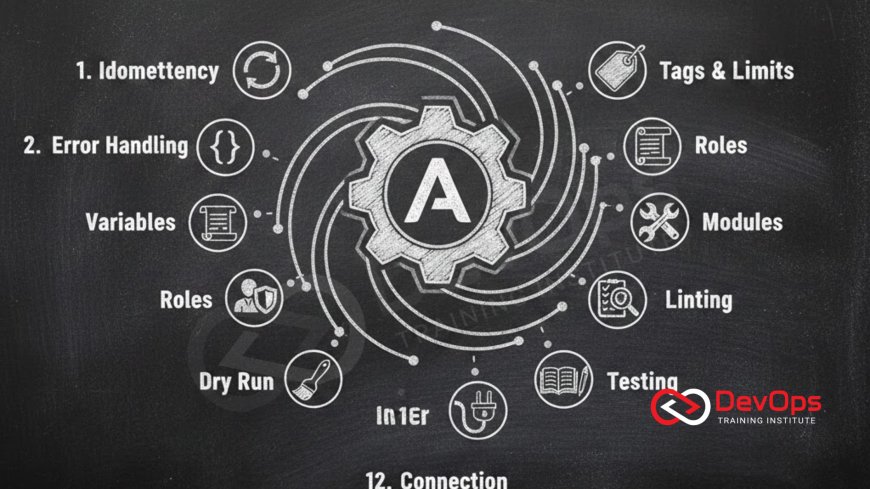
Introduction to Ansible Playbook Reliability
Ansible has revolutionized the way we manage infrastructure by providing a simple, human-readable language to describe automation. However, as playbooks grow in complexity, the chance of running into execution errors increases. Achieving a state of error-free execution is not just about writing code that works once; it is about creating automation that is resilient, predictable, and capable of running safely across hundreds or even thousands of servers without human intervention.
In this guide, we will explore twelve critical tips that will help you move from basic automation to professional-grade orchestration. We will cover everything from the importance of task naming to sophisticated error handling and testing strategies. By following these professional practices, you can ensure that your playbooks are not only functional but also maintainable and secure, providing a solid foundation for your organization's digital transformation and operational excellence in the modern cloud-native era.
Ensuring Idempotency for Consistent Results
The most important concept in Ansible is idempotency. This means that running a playbook multiple times should result in the same final state without causing unintended side effects. For example, if a script ensures a specific package is installed, running it again should simply verify that the package exists rather than trying to install it again. Achieving true idempotency requires careful selection of modules and avoiding manual command execution whenever a specialized module is available.
When you rely on the command or shell modules, you often break idempotency because Ansible has no way of knowing what those manual commands actually do. To fix this, you should always include parameters like creates or removes to tell Ansible when a command is actually necessary. By focusing on the desired state rather than the steps to get there, you build a much more stable environment. This approach is highly compatible with gitops because it allows your infrastructure to constantly align itself with the source of truth in your repository.
Effective Variable Management and Scoping
Variables are the heart of dynamic playbooks, but poorly managed variables are a leading cause of execution errors. A common mistake is hardcoding values directly into tasks or using variable names that are too generic. Professionals use a hierarchical structure for variables, placing common values in group_vars and host-specific details in host_vars. This organization makes it much easier to manage configurations for different environments, such as development, staging, and production.
Using clear and descriptive variable names is essential for long-term maintenance. You should also take advantage of variable encryption tools like Ansible Vault to protect sensitive information such as passwords and API keys. This ensures that your secrets are never exposed in plain text within your version control system. Proper variable handling is a key component of platform engineering as it allows for the creation of flexible and reusable automation components that can be easily consumed by different teams across the entire organization.
Advanced Error Handling with Blocks and Rescue
Even the best playbooks can encounter unexpected issues, such as a temporary network failure or a full disk. Instead of letting the entire execution fail, you should use blocks and rescue sections to handle errors gracefully. A block allows you to group several tasks together, while the rescue section defines what should happen if any of those tasks fail. This is similar to try-catch logic in programming and provides a way to perform cleanup or log useful debugging information before the playbook exits.
Implementing these structures makes your automation much more resilient. For example, if a task that downloads a large file fails, your rescue block could send a notification to a monitoring channel or attempt to clear up space on the server. This level of sophistication is exactly what is needed when managing complex observability requirements in production. By planning for failure, you ensure that your automation remains a help rather than a hindrance during high-pressure situations or critical infrastructure maintenance windows.
Table: Ansible Best Practices and Their Impact
| Best Practice | Description | Impact on Reliability | Recommended Tool |
|---|---|---|---|
| Syntax Validation | Running syntax checks before execution. | High - Prevents basic YAML errors. | ansible-lint |
| Use of Handlers | Triggering actions only when changes occur. | Medium - Avoids unnecessary restarts. | notify: handler_name |
| Task Naming | Providing unique names for every task. | Medium - Improves log readability. | name: "Clear description" |
| Conditionals | Running tasks based on specific facts. | High - Ensures OS compatibility. | when: ansible_os_family == 'RedHat' |
| Check Mode | Dry-running playbooks to see changes. | Very High - Pre-verifies execution. | ansible-playbook --check |
Leveraging Handlers for Efficient Restarts
Handlers are special tasks that only run when a change has been made to a system. For example, if you update a web server configuration file, you only want to restart the service if the file actually changed. Handlers are perfect for this because they are triggered by a notify statement and wait until the end of the play to run. This prevents a service from being restarted multiple times in a single run, which reduces downtime and makes your automation much more efficient.
Using handlers correctly is a hallmark of professional Ansible usage. It prevents the unnecessary disruption of services and ensures that your system remains responsive throughout the automation process. This is particularly important when managing critical services where uptime is the priority. By keeping your restart logic separate from your configuration tasks, you create a cleaner and more logical flow that is easier for other team members to understand and debug when they are reviewing your automation scripts.
Validating with Check Mode and Linting Tools
Before you ever run a playbook on a production server, you should validate it using check mode. This allows Ansible to simulate the execution of the playbook and report what changes it would make without actually making them. This is an incredible tool for catching logic errors or identifying tasks that are not idempotent. Combining check mode with static analysis tools like ansible-lint ensures that your code follows community best practices and is free from common syntax mistakes.
Integrating these validation steps into your continuous integration pipeline is a core part of shift left testing for infrastructure. By catching errors early in the development cycle, you save hours of troubleshooting later on. This automated validation builds confidence within the team, allowing for faster and more frequent updates to your infrastructure without the fear of causing an outage or a security vulnerability. It makes the entire automation process much more scientific and predictable for everyone involved.
Optimizing Task Performance and Execution
As your infrastructure grows, the time it takes for a playbook to finish can become a bottleneck. There are several ways to optimize execution speed, such as using the free strategy to allow faster hosts to proceed without waiting for slower ones. You can also use asynchronous tasks for long-running processes like database migrations or large file downloads, allowing Ansible to move on to other tasks while the long-running one finishes in the background.
Another powerful optimization is gathering only the facts you actually need. By default, Ansible collects hundreds of pieces of information about every host, which can take several seconds per host. By setting gather_subset, you can limit this to just what is required for your specific tasks. These small improvements can cut the execution time of a large playbook in half, significantly improving the productivity of your team and allowing for more rapid response to changing requirements in a fast-paced environment.
Security Hardening and Compliance in Playbooks
Automation should always be used to improve the security of your systems. Playbooks can be designed to enforce security benchmarks, such as disabling unnecessary services or ensuring that encryption is enabled for all network traffic. By automating your security policies, you move toward a state of continuous compliance where every server is guaranteed to meet your organization's security standards from the moment it is provisioned.
This integration of security into the automation lifecycle is a key tenet of devsecops. By using Ansible to manage firewall rules and user permissions, you eliminate the inconsistencies that come with manual configuration. You can also use playbooks to regularly audit your servers and report any deviations from the baseline. This proactive approach to security makes your infrastructure much more resilient to attacks and simplifies the process of meeting regulatory requirements for your business and its customers.
Resilience Testing with Chaos Engineering
Once you have a set of reliable playbooks, it is important to test how they handle failure. You can use Ansible to deliberately inject faults into your environment, such as killing a process or simulating a slow network, to see how your self-healing mechanisms respond. This practice helps you identify weaknesses in your automation and ensures that your system can recover gracefully from real-world disasters without manual intervention.
Implementing chaos engineering with Ansible allows you to build a much higher level of trust in your infrastructure. By regularly testing these failure scenarios, you ensure that your playbooks are truly error-free even in the most difficult circumstances. This disciplined approach to reliability is essential for modern high-scale systems where downtime is not an option and where every automated action must be verified for its impact on the overall health and performance of the application and its underlying services.
- Use descriptive names for every task to make the output easy to follow.
- Organize your tasks into roles to improve reusability across projects.
- Always test your playbooks in a staging environment before going live.
- Limit the use of the shell module to avoid breaking idempotency.
By following these specific guidelines, you can create automation that is both powerful and safe. For example, using canary releases for infrastructure updates allows you to test your playbooks on a small group of servers before a full rollout. This minimizes the risk to your production environment and ensures that any potential issues are caught early. Similarly, employing feature flags within your configuration management allows you to toggle specific settings on and off without a full redeploy, providing additional control over your infrastructure's behavior.
Conclusion
Mastering Ansible is a journey of continuous improvement, and achieving error-free execution is the ultimate goal. By following the twelve tips we have discussed, you can build automation that is not only functional but also resilient, secure, and highly efficient. We have explored the importance of idempotency, the power of effective variable management, and the use of sophisticated error handling to create robust playbooks. We also looked at how validation, optimization, and security hardening contribute to a professional-grade automation environment. Remember that the best automation is one that is invisible and reliable, allowing your team to focus on innovation rather than maintenance. As you continue to refine your Ansible skills, always prioritize clarity and maintainability. By treating your automation code with the same rigor as your application code, you will build a scalable and stable infrastructure that can grow alongside your business and meet the challenges of the digital future with confidence and ease.
Frequently Asked Questions
What is idempotency in Ansible?
Idempotency is the ability of a playbook to be run multiple times while ensuring it only makes changes if necessary to reach the desired state.
Why should I avoid the shell module?
The shell module is not idempotent by default and can lead to inconsistent results and errors if not handled with very specific creating or removing checks.
What is the purpose of an Ansible handler?
Handlers are used to perform actions like restarting a service only when a task notifies them that a change has actually occurred on the system.
How do I encrypt sensitive data in Ansible?
You should use Ansible Vault to encrypt variables and files that contain sensitive information like passwords, tokens, and API keys securely.
What is check mode in Ansible?
Check mode is a dry-run feature that allows you to see what changes a playbook would make without actually applying them to the servers.
Can I use Ansible for cloud provisioning?
Yes, Ansible has extensive modules for managing resources on AWS, Azure, Google Cloud, and many other cloud providers and infrastructure platforms.
What are Ansible roles?
Roles are a way of grouping related tasks, variables, and files together to make your automation much more organized and reusable across projects.
How do I handle task failures?
You can use block and rescue sections to catch errors and define cleanup or notification tasks that should run when a failure occurs.
Is Ansible suitable for large environments?
Absolutely, Ansible is designed to scale and can manage thousands of nodes effectively using strategies like parallel execution and free strategy settings.
How does Ansible differ from Terraform?
Ansible is primarily for configuration management, while Terraform is focused on infrastructure provisioning, though there is some overlap in their capabilities.
What is the inventory file?
The inventory file is a list of the servers and groups that Ansible will manage, providing the connection details and variables for each host.
Can I automate security with Ansible?
Yes, you can write playbooks to enforce security configurations, manage firewall rules, and ensure compliance with corporate or industry security standards easily.
What is ansible-lint?
Ansible-lint is a command-line tool that checks your playbooks for common mistakes, deprecated features, and deviations from community best practices and standards.
How do I speed up my playbooks?
You can speed up execution by limiting fact gathering, using SSH pipelining, and increasing the number of forks to run tasks in parallel.
Should I version control my playbooks?
Yes, playbooks should be stored in a Git repository to track changes, allow for collaboration, and provide a history of infrastructure modifications over time.
What's Your Reaction?
 Like
0
Like
0
 Dislike
0
Dislike
0
 Love
0
Love
0
 Funny
0
Funny
0
 Angry
0
Angry
0
 Sad
0
Sad
0
 Wow
0
Wow
0





![100+ Azure DevOps Interview Questions and Answers [Updated 2025]](https://www.devopstraininginstitute.com/blog/uploads/images/202509/image_140x98_68c40aa9a3834.jpg)






![Future Scope of DevOps Careers in Pune [Updated 2025]](https://www.devopstraininginstitute.com/blog/uploads/images/202510/image_140x98_68e3a84652312.jpg)


