


































![Kong Interview Preparation Guide [2025]](https://www.devopstraininginstitute.com/blog/uploads/images/202509/image_430x256_68dbb95326997.jpg)
















12 Kubernetes Rollout Strategies with Examples
Explore the twelve most effective Kubernetes rollout strategies designed to ensure seamless application updates and zero downtime in twenty twenty six. This comprehensive guide provides real world examples of techniques like rolling updates, canary releases, blue green deployments, and A/B testing to help your DevOps team maintain high availability. Learn how to manage cluster traffic, optimize resource usage, and implement automated rollbacks using advanced orchestration tools. Whether you are scaling microservices or managing mission critical enterprise workloads, mastering these deployment patterns is essential for building a resilient, agile, and high performing cloud native environment today.
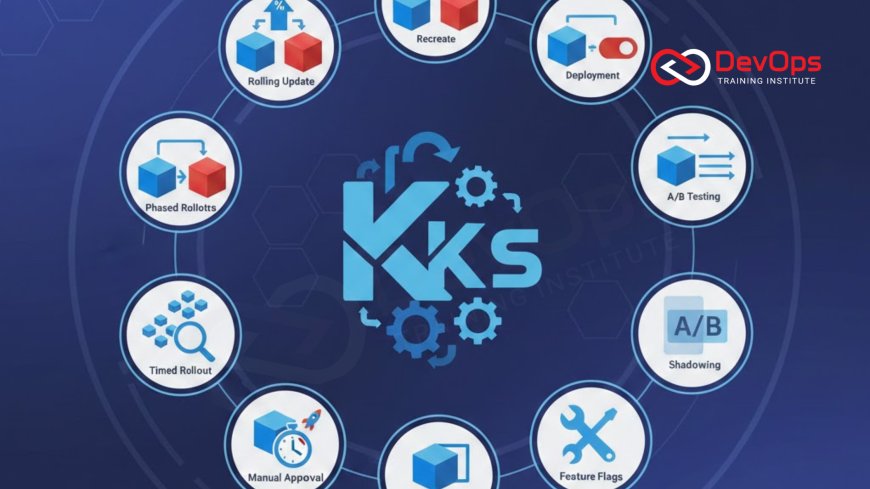
Introduction to Kubernetes Rollout Strategies
In the modern era of cloud computing, the ability to update software without interrupting the user experience has become a fundamental requirement for success. Kubernetes, as the leading container orchestration platform, offers a variety of rollout strategies that allow teams to manage how new versions of their applications are introduced to the cluster. These strategies are not just about technical execution; they are about balancing speed, risk, and resource efficiency. By choosing the right rollout pattern, organizations can ensure that their continuous synchronization efforts lead to stable and reliable production environments.
A rollout strategy defines the specific sequence of actions the cluster takes to transition from the current state to a new desired state. This involves managing the creation of new pods, the termination of old ones, and the routing of traffic between them. In twenty twenty six, as applications become more complex and distributed, the need for sophisticated rollout techniques has only grown. This guide explores twelve essential strategies, providing practical examples and insights to help you navigate the complexities of modern software delivery and maintain a competitive edge in the digital landscape.
The Default Rolling Update Strategy
The Rolling Update is the default strategy in Kubernetes, designed to replace old pods with new ones gradually. This approach ensures that a minimum number of pods are always available to serve traffic, providing a near zero downtime experience for most stateless applications. By controlling parameters like maxUnavailable and maxSurge, you can tune the speed and safety of the rollout. For example, setting maxSurge to 25% allows the cluster to spin up extra pods before shutting down old ones, ensuring that your capacity never dips below the desired level during the cultural change of a new release.
This strategy is ideal for day to day updates where version compatibility is maintained. It requires the application to handle a "mixed version" state where both the old and new versions run simultaneously. If a new version is detected as unhealthy through readiness probes, Kubernetes will automatically stop the rollout, preventing a broken version from taking over the entire cluster. This built in safety mechanism is a cornerstone of reliable DevOps operations, making it the most commonly used strategy for microservices and web APIs that require constant availability and high performance.
Recreate Strategy for Breaking Changes
While zero downtime is usually the goal, some applications cannot handle two versions running at the same time, especially those involving significant database schema changes. The Recreate strategy addresses this by terminating all existing pods before starting any new ones. This creates a brief window of downtime but ensures a clean transition where only one version of the application exists in the environment at any given time. It is a simple and predictable approach for non critical internal tools or batch processing workloads where a short interruption is acceptable in exchange for technical simplicity.
Using the Recreate strategy simplifies incident handling because you never have to worry about data inconsistencies caused by mixed version access. In your deployment manifest, you simply set the strategy type to Recreate. When you update the container image, Kubernetes shuts down the current ReplicaSet and waits for all pods to be removed before launching the new ones. While this strategy is less common for high traffic production sites, it remains a vital tool in the DevOps toolkit for managing legacy systems or specific stateful components that require exclusive access to underlying resources during an update.
Blue-Green Deployment for Instant Switching
Blue-Green deployment is a high availability strategy that involves running two identical environments side by side. The "Blue" environment serves live production traffic, while the "Green" environment hosts the new version. Once the Green environment is fully tested and verified, the traffic is switched instantly, often by updating a service selector or an Ingress rule. This provides a safe way to perform thorough smoke testing in a production like setting without exposing users to potential bugs. If an issue is discovered after the switch, rolling back is as simple as flipping the traffic back to the Blue environment.
This strategy is particularly effective for mission critical applications where the cost of duplicate infrastructure is outweighed by the need for a fail safe release process. It ensures that cluster states are always consistent and that the transition is seamless for the end user. By utilizing architecture patterns that support this level of isolation, teams can achieve total confidence in their releases. Blue-Green deployments are a staple of enterprise software delivery, providing a robust framework for managing complex updates with minimal risk and maximum control over the user experience.
Summary of Kubernetes Rollout Strategies
| Strategy Name | Primary Use Case | Downtime Level | Complexity |
|---|---|---|---|
| Rolling Update | General updates | Zero/Minimal | Low |
| Recreate | Breaking changes | High | Low |
| Blue-Green | Critical availability | Zero | Medium |
| Canary | Risk mitigation | Zero | High |
| Shadow | Performance testing | Zero | High |
Implementing Canary Releases for Gradual Exposure
Canary releases are designed to reduce the blast radius of a new version by exposing it to a small percentage of users first. In a Kubernetes environment, this is often achieved by running two deployments with the same labels but different image versions, allowing the service to distribute traffic between them. As confidence in the new version grows, the percentage of traffic is gradually increased until it handles the entire load. This "canary in a coal mine" approach allows teams to catch performance regressions or subtle bugs before they affect the entire user base, making it a favorite for release strategies in high growth companies.
To implement this effectively, many teams use an Ingress controller or a service mesh like Istio to provide fine grained traffic weights. This allows you to send exactly 5% of your traffic to the new version and monitor its health in real time. If the canary shows increased error rates or high latency, the traffic can be instantly reverted to the stable version. This level of control is essential for managing incident handling during major upgrades. By combining canary releases with continuous verification, you can automate the entire rollout process, ensuring that your software delivery is as safe as it is fast.
Shadow Deployments and Traffic Mirroring
Shadow deployment is an advanced strategy where the new version of an application receives a "shadow" copy of live production traffic without the results being returned to the end user. This allows you to test how the new version handles real world workloads, performance spikes, and complex data patterns without any risk to the live environment. It is the ultimate tool for performance testing and finding edge cases that might not be visible in staging or unit tests. By mirroring traffic, you can compare the output of the old and new versions to ensure data accuracy and consistency.
Implementing shadow deployments typically requires a service mesh or a specialized proxy that can duplicate incoming requests. While it increases the resource usage of the cluster, the insights gained are invaluable for mission critical systems. This strategy ensures that your cluster states remain stable while you experiment with significant architectural changes. It is a key part of choosing ChatOps techniques for monitoring, as you can receive alerts based on shadow environment anomalies. Shadow deployments represent the pinnacle of risk mitigation in the modern cloud native era, providing a safe playground for innovation on live traffic.
Best Practices for Successful Rollouts
- Use Liveness and Readiness Probes: Always define probes to ensure Kubernetes can accurately detect if a pod is healthy before sending it traffic or continuing a rollout.
- Enable Automated Rollbacks: Use tools like Argo Rollouts to automatically revert a deployment if health metrics drop below a certain threshold.
- Monitor Resource Quotas: Ensure your cluster has enough capacity to handle the "surge" of new pods during a rollout to prevent node exhaustion.
- Secure Your Configurations: Use secret scanning tools to ensure no credentials are exposed in your deployment manifests or environment variables.
- Implement Network Policies: Use admission controllers to enforce security standards for all new pods introduced during a rollout.
- Sync with GitOps: Use GitOps to manage your rollout configurations, providing a clear audit trail and repeatable deployment process.
- Optimize Container Runtimes: Check if you should use containerd for faster pod startup times, which can significantly speed up your rolling updates and rollbacks.
Success in Kubernetes rollouts is not just about choosing a strategy; it is about the discipline of your overall operational process. Regularly practicing rollbacks in a staging environment is just as important as the rollout itself. By utilizing AI augmented devops tools, you can predict potential failures based on historical data, allowing for even safer deployment windows. The integration of AI augmented devops trends into your rollout strategy will ensure that your infrastructure remains resilient as your organization scales. Ultimately, the goal is to create a frictionless path from code to production where the tools handle the complexity and humans focus on the value.
Conclusion on Mastering Kubernetes Rollouts
In conclusion, the twelve Kubernetes rollout strategies discussed in this guide provide a robust framework for managing application lifecycles in the cloud native age. From the simplicity of rolling updates to the sophistication of shadow deployments and canary releases, each pattern offers a unique balance of safety and speed. By mastering these techniques, you empower your team to ship features faster while maintaining the high availability and performance that your users expect. The choice of strategy should always be driven by the specific requirements of the application and the risk tolerance of the business.
As you move forward, consider how who drives cultural change within your organization will impact the adoption of these advanced strategies. Transitioning to progressive delivery is as much a cultural shift as it is a technical one. By prioritizing automation, observability, and security in your rollout process, you are building a future proof technical ecosystem. Whether you are managing release strategies for a startup or a global enterprise, these twelve patterns will serve as your roadmap to success in the ever evolving world of Kubernetes orchestration.
Frequently Asked Questions
What is a rollout in Kubernetes?
A rollout is the process of updating a Kubernetes deployment to a new version, managing the lifecycle of pods and traffic routing.
What is the default Kubernetes deployment strategy?
The default strategy is the Rolling Update, which replaces old pods with new ones gradually to maintain application availability throughout the process.
How does a canary deployment work?
A canary deployment releases a new version to a small subset of users first to test for errors before rolling it out to everyone.
What is the main benefit of blue-green deployments?
The main benefit is the ability to perform instant switches and rollbacks with zero downtime, providing a high level of safety for releases.
When should I use the Recreate strategy?
Use the Recreate strategy for applications that cannot handle mixed versions running at the same time, such as those with breaking database changes.
What is traffic mirroring in shadow deployments?
Traffic mirroring is the process of sending a copy of live traffic to a new version for testing without affecting the actual user responses.
How do maxSurge and maxUnavailable parameters work?
These parameters control how many extra pods can be created and how many pods can be offline during a rolling update rollout process.
Does a rolling update cause downtime?
No, if configured correctly with readiness probes, a rolling update should provide a seamless transition with zero downtime for the end users.
What role does an Ingress controller play in rollouts?
An Ingress controller handles external traffic routing and can be used to manage weights for canary releases and blue-green traffic switches.
What is progressive delivery?
Progressive delivery is a set of practices that includes canary and blue-green deployments to release software in a controlled and automated fashion.
How can I automate rollbacks in Kubernetes?
You can use tools like Argo Rollouts or Flagger to automatically trigger a rollback if the new version fails health or performance metrics.
What is a ReplicaSet in the context of rollouts?
A ReplicaSet ensures a specific number of pod replicas are running; rollouts involve creating a new ReplicaSet and scaling down the old one.
Can I pause a Kubernetes rollout?
Yes, you can use the kubectl rollout pause command to stop a rollout mid-way for manual inspection or testing before continuing.
What is a mixed-version state?
A mixed-version state occurs during a rolling update when both the old and new versions of an application are serving traffic simultaneously.
How do I check the status of a rollout?
You can use the kubectl rollout status command to monitor the progress of a deployment and see if it has successfully completed.
What's Your Reaction?
 Like
0
Like
0
 Dislike
0
Dislike
0
 Love
0
Love
0
 Funny
0
Funny
0
 Angry
0
Angry
0
 Sad
0
Sad
0
 Wow
0
Wow
0





![100+ Azure DevOps Interview Questions and Answers [Updated 2025]](https://www.devopstraininginstitute.com/blog/uploads/images/202509/image_140x98_68c40aa9a3834.jpg)






![Future Scope of DevOps Careers in Pune [Updated 2025]](https://www.devopstraininginstitute.com/blog/uploads/images/202510/image_140x98_68e3a84652312.jpg)


