


































![Kong Interview Preparation Guide [2025]](https://www.devopstraininginstitute.com/blog/uploads/images/202509/image_430x256_68dbb95326997.jpg)
















15 DevOps Productivity Tools for Remote Work
In 2026, the success of distributed engineering teams hinges on more than just code; it depends on a seamless digital workspace. This guide explores the fifteen most effective DevOps productivity tools for remote work, covering advanced project management, automated communication, and cloud-native collaboration. Discover how to eliminate isolation, reduce context switching, and maintain high-speed delivery cycles while working from anywhere in the world. Learn to leverage AI-augmented tools and integrated platforms like Slack, Backstage, and Raygun to build a resilient, high-performing technical culture that thrives in a remote-first environment today. Stay ahead of the curve by optimizing your remote toolkit for peak efficiency and team synergy.
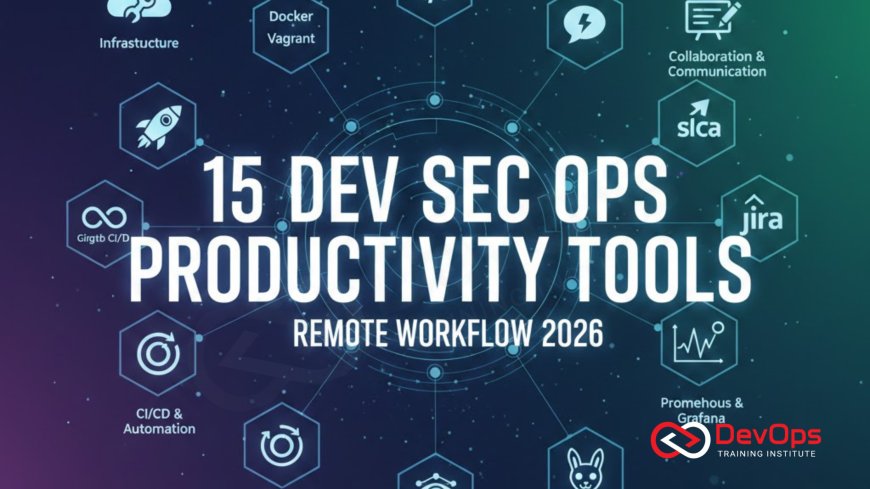
Introduction to Remote DevOps Productivity
The transition to remote work has permanently altered the landscape of software engineering, making specialized productivity tools more important than ever. For DevOps professionals, the challenge of remote work is not just about communication; it is about maintaining a complex web of automated systems without the benefit of physical proximity. In 2026, the most successful teams are those that have replaced office hallway conversations with structured, tool-driven workflows that provide total visibility into every stage of the delivery pipeline. This approach ensures that no matter where an engineer is located, they have the context and power to manage production environments effectively.
Productivity in a remote setting requires a focus on reducing friction and cognitive load. When you are not in the same room as your colleagues, the tools you use become your primary interface for cultural change and technical execution. These fifteen tools have been selected because they address the unique hurdles of distributed DevOps, such as time zone differences, asynchronous coordination, and the need for centralized documentation. By building a "paved road" of integrated applications, you can ensure that your remote team remains as fast and agile as any on-site department, delivering high-quality software with confidence and precision in the digital age.
Centralizing Communication and ChatOps
In a remote environment, your chat platform is the central nervous system of your operations. Slack remains the leader in this space, particularly for DevOps teams that utilize ChatOps techniques to trigger deployments and monitor system health directly from conversation channels. By integrating your CI/CD pipelines, monitoring alerts, and incident management tools into Slack, you create a shared command center where every action is visible to the entire team. This transparency is vital for remote coordination, as it allows engineers to stay informed about cluster states and ongoing changes without needing to attend constant status meetings or check multiple dashboards.
Beyond simple messaging, tools like Microsoft Teams 360 are evolving to provide immersive collaboration spaces, including virtual whiteboarding and even VR-enabled architecture reviews. These features help remote teams visualize complex systems and brainstorm solutions in real-time, bridging the physical gap between team members. Using specialized bots to handle routine tasks, such as scheduling stand-ups or summarizing long incident threads, further boosts productivity by freeing up humans for more strategic work. A well-configured communication stack ensures that your team stays synchronized, regardless of the physical distance between them, fostering a stronger sense of shared purpose and technical alignment.
Advanced Project Management for Distributed Teams
Managing a DevOps roadmap across multiple time zones requires a sophisticated approach to task tracking and prioritization. Jira has long been the gold standard for this, offering deep integrations with version control systems and automated workflows that keep technical tasks moving forward. For remote teams, Jira provides a clear source of truth for the status of every feature, bug, and infrastructure change. By using the Jira DevOps template, teams can automate the transition of tickets based on code commits and pull request status, reducing the need for manual updates and administrative overhead for busy engineers.
For teams seeking a more visual or lightweight approach, platforms like Monday.com and Trello offer best-in-class Kanban boards that are highly effective for managing remote workflows. These tools excel at providing a "bird's-eye view" of project progress, making it easy for stakeholders to see bottlenecks at a glance. In 2026, many of these platforms are integrating AI augmented devops features that can predict project delays based on historical velocity and even suggest resource reallocations. This intelligent layer of project management helps remote leads make data-driven decisions, ensuring that the team remains focused on the highest-priority tasks while maintaining a sustainable pace of work.
The Rise of Internal Developer Portals (IDPs)
As organizations scale their remote teams, the complexity of managing scattered toolchains can lead to significant productivity losses. Backstage, an open-source platform originally created by Spotify, has emerged as a critical tool for centralizing all your technical assets into a single internal developer portal. Backstage provides a "paved road" for developers, allowing them to create new services, access documentation, and view the health of their applications in one unified interface. For a remote DevOps engineer, this means less time spent hunting for information and more time spent building and improving the core technical infrastructure.
IDPs help reduce the cognitive load on remote developers by abstracting away the underlying complexity of cloud services and Kubernetes. Instead of needing to be an expert in every tool, an engineer can use a standardized template to provision a new environment or check secret scanning tools results. This self-service model is essential for remote work, as it eliminates the need to wait for manual approvals or ticket-based provisioning from a centralized operations team. By empowering developers to be self-sufficient, Backstage fosters a culture of autonomy and speed, which are the hallmarks of a truly high-performing and modern remote engineering organization.
Top 15 DevOps Tools for Remote Productivity
| Tool Category | Leading Tool | Remote Benefit | Key Feature |
|---|---|---|---|
| Communication | Slack | Centralized ChatOps hub | App Integrations |
| Project Mgmt | Jira | Clear task ownership | Workflow Automation |
| Dev Portal | Backstage | Single source of truth | Service Catalog |
| AI Coding | GitHub Copilot | Faster code generation | AI Autocomplete |
| Observability | Raygun | Correlated error data | Real-user Monitoring |
AI-Assisted Development and Operations
Artificial intelligence is no longer a futuristic concept; it is a daily reality for productive remote DevOps teams. GitHub Copilot and GitLab Duo have integrated AI directly into the IDE and the command line, helping engineers write code, debug scripts, and even generate documentation in record time. For a remote professional, these AI assistants act as a digital pair-programmer, providing instant answers and suggestions that would otherwise require a message to a colleague. This significantly reduces the isolation of remote work and keeps the development momentum high, even when working on complex or unfamiliar parts of the codebase.
In 2026, AI is also being used to analyze pipeline failures and suggest automatic remediations. Tools like Harness and CircleCI use machine learning to identify flaky tests and optimize build execution paths, ensuring that your continuous synchronization efforts are always as efficient as possible. By automating the mechanical parts of the DevOps lifecycle, AI allows remote teams to focus on the creative and strategic tasks that drive business value. Integrating these AI augmented devops trends into your toolkit is essential for maintaining a competitive edge in a world where speed and quality are the primary benchmarks for engineering success.
Observability 2.0 and Incident Response
When an incident occurs in a distributed system, remote teams need to respond with lightning speed despite being in different locations. Observability 2.0 tools like Raygun and Datadog go beyond traditional monitoring by correlating metrics, logs, and traces in real-time, providing a unified view of system health. Raygun’s ability to pinpoint the exact line of code causing a crash, combined with user-facing performance data, allows remote engineers to diagnose and fix issues without the need for extensive back-and-forth communication. This fast-tracked incident handling is crucial for maintaining 99.9% uptime and high customer satisfaction.
Furthermore, these tools integrate with alerting platforms like PagerDuty to ensure that the right person is notified at the right time. For remote teams, this means having sophisticated escalation policies that account for different time zones and on-call rotations. By using ChatOps techniques within these tools, the entire response process—from detection to resolution—can be managed and documented within a shared chat channel. This automated record is invaluable for post-mortem analysis and continuous verification, ensuring that every incident leads to a more robust and resilient system for the future. It is a vital component of choosing architecture patterns that prioritize observability.
Core Productivity Practices for Remote DevOps
- Document Everything: Use tools like Confluence or Notion to create a searchable wiki of all your processes, reducing the need for repetitive questions.
- Embrace Asynchronicity: Focus on workflows that don't require everyone to be online at the same time, using Loom for video updates and threaded discussions in Slack.
- Optimize Local Envs: Use Docker and Devbox to ensure that every remote engineer has a local environment that is an exact replica of production.
- Automate the Boring Stuff: Use GitHub Actions or GitLab CI to handle repetitive tasks like linting, testing, and secret scanning on every push.
- Prioritize Security: Use secret scanning tools to ensure that no credentials are accidentally committed from a remote developer's machine.
- Implement GitOps: Use GitOps to manage your infrastructure, providing a clear and versioned audit trail for every change.
- Monitor DORA Metrics: Regularly review your deployment frequency and lead time to identify and eliminate remote workflow bottlenecks.
Success in a remote environment is as much about discipline as it is about technology. It is important to establish clear boundaries between work and personal life and to maintain a high level of communication with your team. By utilizing the right release strategies and release strategies, you can ensure that your work is always impactful and aligned with the company's goals. As you become more proficient in these remote productivity tools, you will find that the flexibility of working from anywhere actually enhances your ability to focus and innovate, leading to a more fulfilling and successful career in the fast-paced world of DevOps.
Conclusion on Remote Productivity Excellence
In conclusion, the fifteen DevOps productivity tools discussed in this guide provide a robust foundation for any distributed engineering team. From the seamless communication of Slack to the centralized power of Backstage and the intelligent insights of AI-assisted coding, these tools are designed to eliminate the hurdles of remote work. By focusing on transparency, automation, and self-service, you can build a remote technical culture that is as productive and innovative as any on-site team. The key is to continuously evaluate your toolkit and adapt to the latest trends in the ever-evolving cloud-native landscape.
As we move further into 2026, the integration of AI augmented devops will continue to reshape how we work, making our operations more intuitive and our delivery cycles even faster. Staying informed about continuous verification and other advanced practices will ensure that you remain at the forefront of the industry. Ultimately, the best productivity tool is the one that empowers you to do your best work with the least amount of friction. Invest in your remote toolkit today to build a faster, safer, and more collaborative future for your organization, proving that physical location is no barrier to world-class engineering excellence.
Frequently Asked Questions
What is the most important tool for a remote DevOps team?
The most important tool is a centralized communication platform like Slack, which serves as the hub for all ChatOps and team coordination.
How does Backstage help remote developers?
Backstage provides an internal developer portal that centralizes documentation and services, making it easy for remote engineers to find information and provision resources.
Can AI tools really improve DevOps productivity?
Yes, AI tools like GitHub Copilot can speed up coding, while others can automate incident response and optimize CI/CD pipelines significantly.
What is the benefit of using GitOps for remote work?
GitOps provides a clear, versioned source of truth in Git, making it easy for remote teams to collaborate on infrastructure changes with full auditability.
How do I handle time zone differences in a remote team?
Use asynchronous communication tools, clear documentation, and on-call rotation software like PagerDuty that respects different time zones and regional schedules.
Does remote work slow down incident response?
Not if you have a robust observability stack and integrated alerting tools that provide everyone with the same context and real-time data simultaneously.
What is a "paved road" in DevOps?
A paved road is a standardized, automated set of tools and workflows that make it easy for developers to deploy and manage their applications.
Why is secret scanning essential for remote developers?
Remote work increases the risk of accidental credential leakage, so automated secret scanning is vital to catch keys before they leave the developer's machine.
How does Raygun improve remote engineering productivity?
Raygun correlates errors with actual user data and specific lines of code, allowing remote engineers to debug issues much faster without back-and-forth communication.
What role does video conferencing play in DevOps?
Video tools like Zoom or Microsoft Teams are essential for complex architecture reviews, brainstorming sessions, and maintaining personal connections within a remote team.
Is Jira too complex for a small remote startup?
Jira can be complex, but its specialized templates and integrations make it incredibly powerful for tracking technical work at any scale.
Can I use Trello for managing a CI/CD pipeline?
Trello is great for visual task management, but you should integrate it with your actual CI/CD tools to automate card transitions and updates.
What is the "cognitive load" in a remote setting?
Cognitive load is the amount of mental effort required to perform tasks; reducing it through automation is key to maintaining remote productivity and focus.
How does DORA metrics help remote managers?
DORA metrics provide a data-driven way to measure the performance of a remote team, highlighting areas where workflow friction might be slowing down delivery.
What is the first productivity tool a new remote team should adopt?
Start with a robust version control system like GitHub or GitLab, as it provides the foundation for all other collaboration and automation efforts.
What's Your Reaction?
 Like
0
Like
0
 Dislike
0
Dislike
0
 Love
0
Love
0
 Funny
0
Funny
0
 Angry
0
Angry
0
 Sad
0
Sad
0
 Wow
0
Wow
0

![100+ Azure DevOps Interview Questions and Answers [Updated 2025]](https://www.devopstraininginstitute.com/blog/uploads/images/202509/image_140x98_68c40aa9a3834.jpg)






![Future Scope of DevOps Careers in Pune [Updated 2025]](https://www.devopstraininginstitute.com/blog/uploads/images/202510/image_140x98_68e3a84652312.jpg)


