


































![Kong Interview Preparation Guide [2025]](https://www.devopstraininginstitute.com/blog/uploads/images/202509/image_430x256_68dbb95326997.jpg)
















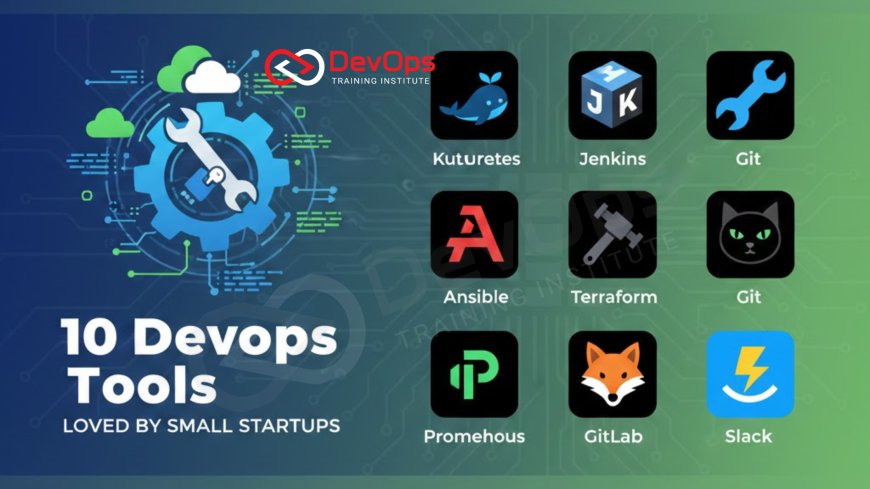
10 DevOps Tools Loved by Small Startups
Discover the top 10 DevOps tools that small startups are using in 2025 to scale their operations without breaking the bank. This guide focuses on accessible, high impact solutions for continuous integration, cloud infrastructure, and real time monitoring. Learn how these essential tools empower early stage engineering teams to automate repetitive tasks and deliver high quality software with speed and precision.
Introduction to Startup DevOps
For a small startup, speed is often the most valuable currency. Engineering teams must move fast to validate ideas, ship features, and respond to user feedback before the competition catches up. However, moving fast can lead to technical debt and unstable systems if not managed correctly. This is where DevOps comes in, providing a set of practices and tools that automate the software delivery lifecycle. For startups, the challenge is finding tools that are powerful enough to scale but simple enough to manage without a massive dedicated operations team.
The right DevOps stack acts as a force multiplier for early stage companies. It allows a handful of developers to manage complex infrastructure, deploy multiple times a day, and maintain high uptime. In 2025, the landscape of tools has shifted toward cloud native, integrated platforms that prioritize ease of use and "pay as you grow" pricing models. This blog post explores ten essential tools that have become favorites among startup founders and lead engineers for their ability to streamline workflows and foster a culture of shift-left testing and continuous improvement.
Version Control and Collaboration
At the heart of every startup’s tech stack is the version control system. For most modern startups, this means Git. While Git is the underlying technology, platforms like GitHub and GitLab have transformed it into a full suite of collaboration tools. These platforms allow developers to work on features in parallel, conduct thorough code reviews via pull requests, and track issues all in one place. For a small team, having a single source of truth for both code and project management is essential for staying organized as the codebase grows.
GitHub remains the dominant player for startups due to its massive ecosystem and the familiarity most developers have with its interface. It offers a generous free tier that includes private repositories and basic automation, which is perfect for teams just starting out. GitLab is also a strong contender, often preferred by teams that want a more integrated, all-in-one experience that includes built-in CI/CD and security scanning right out of the box. Both platforms enable a high level of transparency and collaboration, ensuring that everyone on the team is aligned and can contribute to the software platform engineering efforts from day one.
Streamlined CI/CD Pipelines
Continuous Integration and Continuous Delivery (CI/CD) are the engines that drive rapid software releases. Startups love CI/CD tools because they remove the manual "scary" part of deploying code. Instead of a developer manually running scripts to push an update, the process is triggered automatically every time code is merged. This ensures that every change is tested for bugs and security vulnerabilities before it ever reaches a user. For a small team, this automated safety net is what allows them to maintain a high velocity without constant site outages.
GitHub Actions has become a go-to choice for many startups because it lives directly inside their code repositories. There is no separate server to manage, and the library of community-created "actions" makes it easy to set up complex workflows in minutes. CircleCI is another favorite, known for its incredible speed and flexibility, especially for teams with more complex build requirements. By automating these deployments, startups can focus their energy on writing features rather than debugging deployment scripts, leading to a much more efficient development process.
Containerization with Docker
One of the most common headaches in early stage development is the "it works on my machine" syndrome. Docker solves this by allowing developers to package their applications and all their dependencies into a single container. This container runs exactly the same way on a laptop as it does on a production server. For startups, this consistency is a game changer. It simplifies the onboarding process for new developers and ensures that testing environments are identical to what the users will eventually see.
Docker’s popularity in the startup world also stems from its portability. Whether a startup is hosting on a small virtual private server or moving to a managed cloud service, Docker containers can be moved easily without rewriting configuration files. This flexibility is vital for companies that may need to pivot their infrastructure strategy as they scale. Using containers also makes it easier to adopt modern deployment strategies like canary releases, which help minimize the impact of new updates by rolling them out to a small percentage of users first.
Table: Essential DevOps Tools for Startups
| Category | Top Tool | Why Startups Love It | Key Feature |
|---|---|---|---|
| Version Control | GitHub | Industry standard with a massive ecosystem. | Pull requests and integrated issues. |
| CI/CD | GitHub Actions | Zero infrastructure management needed. | Huge library of pre-built workflows. |
| Containerization | Docker | Ensures environment consistency everywhere. | Lightweight, portable containers. |
| Infrastructure | Terraform | Manage cloud resources via simple code. | Multi-cloud support and state tracking. |
| Monitoring | Prometheus | Free, powerful, and built for containers. | Real-time metrics and alerting. |
| Communication | Slack | Centralizes alerts and team chat. | Deep integrations with DevOps tools. |
Infrastructure as Code (IaC) with Terraform
In the early days of a startup, it is tempting to click around a cloud provider's console to set up servers and databases. However, as the infrastructure grows, this manual approach becomes impossible to track and replicate. Terraform allows startups to define their entire cloud infrastructure using code. This means that if you need a new staging environment that looks exactly like production, you can simply run a command rather than spending hours trying to remember which settings you clicked in the dashboard.
Startups love Terraform because it provides a clear history of how their infrastructure has changed over time. Since the configuration is just text files, it can be version controlled in Git just like application code. This brings a high level of accountability and safety to infrastructure management. It also makes it easier to implement GitOps practices, where the state of the infrastructure is always driven by the code in a repository. For a small team, this level of automation ensures that the foundation of their business is stable and easy to rebuild if something goes wrong.
Real-Time Monitoring and Alerting
When you are a small startup, you cannot afford to have your service go down without knowing about it immediately. Monitoring tools provide the visibility needed to understand how the system is performing and when it is under stress. For startups, the goal is to move beyond simple "is it up?" checks toward deeper observability. This involves tracking metrics like response times, error rates, and resource usage so that issues can be caught before they impact the final user experience.
Prometheus and Grafana are a powerhouse duo for startups that want a professional monitoring setup without the enterprise price tag. Prometheus handles the data collection and alerting, while Grafana provides beautiful, customizable dashboards to visualize that data. These tools are specifically designed for containerized environments, making them a perfect match for Docker and Kubernetes setups. By having these insights readily available, startups can practice better observability and make data-driven decisions about when to scale their resources.
Security and Compliance Automation
Security is often an afterthought for busy startups, but a single breach can be devastating for a young company’s reputation. Modern DevOps tools allow startups to integrate security directly into their development workflow, a practice known as DevSecOps. By automating security scans for code vulnerabilities and misconfigured cloud settings, startups can protect themselves without needing a dedicated security team. This "built-in" approach to security is much more effective than trying to patch holes after a product has already launched.
- Snyk: Automatically finds and fixes vulnerabilities in your code dependencies and container images.
- Checkov: Scans your Infrastructure as Code files to ensure you aren't leaving databases open to the public.
- Trivy: A simple and fast vulnerability scanner for containers that fits perfectly into CI/CD pipelines.
Using these tools helps startups stay compliant with industry standards and gives their customers peace of mind. As the team grows, these automated checks ensure that new developers follow the company’s security best practices. Integrating these tools early on is a key part of how DevSecOps helps small teams build a secure foundation for their future growth.
Communication and Incident Management
DevOps is as much about culture as it is about tools, and communication is the glue that holds that culture together. For startups, Slack is more than just a chat app; it is the central nervous system of the engineering team. By integrating DevOps tools with Slack, teams can receive real-time notifications about failed builds, server alerts, or new pull requests directly in their chat channels. This keeps everyone informed and allows the team to react to issues instantly without constantly checking different dashboards.
When an incident does occur, having a clear process is vital. Tools like PagerDuty or Opsgenie can be integrated with monitoring systems to ensure that the right developer is notified when a critical alert is triggered. For a small startup where everyone might be on-call, these tools help manage the noise and ensure that only truly urgent issues wake someone up in the middle of the night. This organized approach to incident response reduces downtime and helps the team learn from every failure, ultimately leading to a more resilient service for their customers.
Conclusion
Building a successful startup requires a balance between rapid innovation and operational stability. The DevOps tools highlighted in this guide provide the framework for achieving that balance. By embracing automation in version control, CI/CD, infrastructure management, and monitoring, small teams can punch well above their weight class, managing complex systems with ease. These tools not only save time but also foster a culture of transparency, security, and continuous learning that is essential for long-term success. As a startup grows, its DevOps needs will evolve, but starting with a solid foundation of reliable, accessible tools ensures that the engineering team is prepared for whatever challenges come their way. Investing in the right DevOps stack early is not just about technology; it is an investment in the speed, reliability, and sanity of your entire team.
Frequently Asked Questions
What is the best DevOps tool for a brand new startup?
GitHub is arguably the best starting point because it combines code hosting, collaboration, and CI/CD automation in one familiar platform.
Do startups really need Kubernetes?
Not always. Many startups find Kubernetes too complex initially and prefer simpler options like Docker Compose or managed container services instead.
How much do these DevOps tools cost for small teams?
Most of these tools offer generous free tiers for small teams, allowing startups to build a professional stack with very little investment.
What is Infrastructure as Code?
Infrastructure as Code is the practice of managing your cloud servers and networks using configuration files rather than manual dashboard clicks.
Why should a startup use Docker?
Docker ensures that your application runs exactly the same way on every machine, which eliminates bugs caused by different environment setups.
Can a single developer handle DevOps for a startup?
Yes, with the right automation tools, a single developer can manage the entire deployment and monitoring process for a small company.
What is the difference between CI and CD?
CI focuses on automatically testing code changes, while CD focuses on automatically deploying those changes to your production or staging environments.
How does Slack help with DevOps?
Slack centralizes notifications from all your other tools, allowing the team to discuss and resolve issues in real time together.
What is DevSecOps?
DevSecOps is the practice of integrating security checks and balances into every stage of the software development and deployment process.
Is Terraform hard to learn for beginners?
Terraform has a learning curve, but its declarative language is logical and there is a massive amount of community documentation available.
Should we automate everything right away?
Start by automating the most repetitive or error-prone tasks first, then gradually add more automation as your team and product grow.
What is monitoring vs observability?
Monitoring tells you if a system is healthy, while observability helps you understand the internal state and find why something broke.
Does GitLab offer a free tier?
Yes, GitLab offers a very capable free tier for both individual users and small organizations that includes integrated CI/CD pipelines.
How do I prevent "on-call burnout" in a small team?
Use alerting tools to filter out non-critical noise and ensure that your automation handles basic self-healing tasks whenever it is possible.
What are the benefits of using a managed cloud provider?
Managed providers handle the underlying hardware and scaling, allowing your startup team to focus entirely on building and shipping your product.
What's Your Reaction?
 Like
0
Like
0
 Dislike
0
Dislike
0
 Love
0
Love
0
 Funny
0
Funny
0
 Angry
0
Angry
0
 Sad
0
Sad
0
 Wow
0
Wow
0

![100+ Azure DevOps Interview Questions and Answers [Updated 2025]](https://www.devopstraininginstitute.com/blog/uploads/images/202509/image_140x98_68c40aa9a3834.jpg)






![Future Scope of DevOps Careers in Pune [Updated 2025]](https://www.devopstraininginstitute.com/blog/uploads/images/202510/image_140x98_68e3a84652312.jpg)


