


































![Kong Interview Preparation Guide [2025]](https://www.devopstraininginstitute.com/blog/uploads/images/202509/image_430x256_68dbb95326997.jpg)
















12 Must-Know Kubernetes Architecture Components
Master Kubernetes in 2025 with this beginner-friendly guide to the 12 essential architecture components. Understand how control plane and worker nodes work together, what each component does, and why they matter for running reliable containerized applications at scale.
Introduction
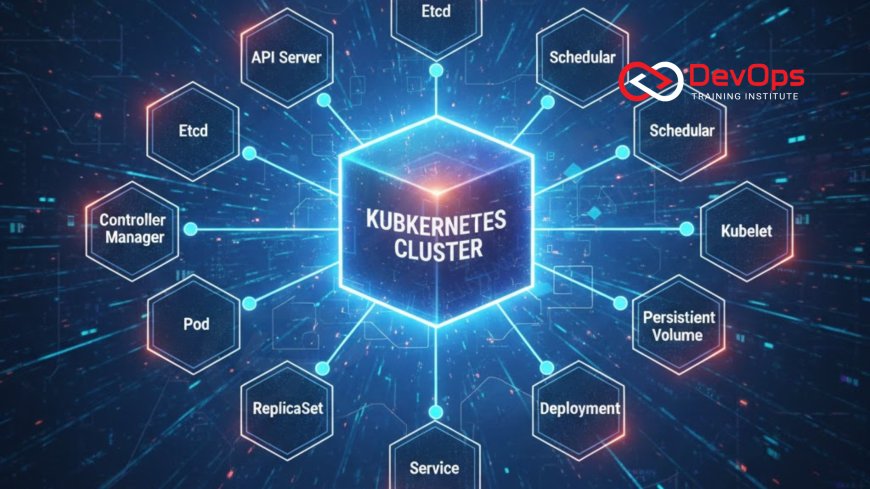
Kubernetes is the most popular container orchestration platform in the world, but its architecture can feel overwhelming at first. The good news is that once you understand the core components and how they communicate, everything starts making sense. This guide explains the 12 most important Kubernetes architecture components in simple, practical language so that even beginners can confidently understand how a real cluster works from the inside.
We’ll cover both the control plane (the brain) and worker node (the muscles) components, explain what each one does, and show why it matters when things go wrong. Let’s get started.
1. kube-apiserver – The Front Door of Your Cluster
The kube-apiserver is the central management point and the only component that clients (like kubectl) and other components talk to directly. It exposes the Kubernetes API, validates requests, and updates the cluster state in etcd. Think of it as the receptionist of a huge building: every request has to go through it.
It handles authentication, authorization (RBAC), admission control, and API versioning. It scales horizontally—you can run multiple instances behind a load balancer for high availability. Without a healthy API server, nothing in the cluster works.
2. etcd – The Cluster’s Single Source of Truth
etcd is a distributed key-value store that holds the entire state of your cluster: which pods are running where, configuration data, secrets, etc. Only the kube-apiserver talks directly to etcd, making it the ultimate source of truth.
In production you always run etcd in a highly available cluster (3 or 5 members) with backups. If etcd loses data or becomes inconsistent, your cluster can become unusable, so encryption at rest and regular snapshots are must-haves.
3. kube-scheduler – The Matchmaker
The scheduler watches the API server for newly created pods that don’t have a node assigned yet. It evaluates node resources, affinity rules, taints/tolerations, and other constraints, then decides which worker node should run each pod.
It’s completely stateless and can be scaled horizontally. Advanced scheduling is possible with custom scheduler plugins or tools like Volcano for batch workloads.
4. kube-controller-manager – The Automation Engine
This binary runs multiple controllers in a single process. Each controller watches the desired state in etcd and makes the actual state match it. Examples include:
- ReplicaSet controller (keeps the right number of pods running)
- Deployment controller (handles rollouts and rollbacks)
- Node controller (monitors node health)
- Endpoints controller (populates service endpoints)
If a controller crashes, the others keep running. It’s usually runs with leader election for high availability.
5. cloud-controller-manager – Cloud Provider Bridge
When running Kubernetes on AWS, Azure, GCP, or other clouds, the cloud-controller-manager connects Kubernetes to the cloud provider’s APIs. It handles load balancers, storage volumes, node registration, and route creation.
In on-prem or bare-metal clusters this component is either absent or replaced with custom integrations.
6. kubelet – The Node Agent
The kubelet runs on every worker node and is responsible for making sure containers are running in pods as expected. It talks to the API server, pulls pod specs, talks to the container runtime (Docker, containerd, CRI-O), and reports node/pod status back.
It also executes static pods (like those in /etc/kubernetes/manifests) and runs cAdvisor for resource metrics collection.
7. kube-proxy – Network Rules Manager
kube-proxy runs on every node and maintains network rules so pods can talk to services. It implements Kubernetes Services using iptables, IPVS, or eBPF depending on the mode.
In modern clusters using Cilium or Calico, kube-proxy is often replaced with more advanced CNI plugins.
8. Container Runtime – The Engine That Runs Containers
The container runtime actually pulls images and runs containers. Popular choices are containerd (default in Kubernetes 1.24+), CRI-O, and Docker (via cri-dockerd). The kubelet talks to the runtime through the Container Runtime Interface (CRI).
Runtime security features like gVisor or Kata Containers can be used for extra isolation.
9. Pod – The Smallest Deployable Unit
Although not a “component” in the control-plane sense, the pod is the fundamental building block of Kubernetes. A pod is one or more containers that share network and storage. All other resources (Deployments, Services, etc.) manage pods.
Understanding pods deeply is crucial because everything else is just an abstraction on top of them.
10. CoreDNS – Cluster DNS Service
CoreDNS provides name resolution inside the cluster. Every service gets a DNS name like my-svc.my-namespace.svc.cluster.local. It is deployed as a Deployment itself and is critical for service discovery.
If CoreDNS is down, pods can’t resolve service names and internal communication breaks.
11. Ingress Controller & Ingress Resources
Ingress is an API object that manages external HTTP/HTTPS traffic. Popular controllers include NGINX Ingress, Traefik, HAProxy, and cloud load balancers. It works with Ingress resources to define routing rules.
Many teams now use Gateway API (successor to Ingress) for more advanced traffic management.
12. Add-ons & Operators – Ecosystem Extensions
The ecosystem includes metrics-server (for kubectl top), dashboard, monitoring (Prometheus), logging (Fluent Bit/Fluentd), service mesh (Istio/Linkerd), and hundreds of operators. Operators extend Kubernetes using custom resources and controllers (example: Prometheus Operator, Postgres Operator).
These are not part of the core but are essential for production clusters.
| Component | Location | Main Responsibility |
|---|---|---|
| kube-apiserver | Control Plane | API entry point |
| etcd | Control Plane | Cluster database |
| kube-scheduler | Control Plane | Pod placement |
| kube-controller-manager | Control Plane | Reconciliation loops |
| kubelet | Every Node | Runs pods |
| kube-proxy | Every Node | Service networking |
| CoreDNS | Cluster Add-on | DNS resolution |
Conclusion
Kubernetes looks complex, but it’s really just these 12 core components working together in a beautiful, distributed system. Master the control plane (API server, etcd, scheduler, controller manager) and the node-level agents (kubelet, kube-proxy, container runtime), and you’ll understand 90% of how Kubernetes works under the hood. Add networking (CNI), DNS, and storage, and you have a complete production-grade cluster. Whether you’re preparing for interviews, designing systems, or operating clusters, knowing these components inside out will make you far more confident and effective.
Frequently Asked Questions
What are the main parts of Kubernetes architecture?
Control plane (master) components and worker node components.
Which component stores cluster state?
etcd is the only persistent storage for cluster data.
Can I run Kubernetes without etcd?
No. etcd is mandatory for a functional cluster.
What happens if kube-apiserver goes down?
Nothing can be changed in the cluster; kubectl commands will fail.
Do all nodes need kube-proxy?
Only if you use Kubernetes Services with kube-proxy mode (many CNI plugins replace it).
What runs on worker nodes?
kubelet, kube-proxy, container runtime, and your pods.
Is the scheduler stateful?
No, it’s stateless and can be restarted or scaled easily.
What is the role of cloud-controller-manager?
It connects Kubernetes to cloud provider APIs for load balancers, storage, etc.
How many etcd instances should I have?
Minimum 3 for production to survive one node failure.
Can I have multiple API servers?
Yes, run them behind a load balancer for high availability.
What is the smallest deployable unit in Kubernetes?
The pod.
Is CoreDNS mandatory?
Practically yes—almost everything relies on DNS.
How does kubectl talk to the cluster?
It talks to kube-apiserver over HTTPS using kubeconfig credentials.
What replaced Docker as the default runtime?
containerd (since Kubernetes 1.24 Docker is deprecated).
Can I learn Kubernetes without knowing these components?
You can deploy apps, but you won’t be able to troubleshoot or operate clusters effectively.
What's Your Reaction?
 Like
0
Like
0
 Dislike
0
Dislike
0
 Love
0
Love
0
 Funny
0
Funny
0
 Angry
0
Angry
0
 Sad
0
Sad
0
 Wow
0
Wow
0

![100+ Azure DevOps Interview Questions and Answers [Updated 2025]](https://www.devopstraininginstitute.com/blog/uploads/images/202509/image_140x98_68c40aa9a3834.jpg)






![Future Scope of DevOps Careers in Pune [Updated 2025]](https://www.devopstraininginstitute.com/blog/uploads/images/202510/image_140x98_68e3a84652312.jpg)


