


































![Kong Interview Preparation Guide [2025]](https://www.devopstraininginstitute.com/blog/uploads/images/202509/image_430x256_68dbb95326997.jpg)
















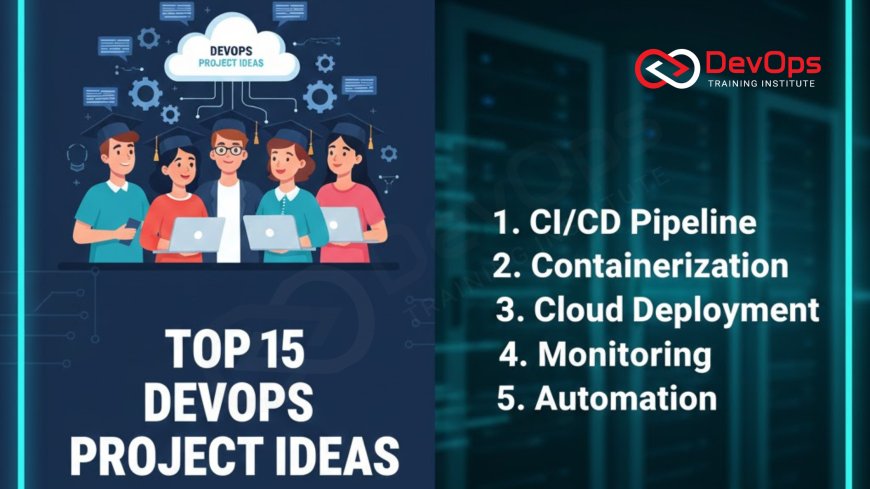
Top 15 DevOps Project Ideas for Freshers
Kickstart your career with the top 15 hands-on DevOps project ideas designed specifically for freshers and entry-level professionals. These projects cover the entire DevOps lifecycle, from fundamental Continuous Integration and Continuous Delivery (CI/CD) pipelines to advanced topics like Infrastructure as Code (IaC), container orchestration with Kubernetes, and robust monitoring with Prometheus and Grafana. Learn the essential tools—Git, Jenkins, Docker, Ansible, and Terraform—by building real-world solutions that solve common operational problems, such as automating application deployment, implementing secure credential management, and setting up centralized logging systems. Each project is detailed with objectives, required tools, and key learning outcomes, providing a clear roadmap to transition from theoretical knowledge to practical, deployable skills. Focus on creating portfolio-worthy work that demonstrates mastery of automation, configuration management, cloud resource provisioning, and security best practices, making you a standout candidate in the competitive DevOps landscape. This guide emphasizes foundational concepts, best practices for file system management and user management, and the creation of self-healing, observable systems that minimize human error and operational toil.
Introduction
The field of DevOps demands practical, hands-on experience that goes far beyond theoretical knowledge. For freshers, the challenge lies in translating academic concepts into deployable, real-world solutions. A well-executed portfolio project serves as undeniable evidence of your proficiency, demonstrating not only your tool knowledge but also your understanding of the core philosophies: automation, collaboration, and continuous improvement. The 15 projects detailed below are structured to cover foundational, intermediate, and advanced aspects of the DevOps lifecycle. By working through these ideas, you will master the most in-demand tools and patterns, starting from the basic use of command-line tools—which are essential for all foundational work—to complex orchestrators. We strongly recommend that you first familiarize yourself with the basic commands every beginner should know to ensure you can navigate and interact with Linux environments efficiently, as virtually all DevOps work is built upon this foundation. Treat these projects as living documents; host all code on a public Git repository, document your design decisions, and include clear instructions on how others can replicate your work. This level of detail is what distinguishes a strong candidate in a crowded job market.
1. Automated CI/CD Pipeline for a Simple Web Application (Jenkins/GitLab CI)
Objective: Build a complete end-to-end pipeline that automatically fetches code, runs tests, and deploys a simple web application whenever a developer commits changes to the Git repository's main branch. This is the bedrock project for any DevOps portfolio, demonstrating a foundational understanding of continuous delivery principles.
Required Tools: Git, Jenkins (or GitLab CI/GitHub Actions), Maven/npm (for building), Tomcat/Nginx (for hosting), a basic Java/Node.js application.
The Project Details: Start with a simple "Hello World" application. Configure a Jenkinsfile (or equivalent YAML definition) to define the pipeline stages. The stages must include: Source Code Checkout (pulling from Git), Build (compiling the code and generating an artifact), Unit Testing (running tests and generating reports), and Deployment (copying the artifact to a target server or container and starting the application). Focus on making the pipeline declarative and robust. Implement post-build actions to notify stakeholders (e.g., via Slack or email) of the build status. Ensure the pipeline is triggered by a webhook from the Git repository, establishing true continuous integration. The key learning outcome is a deep understanding of pipeline execution flow, artifact management, and the use of declarative programming (Pipeline as Code) to define infrastructure actions, moving away from manual configuration on the CI server GUI. This project should conclude with the application accessible via a public IP, automatically updated seconds after a code commit.
Learning Outcomes: Declarative Pipeline definition, webhook configuration, artifact management, basic testing integration, and fundamental CI/CD flow mastery.
2. Dockerization Project with Multi-Stage Builds and Registry Integration
Objective: Containerize a non-trivial application (e.g., a full-stack application with a front-end and a database) using Docker, optimizing the resulting image size using multi-stage builds, and pushing the final image to a centralized registry.
Required Tools: Docker, Docker Compose, a language like Python/Go/Java, Docker Hub or a private registry (e.g., AWS ECR, GitLab Container Registry).
The Project Details: Begin by writing a Dockerfile for a backend API. Next, introduce a multi-stage build to separate the build environment (which contains compilers, testing tools, and heavy dependencies) from the final runtime environment. The final stage should only include the application runtime and the compiled artifact, drastically reducing the image size and attack surface. Then, use Docker Compose to orchestrate the application along with a dependency (like a MongoDB or PostgreSQL container), demonstrating service linking and volume mounting for persistent data. The final stage of this project involves writing a simple automation script (or adding a stage to the CI/CD pipeline from Project 1) that tags the built image and authenticates to a public or private registry before successfully pushing the image. Documenting the image size before and after optimization proves the value of the multi-stage approach. Understanding the layering mechanism of Docker and how to write efficient, minimal-size images is a crucial skill for modern container environments.
Learning Outcomes: Dockerfile best practices, image size optimization (multi-stage builds), Docker Compose for local orchestration, and registry integration/tagging.
3. Local Kubernetes Deployment and Service Exposure (Minikube/k3s)
Objective: Deploy the Dockerized application from Project 2 onto a single-node Kubernetes cluster (using tools like Minikube or k3s), defining the deployment using YAML manifests, and exposing the service using a LoadBalancer or NodePort.
Required Tools: Minikube/k3s/Kind, Kubectl, YAML, the Docker image from Project 2.
The Project Details: This project introduces the complexities of orchestration. Start by installing your chosen local Kubernetes tool. Write the necessary YAML manifests: a Deployment defining the desired state (e.g., 3 replicas) of your application Pods, a Service manifest to expose the Pods internally and manage load balancing, and potentially a ConfigMap to handle non-sensitive configuration data. Deploy the application using `kubectl apply -f`. Demonstrate auto-healing by manually deleting one of the application pods and observing Kubernetes automatically recreate it to meet the deployment replica count. Furthermore, implement an HPA (Horizontal Pod Autoscaler) definition that automatically scales the application based on a simulated metric like CPU utilization. The final step is to expose the application to the host machine using a service of type NodePort or, if using a cluster with a built-in load balancer, LoadBalancer, proving a complete orchestration lifecycle understanding.
Learning Outcomes: Kubernetes core concepts (Pods, Deployments, Services), YAML manifesto creation, basic scaling, and application exposure.
4. Infrastructure as Code (IaC) Project: Provisioning a Cloud Environment with Terraform
Objective: Use Terraform to provision a complete, secure environment on a major cloud provider (AWS, Azure, or GCP). This environment should include a Virtual Private Cloud (VPC), subnets, a security group (firewall rules), and a single compute instance (VM) ready for application deployment.
Required Tools: Terraform, a free-tier cloud account (AWS/Azure/GCP), IAM user credentials.
The Project Details: Write declarative HCL (HashiCorp Configuration Language) code to define the target architecture. The core of this project is demonstrating the IaC lifecycle: init (initializing the working directory), plan (generating an execution plan, which must be reviewed and documented), and apply (creating the resources). Focus on modularity by using variables for all sensitive or frequently changing parameters (e.g., instance type, region). Implement a secure remote backend (like S3/Azure Blob Storage) for storing the Terraform state file, which is crucial for collaborative environments and preventing state loss. The final, essential step is to use `terraform destroy` to tear down the entire infrastructure, proving the resources are disposable and manageable via code. As part of setting up the base image for this VM, it is important to understand and incorporate foundational checks often found on a post-installation checklist for sysadmins, ensuring that the base OS is secure and configured correctly before any application code is deployed, turning a manual audit into an automated check.
Learning Outcomes: HCL syntax, VPC networking concepts, remote state management, IaC lifecycle (plan/apply/destroy), and resource dependency management.
5. Automated Configuration Management: Web Server Setup with Ansible Playbooks
Objective: Write a comprehensive Ansible playbook to automatically configure the compute instance provisioned in Project 4, installing necessary packages, setting up configuration files, and starting the web server service (Nginx or Apache).
Required Tools: Ansible, Jinja2 templating, the cloud VM from Project 4.
The Project Details: This project focuses on idempotence and declarative configuration. Define a complex Ansible role for your web server setup. The role should include: a tasks directory for installing the web server package, a templates directory using Jinja2 to dynamically generate the `nginx.conf` file based on environment variables, a handlers section to gracefully restart the Nginx service only when the configuration file changes, and a vars file for default parameters. Ensure the playbook can be run multiple times without causing unintended side effects (i.e., it must be idempotent). As part of this configuration, include a task that creates the necessary directories and mounts or configures appropriate storage structures for log files and static assets. Understanding proper file system management within the automation is crucial for ensuring persistence and performance of the application's data. Run the playbook using an Ansible inventory file that targets the public IP or DNS name of the VM provisioned by Terraform.
Learning Outcomes: Ansible Playbooks and Roles, Jinja2 templating, handler usage for graceful service restarts, SSH connectivity for agentless configuration, and ensuring idempotence.
6. Server Hardening and Network Security Automation
Objective: Use Ansible to implement a baseline set of security hardening practices on a Linux server, specifically focusing on disabling unnecessary services and automating firewall rule configuration.
Required Tools: Ansible, `firewalld` or `iptables`, a Linux VM.
The Project Details: Develop an Ansible playbook dedicated entirely to security. This playbook should: Update all packages to the latest versions, disable root SSH login, enforce password complexity policies, and remove unnecessary packages (e.g., telnet, FTP clients). The centerpiece of this project is the network security automation. Write Ansible tasks to configure the system firewall, opening only essential ports (e.g., 22, 80, 443) and setting a default deny policy. You should demonstrate mastery of applying and managing network access rules by using specific Firewalld commands and examples within your automation script to set up zones and port forwarding rules. This ensures that the server is protected against unauthorized access from the internet. The final stage involves running a security audit tool (like Lynis or OpenSCAP) against the configured server and comparing the results before and after the Ansible playbook execution to prove the security posture improvement.
Learning Outcomes: Security best practices, package management automation, firewall configuration (Layer 4 security), and integrating security auditing into configuration workflows.
7. Centralized Logging and Visualization with the ELK Stack
Objective: Set up a centralized logging system (Elasticsearch, Logstash, Kibana, or a modern equivalent like Grafana/Loki) to ingest, store, and visualize application and system logs from the server configured in Project 5.
Required Tools: Elasticsearch, Logstash/Fluentd/Filebeat, Kibana/Grafana, Docker Compose (to run the stack locally).
The Project Details: This project provides critical insight into observability. First, deploy the ELK stack using Docker Compose. On the target web server, install and configure a log shipper (e.g., Filebeat or Fluentd). The log shipper must be configured to monitor the Nginx access and error logs, parse them into a structured format (JSON), and forward them to the Logstash input. The Logstash component must apply transformation filters to enrich the data, potentially adding geo-location data or response codes. Finally, use Kibana (or Grafana) to create a dashboard that visualizes key metrics, such as: top 10 error response codes, latency distribution, and total request count over time. Adhering to strong principles of log management best practices is central to this project, ensuring logs are not only collected but are also parsed, retained, and secured correctly for future compliance and analysis needs.
Learning Outcomes: Log ingestion pipeline design, structured logging (JSON parsing), data visualization dashboard creation, and real-time operational troubleshooting.
8. Server Monitoring, Metrics, and Alerting with Prometheus and Grafana
Objective: Implement a full monitoring solution using Prometheus to collect system metrics (CPU, memory, disk I/O) from the target server and Grafana to visualize them, coupled with an alerting system.
Required Tools: Prometheus, Node Exporter, Grafana, Alertmanager, Docker Compose.
The Project Details: Start by deploying Prometheus and Grafana via Docker Compose. On the target Linux server, deploy the Node Exporter, which exposes system-level metrics on a specific port. Configure Prometheus to automatically discover and scrape the Node Exporter endpoint. Next, configure Alertmanager with a simple webhook or email notification integration. Define Prometheus Alerting Rules (PromQL) for critical conditions, such as: "Alert if CPU utilization > 95% for 5 minutes" or "Alert if disk space is < 10% free." The visualization component requires setting up Grafana and importing a professional-looking Node Exporter dashboard that clearly displays the server's health. Demonstrate the alert functionality by writing a script that simulates high CPU load on the target server and confirming that the alert fires and is routed correctly through Alertmanager. This project proves a strong understanding of observability, which is essential for managing production systems.
Learning Outcomes: Metrics collection via Exporters, PromQL querying, Grafana visualization, and robust alert configuration/routing.
9. Basic Chaos Engineering: Resilience Testing on a Docker Compose Application
Objective: Introduce deliberate, controlled failures into a multi-container Docker application (Project 2) to test and verify its resilience, auto-healing capabilities, and monitoring coverage.
Required Tools: Docker Compose, a simple Chaos tool (e.g., Chaos Mesh, Pumba, or simple shell scripts).
The Project Details: This project elevates your operational skills by shifting from fixing failures to intentionally causing them. Use a shell script to simulate three types of failure against your Docker Compose application: Dependency Failure (stopping the database container), Resource Exhaustion (injecting latency or high CPU load into the application container), and Sudden Death (killing a non-critical application container). The test should be preceded by an established metric baseline from Project 8. Write a clear hypothesis for each failure (e.g., "If the database is stopped, the application should return a 503 error, not crash"). During the test, monitor the application’s behavior and verify that the monitoring system (Project 8) correctly alerts on the failure and that the logging system (Project 7) captures the relevant error messages. The final output is a detailed report comparing the hypothesis with the actual result, outlining any necessary changes to the application or the infrastructure configuration to improve resilience.
Learning Outcomes: Resilience testing, failure domain identification, understanding of distributed system failure modes, and verification of observability tooling.
10. Implementing GitOps: Declarative Deployment with ArgoCD or Flux
Objective: Transition the Kubernetes deployment from Project 3 to a GitOps model by using a tool like ArgoCD or Flux. The entire application state should be defined in a dedicated Git repository, and the GitOps tool should automatically synchronize the cluster state with the repository.
Required Tools: Kubernetes (Minikube/k3s), ArgoCD/Flux, two Git repositories (one for application code, one for Kubernetes manifests).
The Project Details: The GitOps approach represents a significant step up in maturity. First, deploy the ArgoCD/Flux controller onto your Kubernetes cluster. Create a new Configuration Repository where all your Kubernetes YAML manifests from Project 3 will reside. Configure the GitOps tool to monitor this repository, connecting it to the cluster and automatically pulling the desired application state. Demonstrate the self-healing and single source of truth principles: manually change a Pod replica count using `kubectl scale` and show that the GitOps tool automatically reverts the change back to the value defined in the Git repository. Next, perform a simulated deployment by simply changing the application image tag in the Git repository and committing the change, demonstrating that the tool automatically pulls the change and updates the live deployment without any explicit `kubectl` command. This project provides a strong foundation in modern deployment methodologies.
Learning Outcomes: GitOps principles, declarative configuration enforcement, ArgoCD/Flux installation and usage, and understanding separation of concerns in modern CD.
11. Secure Secret Management in Kubernetes using External Tools
Objective: Implement a secure solution to manage sensitive application secrets (like database passwords) within a Kubernetes environment, ensuring that the secrets are encrypted at rest in the Git repository.
Required Tools: Kubernetes, Sealed Secrets or HashiCorp Vault, ArgoCD (optional but recommended).
The Project Details: Storing secrets in plain text or base64-encoded Kubernetes Secrets in Git is a major security flaw. This project addresses that by implementing a solution that allows you to safely commit encrypted data to a public repository. If using Sealed Secrets, you must install the controller, encrypt a Kubernetes Secret YAML file using the tool, and commit the resulting `SealedSecret` manifest to your Git repository. Demonstrate how the controller on the cluster automatically decrypts this into a standard Kubernetes Secret at runtime. If using HashiCorp Vault, you must deploy Vault, configure it with a backend, and implement a Vault Agent or sidecar container in your application Pods to retrieve the secret at application startup. This proves mastery over the critical security practice of secret rotation and least privilege access in a containerized environment, moving away from vulnerable practices.
Learning Outcomes: Secret handling best practices, at-rest encryption for configuration, integration of security tools into CI/CD, and minimizing attack surface.
12. Automated User Provisioning and Access Control for Infrastructure
Objective: Create a simplified workflow to automatically provision new user accounts and manage their access across multiple servers based on their role, using a centralized tool and coding the desired state.
Required Tools: Ansible/Chef, a simple local LDAP server (optional, for advanced users) or a local CSV file of users, Linux VMs.
The Project Details: Manual user management is tedious and error-prone, leading to security issues from forgotten accounts. Use an Ansible playbook to define user roles (e.g., 'Developer', 'Read-Only Operator', 'Admin'). The playbook should: create the necessary Linux user accounts on a target set of servers, assign users to appropriate groups, configure the users' `.bashrc` for environment setup, and, most importantly, manage their authorized SSH keys. Demonstrate the full lifecycle: adding a new user to the central user list and running the playbook to provision them, then removing them from the list and re-running the playbook to de-provision (delete) the user, proving automated access revocation. This project highlights the security and efficiency benefits of defining identity and access management through code, ensuring compliance with organizational policies for every server, every time, without relying on manual console interaction.
Learning Outcomes: Centralized identity management concepts, Ansible for user creation/deletion, Group/Role-Based Access Control (RBAC), and automated SSH key management.
13. Securing the CI/CD Pipeline: Static and Dynamic Analysis Integration
Objective: Integrate security scanning tools (SAST/DAST) into the CI/CD pipeline (Project 1) to identify vulnerabilities in the application code and the running environment before deployment.
Required Tools: Jenkins/GitLab CI, SonarQube (or equivalent SAST tool), OWASP ZAP (or equivalent DAST tool), a vulnerable application (e.g., OWASP Juice Shop).
The Project Details: This project focuses on DevSecOps. Modify the pipeline from Project 1 to include a new "Security Scan" stage immediately after the "Unit Testing" stage. In the first part, integrate a Static Application Security Testing (SAST) tool (like SonarQube) to scan the source code for common security flaws and quality issues. Set a gate in the pipeline: if the scan fails to meet a predefined security rating, the build must be failed and deployment halted. In the second part, deploy the application to a temporary staging environment. Run a Dynamic Application Security Testing (DAST) tool (like OWASP ZAP) against the running instance to find runtime vulnerabilities. The core goal is to demonstrate that the pipeline automatically enforces security compliance, making security a non-negotiable part of every deployment, thus shifting security left. Furthermore, ensure that the application's external-facing port is protected during the test, only allowing the scanner access, by using specific Firewalld commands within the staging environment's configuration script, adding a necessary layer of host-based security.
Learning Outcomes: DevSecOps principles, integrating SAST/DAST tools, setting security quality gates, and automated security testing in the pipeline.
14. Automated Disaster Recovery (DR) Plan: Backup and Restore for a Database
Objective: Design and automate a complete disaster recovery plan for a stateful component, such as a PostgreSQL or MySQL database, ensuring that data can be backed up to a remote location and restored to a new server instantly.
Required Tools: PostgreSQL/MySQL, a cloud storage service (S3/GCS/Azure Blob Storage), Ansible/Terraform, Cron job/Scheduled automation.
The Project Details: This project validates your ability to protect critical business data. First, use Ansible to install the database and set up a routine cron job to run a database dump (e.g., `pg_dump`). The automation must then securely transfer the backup file to the remote cloud storage location. The most critical part is the restore automation: write a Terraform script to provision an entirely new, fresh server and a corresponding Ansible playbook that runs on the new server. This playbook must fetch the latest backup file from the cloud storage, install the database, and automatically restore the data, bringing the new instance online to serve the application. The final output is a simulated DR drill, documenting the Mean Time to Recovery (MTTR) achieved using your automated process. The success of the restore must be verified by comparing the data on the original database with the restored version.
Learning Outcomes: Database backup strategies, secure data transfer, cloud storage integration, defining an MTTR metric, and full-stack provisioning for recovery.
15. Advanced Access Security: Automated SSH Keys Security and Role-Based Access
Objective: Implement a centralized, automated system for managing SSH access across a fleet of servers, ensuring that developers and operators can only access servers they are authorized for, and that their keys are securely rotated and revoked.
Required Tools: Ansible, a central user list, a Linux server fleet, potentially HashiCorp Vault SSH Secrets Engine (for advanced users).
The Project Details: This project combines the security focus of credential management with the automation of user access. Build an Ansible role that handles all SSH key management. This role must dynamically generate the `~/.ssh/authorized_keys` file on every server based on a central, authoritative source (e.g., a map of users to servers defined in a structured YAML file). For basic implementation, the role should: fetch the public SSH key for a user from a defined location (like a key server or a central Git repo), and use an Ansible loop to add the key only to the servers tagged for that user's role. For the most advanced version, integrate a tool like HashiCorp Vault's SSH Secrets Engine to issue short-lived, one-time-use SSH certificates instead of static keys. This allows access to be granted on a just-in-time basis. This level of automation is critical for maintaining robust operational security and ensuring compliance with audit requirements by strictly controlling who can log into a server and for how long. The automated process must also handle the immediate removal of keys for de-provisioned users, a crucial security step often missed in manual processes.
Learning Outcomes: Centralized key management, dynamic file generation, role-based access enforcement, security policy automation, and advanced credential rotation.
Project Summary and Tool Matrix
| # | Project Title | Primary Tool Focus | Key Concept Learned |
|---|---|---|---|
| 1 | Basic CI/CD Pipeline (Jenkins) | Jenkins, Git | Pipeline as Code, Continuous Integration |
| 2 | Dockerization and Multi-Stage Builds | Docker, Docker Compose | Image Optimization, Containerization |
| 3 | Local Kubernetes Deployment | Kubernetes (k3s/Minikube), Kubectl | Orchestration, Deployment/Service/Pod YAML |
| 4 | IaC: Cloud Provisioning with Terraform | Terraform, AWS/Azure/GCP | VPC Networking, Remote State |
| 5 | Configuration Management with Ansible | Ansible, Jinja2 | Idempotence, Configuration Drift Prevention |
| 6 | Server Hardening and Firewall Automation | Ansible, Firewalld | Security Baseline, Least Privilege Networking |
| 7 | Centralized Logging with ELK/Loki | Elasticsearch, Filebeat, Kibana/Grafana | Structured Logging, Log Aggregation |
| 8 | Monitoring with Prometheus and Grafana | Prometheus, Grafana, Node Exporter | PromQL, Alerting Rules, Observability Pillars |
| 9 | Basic Chaos Engineering | Docker Compose, Shell Scripts | Resilience Testing, Failure Hypothesis |
| 10 | Implementing GitOps with ArgoCD/Flux | ArgoCD/Flux, Kubernetes | Declarative Synchronization, Single Source of Truth |
| 11 | Secure Secret Management in Kubernetes | Sealed Secrets/HashiCorp Vault | At-Rest Encryption, Secret Rotation |
| 12 | Automated User Provisioning | Ansible, User Roles | RBAC, Access Lifecycle Management |
| 13 | CI/CD Security Integration (SAST/DAST) | SonarQube, OWASP ZAP | DevSecOps, Security Quality Gates |
| 14 | Disaster Recovery Automation | Terraform, Ansible, Database Dumps | MTTR, Business Continuity |
| 15 | Advanced SSH Key Management | Ansible, HashiCorp Vault (Advanced) | Short-Lived Certificates, JIT Access |
Conclusion
Successfully completing a selection of these 15 projects will transform your profile from an entry-level candidate with theoretical knowledge to a full-stack automation engineer ready to contribute from day one. The common thread running through all these ideas is the emphasis on automation, idempotence, and observability. Focus particularly on projects that integrate multiple tools, such as combining Terraform (IaC) with Ansible (Configuration Management) and connecting them to a Jenkins (CI/CD) pipeline. This interconnected approach mimics the real-world complexity of modern infrastructure and demonstrates the ability to manage an entire software delivery lifecycle, from cloud resource creation to service monitoring. Remember to document every decision, every roadblock, and every successful outcome in your Git repository's README. This documentation not only helps recruiters understand your technical thought process but also reinforces your commitment to best practices. By applying these methods, you are building more than just a portfolio; you are establishing a professional standard that will serve as the foundation for a successful and long-lasting career in DevOps.
Frequently Asked Questions About DevOps Projects
How many projects should I complete for a strong portfolio?
Aim for three to five highly detailed, integrated projects. Quality trumps quantity. Instead of five basic pipelines, one project that successfully integrates IaC (Terraform), Configuration Management (Ansible), CI/CD (Jenkins), and Monitoring (Prometheus) demonstrates a much deeper and more valuable understanding of the entire DevOps ecosystem.
Which tools are the most critical to focus on initially?
The most critical tools are Git (version control), Docker (containerization), Jenkins or GitLab CI (CI/CD), and Terraform or Ansible (IaC/Configuration Management). These four tools form the basis of almost every modern DevOps pipeline. Mastering these foundational tools will make learning any specialized tool much easier later on.
Should I use a paid cloud provider for these projects?
While many projects can be completed locally with Docker Compose or Minikube, using a free-tier account on AWS, Azure, or GCP for the Terraform (IaC) project is highly recommended. It demonstrates experience with real cloud APIs, networking, and security concepts that local tools cannot fully replicate. Just be sure to use `terraform destroy` immediately to avoid unexpected charges.
What is "Toil" and how do these projects help reduce it?
Toil refers to manual, repetitive, tactical work that provides no lasting value and scales linearly with service growth (e.g., manually restarting services, applying patches, or checking logs). Projects focused on Configuration Management, Automated Patching, and Centralized Logging all directly reduce toil by automating these tasks and moving them into codified, repeatable scripts, freeing up human engineers for strategic work.
How do I handle post-installation checklist procedures in an automated way?
In a manual environment, this is a checklist. In an automated environment, this list is converted into automated tests. Use a configuration management tool like Ansible to enforce the settings (e.g., set up users, harden SSH) and then use a testing framework (like InSpec or ServerSpec) to automatically verify that the desired state is active on the server after deployment, effectively turning the checklist into a continuous, automated compliance audit.
How is secure user management addressed in these projects?
Projects 12 and 15 focus on this. User management is automated by defining roles and permissions in code (Ansible/Terraform). This ensures that when a user is onboarded or offboarded, their account and their SSH keys are instantly and consistently managed across all servers based on a single source of truth, removing the risk of orphaned or insecure accounts.
What is the importance of Idempotence in Configuration Management?
Idempotence means that running a configuration script multiple times will always yield the same result without causing unintended side effects. For example, an Ansible task to install a package should not re-install it if it already exists. This is fundamental for automation because pipelines and configuration tools run continuously; without idempotence, repeated runs would cause errors, waste time, or break the system state.
What's Your Reaction?
 Like
0
Like
0
 Dislike
0
Dislike
0
 Love
0
Love
0
 Funny
0
Funny
0
 Angry
0
Angry
0
 Sad
0
Sad
0
 Wow
0
Wow
0

![100+ Azure DevOps Interview Questions and Answers [Updated 2025]](https://www.devopstraininginstitute.com/blog/uploads/images/202509/image_140x98_68c40aa9a3834.jpg)






![Future Scope of DevOps Careers in Pune [Updated 2025]](https://www.devopstraininginstitute.com/blog/uploads/images/202510/image_140x98_68e3a84652312.jpg)


